suzuran0y/CCTV-Smartphone-AI-Monitoring
Turn your old Android phone into a LAN-based AI sentry
A Flask dashboard and Android client that repurpose e-waste into a privacy-first computer-vision pipeline with structured event logging.
Not currently ranked — collecting fresh signals.
star history
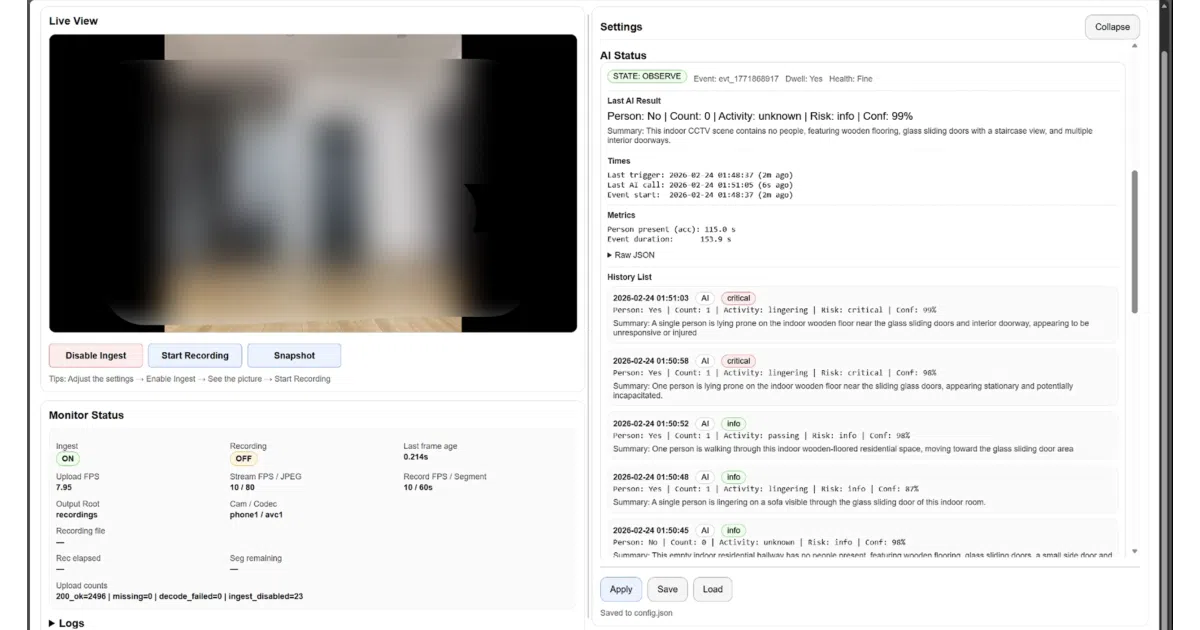
What it does Sentinel is a three-tier system: an Android app (CamFlow) streams JPEG frames over your LAN to a Flask server, which serves an MJPEG preview in the browser, records segmented MP4s, and optionally triggers AI analysis. No cloud required, no SD cards, no subscription — just a Wi-Fi network and a phone you already own.
The interesting bit The architecture treats the phone as a dumb frame pump and keeps all intelligence on the PC. A shared FrameBuffer decouples streaming, recording, and AI so none block the others. The AI path is deliberately two-stage: traditional CV (motion detection) acts as a cheap gatekeeper before calling in a vision model for structured semantic output — person count, activity, risk level, confidence — all logged as JSON events.
Key highlights
- Android client auto-discovers the server via UDP, so you don’t hard-code IP addresses
- Browser dashboard controls preview, recording, and AI parameters without installing anything else
- Pluggable model interface: swap in your own vision backend via config
- Segmented local recording with time-based file rotation for long-term runs
- Structured JSON event logs for downstream analysis or model fine-tuning
Caveats
- Multimodal AI inference is explicitly recommended to use an online service, so “local-only” applies to the pipeline, not necessarily the cognition
- The README notes this is positioned as both a tool and an “engineering prototype platform” — expect to tinker
- Android 8.0+ required; no iOS path mentioned
Verdict Grab this if you have a drawer of old phones and want a hackable, privacy-respecting vision pipeline for home labs or small-scale data collection. Skip it if you need turnkey cloud analytics or a polished consumer app.
Frequently asked
- What is suzuran0y/CCTV-Smartphone-AI-Monitoring?
- A Flask dashboard and Android client that repurpose e-waste into a privacy-first computer-vision pipeline with structured event logging.
- Is CCTV-Smartphone-AI-Monitoring open source?
- Yes — suzuran0y/CCTV-Smartphone-AI-Monitoring is open source, released under the MIT license.
- What language is CCTV-Smartphone-AI-Monitoring written in?
- suzuran0y/CCTV-Smartphone-AI-Monitoring is primarily written in Python.
- How popular is CCTV-Smartphone-AI-Monitoring?
- suzuran0y/CCTV-Smartphone-AI-Monitoring has 823 stars on GitHub.
- Where can I find CCTV-Smartphone-AI-Monitoring?
- suzuran0y/CCTV-Smartphone-AI-Monitoring is on GitHub at https://github.com/suzuran0y/CCTV-Smartphone-AI-Monitoring.