superdesigndev/superdesign
An AI designer that actually sits in your IDE
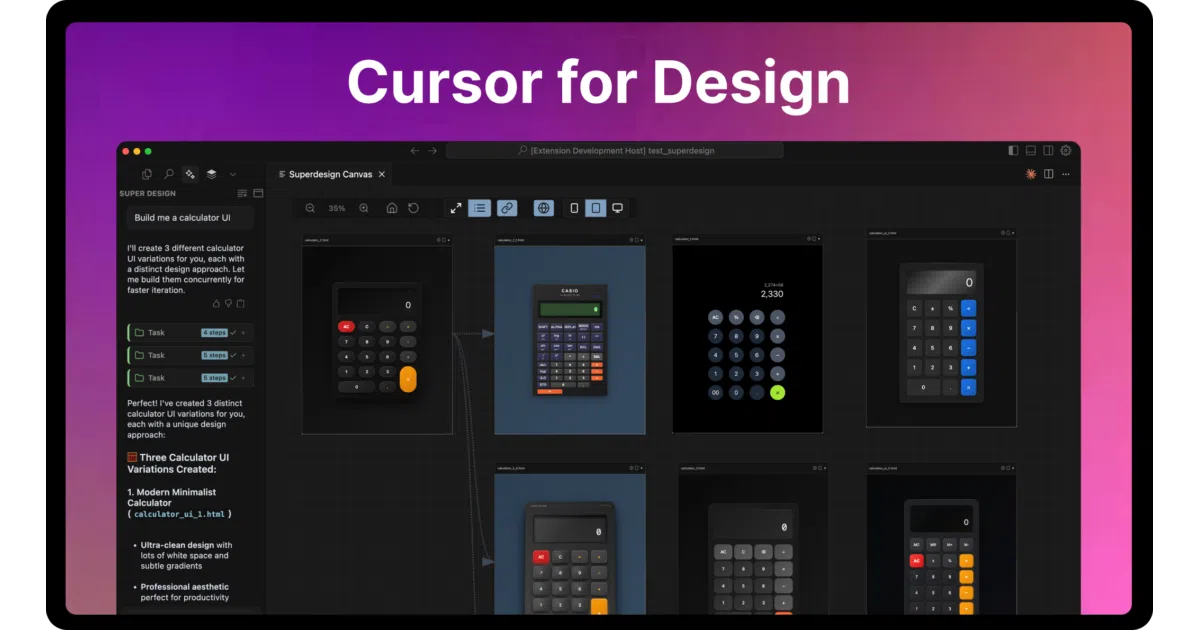
SuperDesign turns natural language prompts into UI mockups, components, and wireframes without leaving your editor.
Not currently ranked — collecting fresh signals.
star history
What it does
SuperDesign is a VS Code/Cursor/Windsurf extension that generates UI mockups, components, and wireframes from text prompts. It renders results in a sidebar canvas, lets you fork iterations, and exports designs to paste into your project. Everything lands in a local .superdesign/ folder.
The interesting bit The project treats your IDE as the design environment rather than bolting on a separate tool. It also plays nice with your existing AI setup: feed it a local OpenAI-compatible server (LM Studio, etc.) or lean on your Cursor/Claude Code subscription by wiring the extension’s rules into a custom agent mode.
Key highlights
- Generates mocks, components, and wireframes from a single prompt
- “Fork & iterate” workflow for quick design exploration
- Local-first storage; no cloud lock-in for your generated files
- Supports local LLMs via OpenAI-compatible endpoints
- Chrome extension (separate) for cloning existing websites
Caveats
- The README is heavy on emoji and light on technical architecture; it’s unclear what model(s) actually generate the designs
- “Works seamlessly” is claimed but not demonstrated; your mileage likely varies by IDE and model choice
Verdict Worth a spin if you’re already living in Cursor/VS Code and want fast visual prototyping without context-switching. Skip it if you need rigorous design-system constraints or detailed specs — this is exploration tooling, not production handoff.
Frequently asked
- What is superdesigndev/superdesign?
- SuperDesign turns natural language prompts into UI mockups, components, and wireframes without leaving your editor.
- Is superdesign open source?
- Yes — superdesigndev/superdesign is an open-source project tracked on heatdrop.
- What language is superdesign written in?
- superdesigndev/superdesign is primarily written in TypeScript.
- How popular is superdesign?
- superdesigndev/superdesign has 6.6k stars on GitHub.
- Where can I find superdesign?
- superdesigndev/superdesign is on GitHub at https://github.com/superdesigndev/superdesign.