steven-jianhao-li/zotero-AI-Butler
Your Zotero library finally gets a reading assistant that actually reads
A Zotero plugin that feeds your unread PDFs to LLMs and writes structured Markdown notes back into your library—no copy-pasting required.
Not currently ranked — collecting fresh signals.
star history
What it does
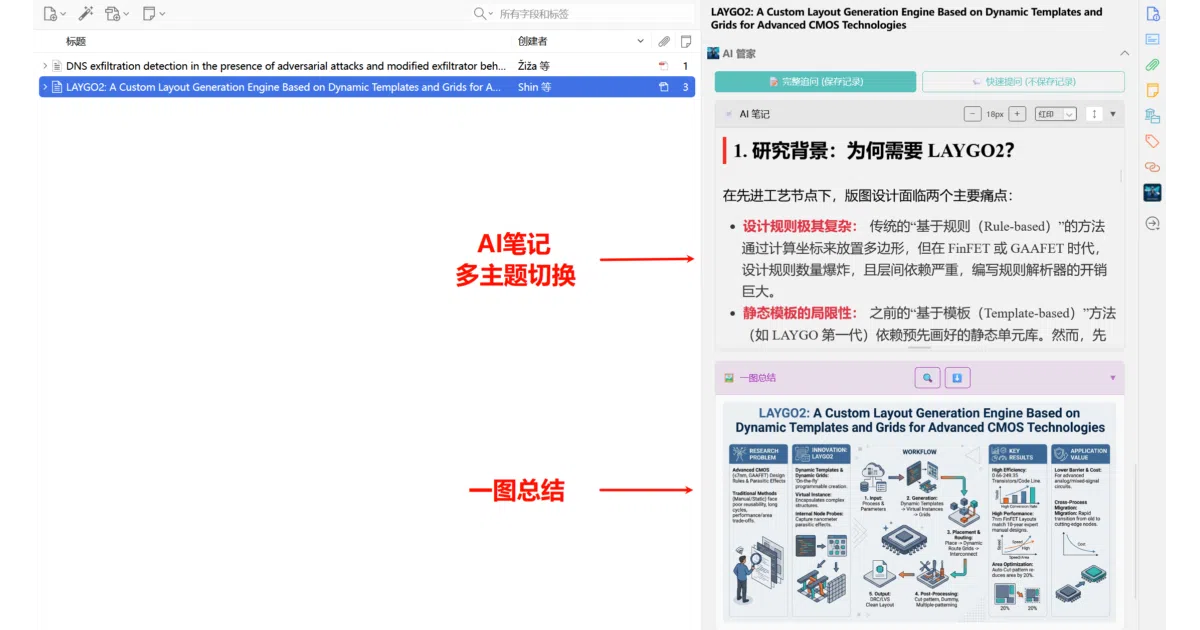
Zotero-AI-Butler is a plugin that intercepts your PDFs before they rot in your “read later” pile. It sends papers to your choice of LLM—Gemini, OpenAI, Anthropic, Volcano Ark, Ollama, or any OpenAI-compatible endpoint—and writes the resulting summaries directly into Zotero as Markdown notes. You can trigger it manually, let it auto-scan new arrivals, or batch-process your backlog. It also generates mind maps, multi-paper literature reviews, and (in v3.0) “academic poster” images via Nano Banana Pro.
The interesting bit
The plugin treats Zotero as the source of truth, not just a storage bin. Notes live inside the item they describe, follow Zotero’s native interaction patterns, and can be pinned as a persistent sidebar so switching papers doesn’t break your flow. The “producer-consumer” task queue with configurable rate-limiting is a nice touch for anyone who’s hit API caps.
Key highlights
- Multi-modal PDF ingestion: Base64-encodes PDFs for vision-capable models (Gemini 2.5 Pro recommended), or falls back to text extraction for models that can’t “see”
- Three trigger modes: right-click immediate, auto-cruise on new drops, or bulk backlog scan
- Customizable prompts: all templates are editable, with variable substitution (
{{title}},{{authors}}, etc.) and live preview - Built-in追问 (follow-up): sidebar supports multi-turn Q&A against the generated summary, with LaTeX rendering
- No proxy server: requests go straight from your machine to your configured API; the plugin claims it touches no data itself
Caveats
- Bring your own API keys—and your own rate-limit anxiety. The plugin is free but the LLM bills are yours
- “Pre-release” label on the对话与追问 feature; stability unclear
- Auto-scan is off by default to avoid performance hits, so “set and forget” requires one manual toggle
- The README’s recommended “free” Gemini 3 Pro access involves deploying a separate proxy project (gcli2api), which is not exactly turnkey
Verdict
Grad students and researchers drowning in unread PDFs should take a look—especially if you already pay for an LLM API. If you expect a polished consumer product with bundled AI, this is not it; it’s a power-user’s glue code with a surprisingly thoughtful queue system.
Frequently asked
- What is steven-jianhao-li/zotero-AI-Butler?
- A Zotero plugin that feeds your unread PDFs to LLMs and writes structured Markdown notes back into your library—no copy-pasting required.
- Is zotero-AI-Butler open source?
- Yes — steven-jianhao-li/zotero-AI-Butler is open source, released under the AGPL-3.0 license.
- What language is zotero-AI-Butler written in?
- steven-jianhao-li/zotero-AI-Butler is primarily written in TypeScript.
- How popular is zotero-AI-Butler?
- steven-jianhao-li/zotero-AI-Butler has 1.8k stars on GitHub.
- Where can I find zotero-AI-Butler?
- steven-jianhao-li/zotero-AI-Butler is on GitHub at https://github.com/steven-jianhao-li/zotero-AI-Butler.