skymanbp/autoshade
The AI proposes, the Rust engine renders — and the RAW keeps the detail
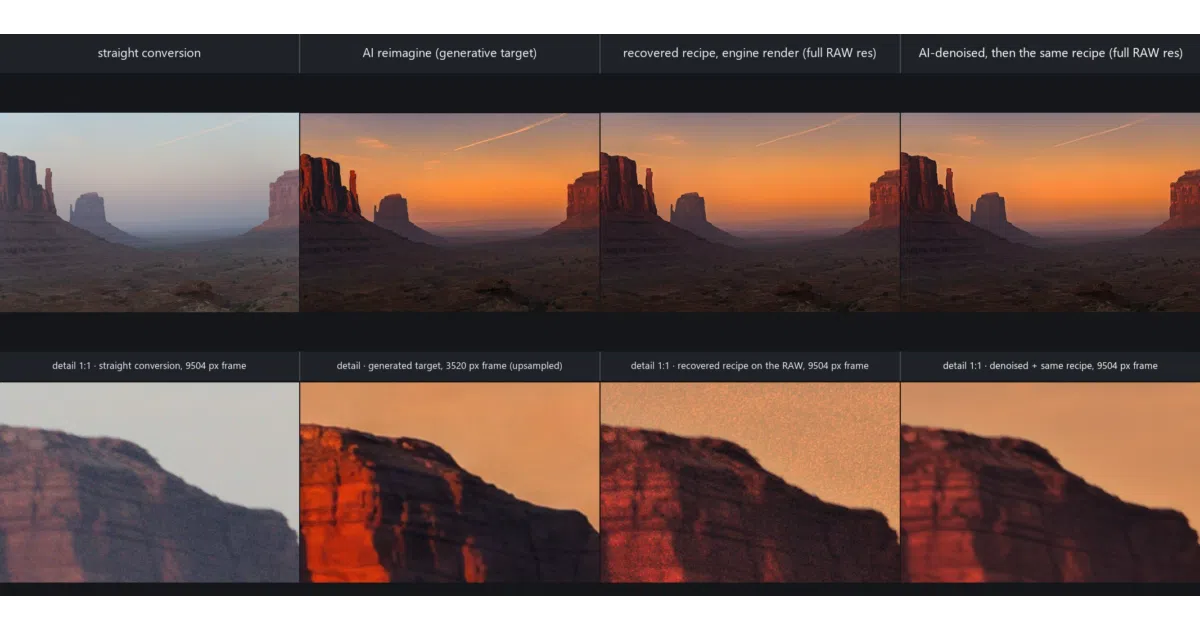
AutoShade turns a described look into an editable, Lightroom-compatible develop recipe instead of handing you a generated picture you can't use.
Collecting fresh signals — velocity needs a few days of history.
collecting data…
star history
What it does
AutoShade is a non-destructive RAW developer where AI decides what to change and a deterministic Rust engine does the changing. You describe the picture you want; reimagine asks an image model (gpt-image-2) to generate it from your frame, and match reverse-fits an EditRecipe from that target — bounded controls, rationale, confidence — which renders on the full-resolution RAW. The generated image is a target, never the delivery: the recipe carries the look, the sensor carries the detail. Recipes are hand-editable, replayable, and export to Lightroom via XMP sidecars (with unmodeled fields preserved byte for byte).
The interesting bit
In the recipe-development path the AI never touches a pixel. The one network that does — a RAW denoiser trained on the project’s own data — is held to a same-frame comparison against Lightroom’s Denoise 50 on a real star field, with pass marks written down before each training run. The reverse-fit also measures how far a generated target’s content diverged (a structural-divergence statistic D) before trusting it, and refuses moves when a repaint broke pixel correspondence in a region.
Key highlights
- 24 RAW formats plus baked images, rendered by one local engine behind app, CLI, and web UI
- Lightroom/ACR interop: masks export in Lightroom’s own grammar; the whole develop rides in the sidecar under AutoShade’s namespace and survives a Lightroom rewrite
- Local AI masks (BiRefNet, OneFormer, SAM 2.1) as pinned Python sidecars — no API key
- HDR merge, exposure fusion, focus and noise stacking over a single affine-per-block alignment matched in log luminance
- Style read from your past Lightroom edits via opt-in local SigLIP 2 embeddings
Caveats
- Bit-exact Adobe rendering is out of scope (parity is only measured), and the X-Trans demosaic is approximate
- The macOS bundle is ad-hoc signed, so first launch needs an explicit “Open Anyway” per machine
- Generative paths (reimagine, retouch, heal, AI denoise) can invent scene content — labelled and opt-in, but present
Verdict
For photographers who want an AI first pass on a card of RAWs but insist on knowing, in numbers, what it changed before trusting it — this is a rare fit. If you just want one-click JPEGs, the rigor will feel like paperwork.
Frequently asked
- What is skymanbp/autoshade?
- AutoShade turns a described look into an editable, Lightroom-compatible develop recipe instead of handing you a generated picture you can't use.
- Is autoshade open source?
- Yes — skymanbp/autoshade is open source, released under the MIT license.
- What language is autoshade written in?
- skymanbp/autoshade is primarily written in Rust.
- How popular is autoshade?
- skymanbp/autoshade has 629 stars on GitHub.
- Where can I find autoshade?
- skymanbp/autoshade is on GitHub at https://github.com/skymanbp/autoshade.