signerlabs/ShipSwift
SwiftUI building blocks that LLMs can actually use
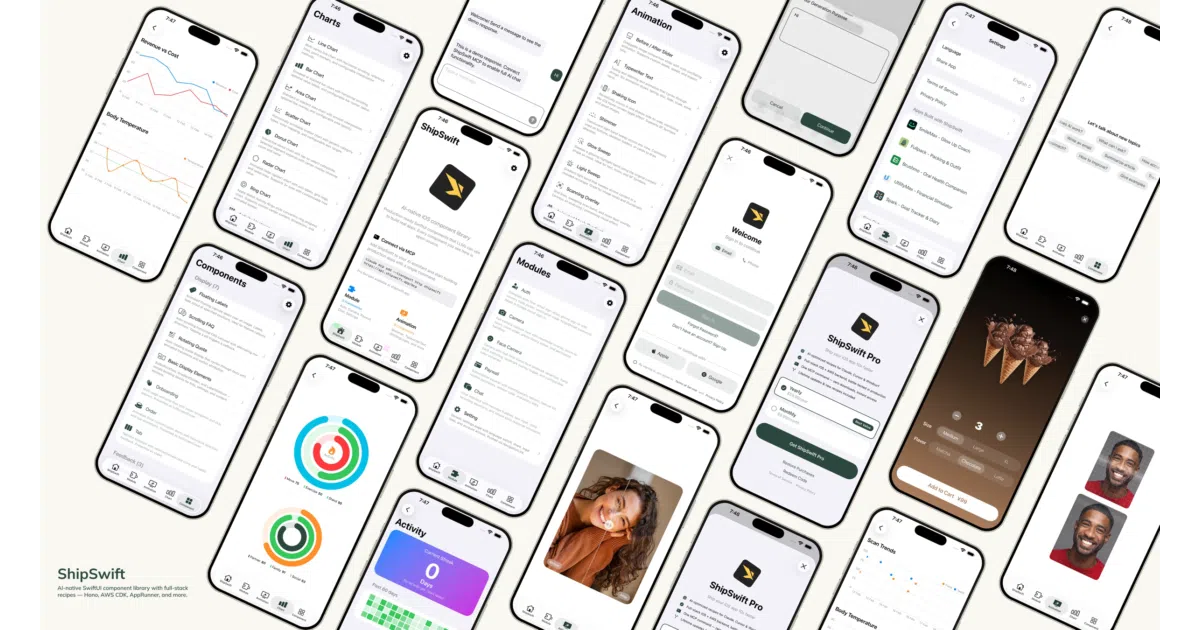
ShipSwift packages production-ready SwiftUI components as LLM-readable recipes so AI assistants can assemble real apps instead of inventing layout code.
Not currently ranked — collecting fresh signals.
star history
What it does
ShipSwift provides self-contained SwiftUI components—animations, charts, inputs, and multi-file modules like auth and camera—that can be copied individually into an Xcode project. The codebase is organized under strict internal dependency rules and an SW naming convention, but the larger pitch is a catalog of recipes meant to be consumed by AI assistants. A connected MCP server extends the open-source iOS code with backend guides, compliance templates, and pitfall notes.
The interesting bit The library treats the LLM as the primary user. Components are single-file where possible, the directory structure is rigidly layered, and the whole package is exposed through MCP tools so an AI can search, list, and retrieve recipes on demand rather than scraping ambiguous documentation. It is essentially a UI kit built to be prompt-engineered.
Key highlights
- 30 animation components spanning SwiftUI transitions, Canvas 3D spheres, and Metal shader backgrounds like
LiquidChromeandNeuroNoise. - Ready-made modules for common app infrastructure:
SWAuth(Cognito),SWCamera(Vision face detection),SWChat(with optional VolcEngine voice input), andSWPaywall(StoreKit 2). - Strict dependency hierarchy:
SWUtilhas no internal dependencies, whileSWModulecan rely onSWUtilandSWComponent, making copy-paste extraction predictable. - Free MIT-licensed iOS client code with optional Pro recipes that add backend schemas, Hono routes, webhooks, and App Store compliance manifests.
- Offline-capable local skills mode that reads source directly from the repo without requiring an external MCP server.
Caveats
- The library requires iOS 18.0+, which immediately filters out users supporting older devices.
- Modules like
SWPaywallandSWTikTokTrackinginclude the iOS client under MIT, but the matching backend recipes, compliance templates, and pitfall guides sit behind the Pro tier. - Pro recipes for Push Notifications and Analytics Dashboard are marked “coming soon,” so the full-stack catalog is still incomplete.
Verdict ShipSwift is worth a look if you are building iOS apps with AI assistance and want battle-tested, self-contained components rather than generated guesswork. Skip it if you are targeting older iOS versions or need a fully free, backend-included starter kit today.
Frequently asked
- What is signerlabs/ShipSwift?
- ShipSwift packages production-ready SwiftUI components as LLM-readable recipes so AI assistants can assemble real apps instead of inventing layout code.
- Is ShipSwift open source?
- Yes — signerlabs/ShipSwift is open source, released under the MIT license.
- What language is ShipSwift written in?
- signerlabs/ShipSwift is primarily written in Swift.
- How popular is ShipSwift?
- signerlabs/ShipSwift has 3.2k stars on GitHub.
- Where can I find ShipSwift?
- signerlabs/ShipSwift is on GitHub at https://github.com/signerlabs/ShipSwift.