shinshin86/mesh-avatar-studio
Your coding agent is now a rigger
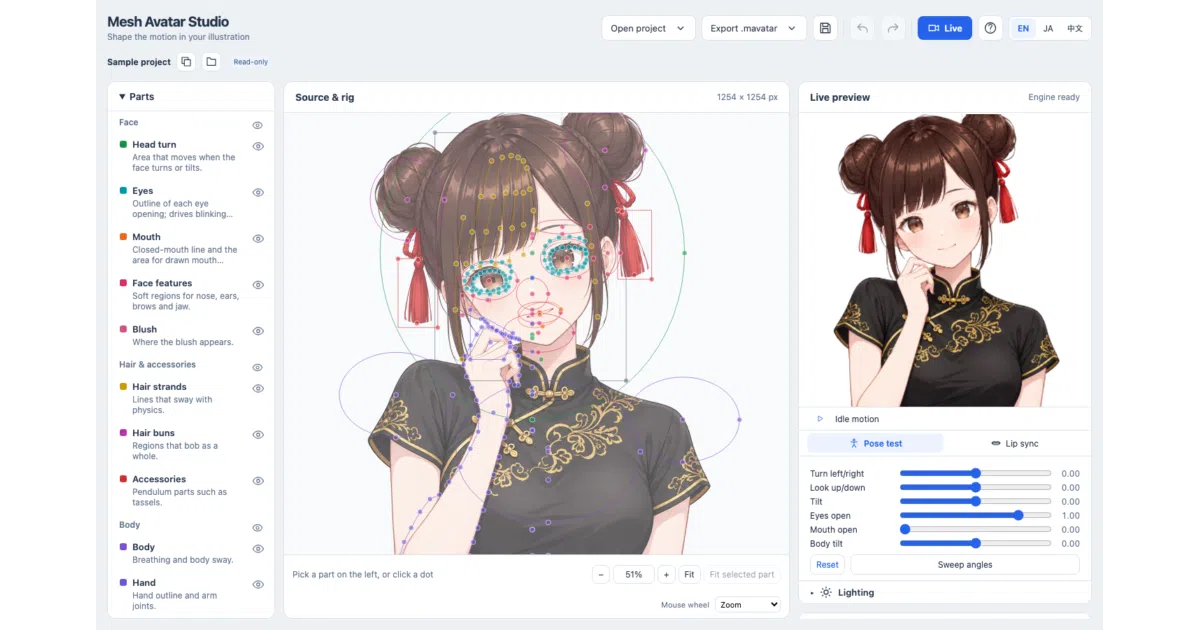
Mesh Avatar Studio has Claude Code or Codex do the tedious rigging work of turning one illustration into a live 2D avatar, then hands you a drag-to-fix editor.
Collecting fresh signals — velocity needs a few days of history.
collecting data…
star history
What it does
You give it a single front-facing illustration (ideally a transparent-background PNG), and a coding agent working inside the repo builds a rigged 2D mesh avatar that blinks, lip-syncs, turns its head, breathes, and sways its hair. You then open the project in a local editor with a live preview, drag control points to fix whatever the agent got wrong, and export a single .mavatar file. There’s also a Live page that drives the avatar from your webcam and microphone for streaming into OBS.
The interesting bit
The division of labor is the clever part: the agent follows a written procedure (docs/agent-guide.md) — checking its own coordinate accuracy on zoomed grids, cutting the image into layers, reviewing poses — doing the fiddly rigging work that normally demands a human in Live2D. The human only steps in to drag dots when something looks off. Drawn eye and mouth variants (which make blinking and talking look natural) can be generated by Codex’s built-in image tools; Claude Code can’t generate images, so it preps masks and prompts for you to hand to an external generator.
Key highlights
- Face tracking via MediaPipe and microphone lip sync, with camera video and audio staying on your machine — only numeric motion values reach the stream view
- OBS integration via Browser Source with transparent background, or green-screen chroma key for other capture software
- Expressions switchable via keys 1–8 or Stream Deck while OBS is in front; up to eight lighting presets (red light from below for horror streams, naturally)
- A no-install browser Player that runs tracking, lip sync, expressions and lighting entirely client-side — nothing uploaded
- Full rig data documented in
rig.jsonfields and an open.mavatararchive format
Caveats
- The agent-driven pipeline needs specific tooling beyond Node.js: uv and Python for layer rebuilds, Playwright Chromium for the agent’s motion review — the bundled doctor check warns about each missing piece
- Windows users get a small essay on folder permissions and ZIP unblocking; sandbox-created project folders can be unreadable
- The Live page must stay visible in its own window — background tabs can stop or slow tracking
- The bundled Miko sample character is under separate usage terms, not the project’s MIT license
Verdict
Worth a look if you’re VTuber-curious but bounced off Live2D’s rigging learning curve, especially if you already live in Claude Code or Codex. If you want a polished consumer app with one-click avatars, this is a developer tool with a developer tool’s edges.
Frequently asked
- What is shinshin86/mesh-avatar-studio?
- Mesh Avatar Studio has Claude Code or Codex do the tedious rigging work of turning one illustration into a live 2D avatar, then hands you a drag-to-fix editor.
- Is mesh-avatar-studio open source?
- Yes — shinshin86/mesh-avatar-studio is open source, released under the MIT license.
- What language is mesh-avatar-studio written in?
- shinshin86/mesh-avatar-studio is primarily written in TypeScript.
- How popular is mesh-avatar-studio?
- shinshin86/mesh-avatar-studio has 1k stars on GitHub.
- Where can I find mesh-avatar-studio?
- shinshin86/mesh-avatar-studio is on GitHub at https://github.com/shinshin86/mesh-avatar-studio.