scenario-labs/blender-plugin
Scenario bolts a full generative-AI studio onto Blender's viewport
One experimental extension brings image, video, 3D, PBR, audio and 360 generation into your scene — plus a local MCP server so agents can drive it.
Collecting fresh signals — velocity needs a few days of history.
collecting data…
star history
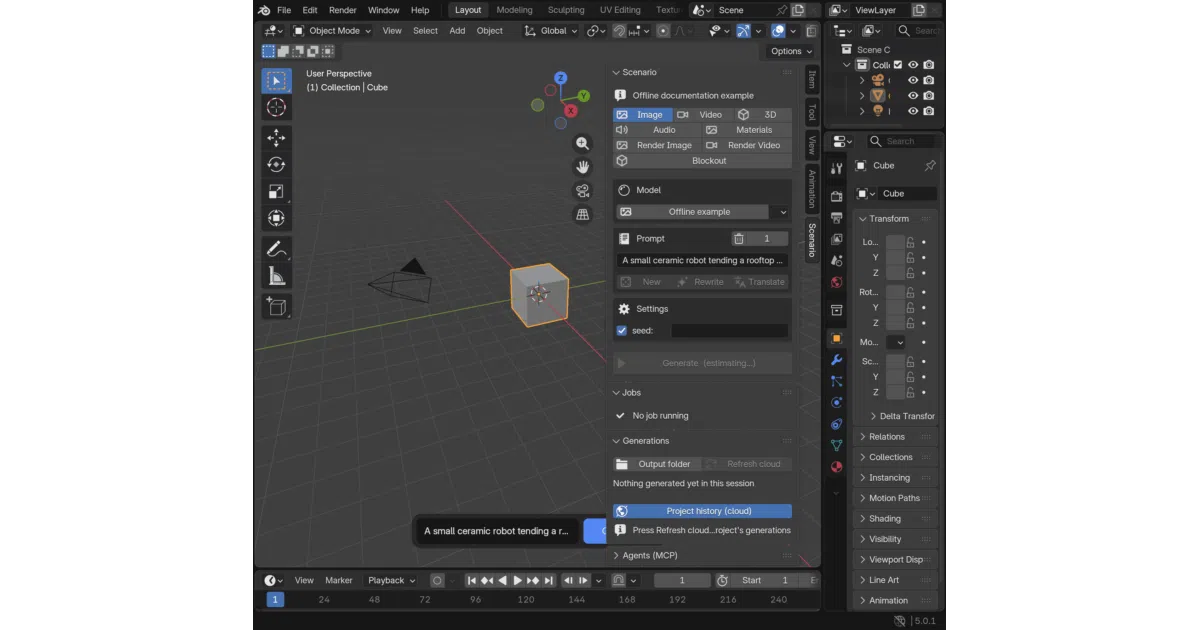
What it does Scenario for Blender is a GPL-3.0 extension (Blender 5.0+) that pipes Scenario’s generative services directly into the 3D viewport. It covers a lot of ground: text-to-image, video from prompts or scene playblasts, mesh generation and edits, PBR texture sets applied to material slots, audio into the sequencer, 360 environments applied to the World, and a “Blockout” mode that turns a written scene description into a greybox layout. There’s even a “Film tasks” lane that converts a JSON recipe into shots, a timeline, a review scene and an exported video.
The interesting bit
It ships a local MCP server (scenario-blender, default endpoint http://127.0.0.1:9876/mcp) that lets an authorized agent read your open scene and request paid generation work — with arbitrary Python execution as a separate, opt-in permission disabled by default. The README is also unusually candid about what leaves your machine: cost previews, uploads, and the fact that any local program can connect to the unauthenticated MCP endpoint.
Key highlights
- Nine generation lanes: image, video, 3D, materials, audio, render image/video, blockout, environment
- Scene captures and selected meshes as generation inputs; camera path planner for render video
- Local MCP server for agents, plus a hosted Scenario MCP for platform-wide workflows without Blender
- Distributed via its own Blender extension repository (Blender’s official one bars key-gated extensions), with SHA256 checksums and GitHub attestations on releases
- Headless mode via
blender --background scene.blend --command scenario_blender
Caveats
- Explicitly experimental; the README points you to a known-limitations doc before relying on any workflow
- Requires a paid Scenario account — generations and even prompt helpers consume Creative Units
- The local MCP endpoint needs no credential, so any program on the machine can connect and spend your credits; credentials live in Blender preferences, not an OS keychain
Verdict Worth a look if you already pay for Scenario and want generation woven into actual scene work, or if you’re curious what an agent-driven Blender pipeline looks like. If you wanted a free, offline, self-hosted tool, this is the opposite: a well-documented client for a commercial service.
Frequently asked
- What is scenario-labs/blender-plugin?
- One experimental extension brings image, video, 3D, PBR, audio and 360 generation into your scene — plus a local MCP server so agents can drive it.
- Is blender-plugin open source?
- Yes — scenario-labs/blender-plugin is open source, released under the GPL-3.0 license.
- What language is blender-plugin written in?
- scenario-labs/blender-plugin is primarily written in Python.
- How popular is blender-plugin?
- scenario-labs/blender-plugin has 568 stars on GitHub.
- Where can I find blender-plugin?
- scenario-labs/blender-plugin is on GitHub at https://github.com/scenario-labs/blender-plugin.