santinic/how2
StackOverflow without the browser tab tax
A terminal tool that turns natural language into shell commands, with a fallback to actual human answers when the AI hallucinates.
Not currently ranked — collecting fresh signals.
star history
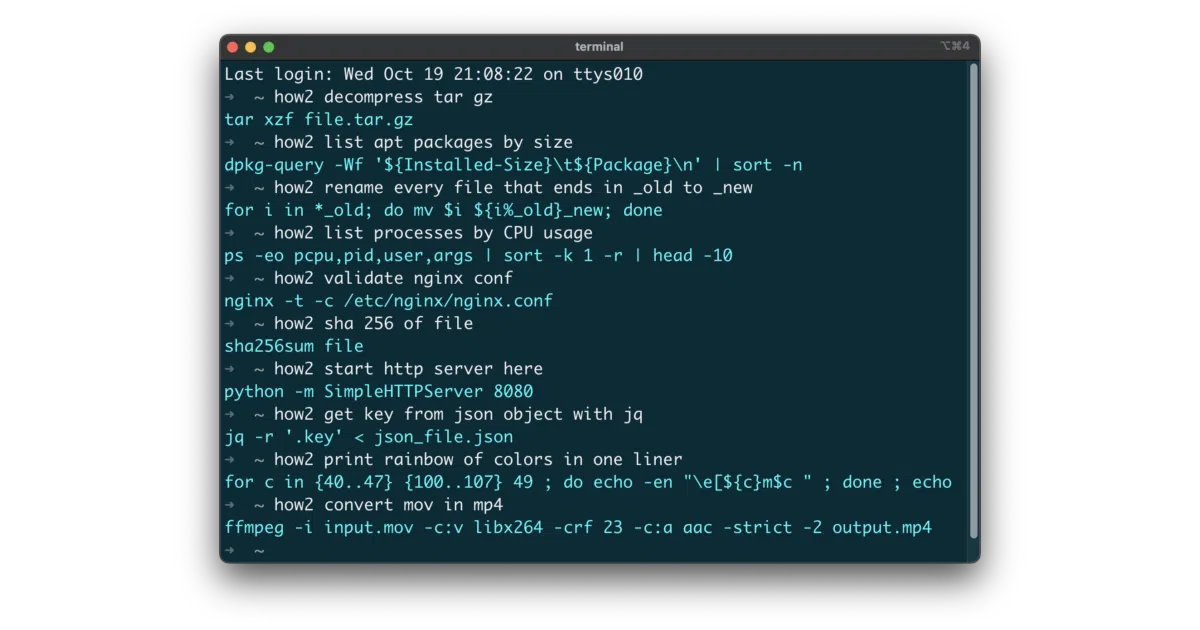
What it does how2 is a command-line utility that takes plain-English queries like “find all files modified yesterday” and returns shell commands. It runs as a Node.js binary with packages for macOS (Homebrew), Debian/Ubuntu (.deb), and npm. The core pitch: skip the browser entirely — no new tab, no Google, no scrolling past the accepted answer.
The interesting bit
The project hedges its bets in a way most AI tools don’t. By default it hits an external AI server (retrained code-completion models for Bash/PowerShell), but add -s and it searches StackOverflow directly. There’s even an interactive mode (hit SPACE) to browse alternate answers without leaving the terminal. The README openly admits the AI “sometimes… will result in unexpected output” — so the StackOverflow fallback isn’t a bonus feature, it’s damage control.
Key highlights
- Natural language to shell command via external AI API (5 free requests/day)
-sflag falls back to StackOverflow search with interactive answer selection- Cross-platform: Homebrew, npm, .deb, and raw binaries
- Proxy support via
HTTP_PROXY/HTTPS_PROXYenvironment variables - Interactive mode supports “p” to print answers for easier copy-paste
Caveats
- Free tier is capped at 5 AI requests per day; paid subscription required beyond that
- Requires trusting an external AI server with your terminal queries
- npm install requires
sudofor global CLI access unless you alias manually
Verdict
Worth a look if you live in a terminal and tolerate occasional AI weirdness. Skip it if you’re privacy-sensitive about shell commands leaving your machine, or if you already have muscle memory for tldr and cheat that covers your workflow.
Frequently asked
- What is santinic/how2?
- A terminal tool that turns natural language into shell commands, with a fallback to actual human answers when the AI hallucinates.
- Is how2 open source?
- Yes — santinic/how2 is open source, released under the MIT license.
- What language is how2 written in?
- santinic/how2 is primarily written in JavaScript.
- How popular is how2?
- santinic/how2 has 5.8k stars on GitHub.
- Where can I find how2?
- santinic/how2 is on GitHub at https://github.com/santinic/how2.