qunash/stable-diffusion-2-gui
Stable Diffusion 2.1, bottled in one Colab notebook
It gives Stable Diffusion 2.1 a Gradio interface inside a single notebook, mostly so you can click a Colab badge and start generating instead of fighting pip.
Not currently ranked — collecting fresh signals.
star history
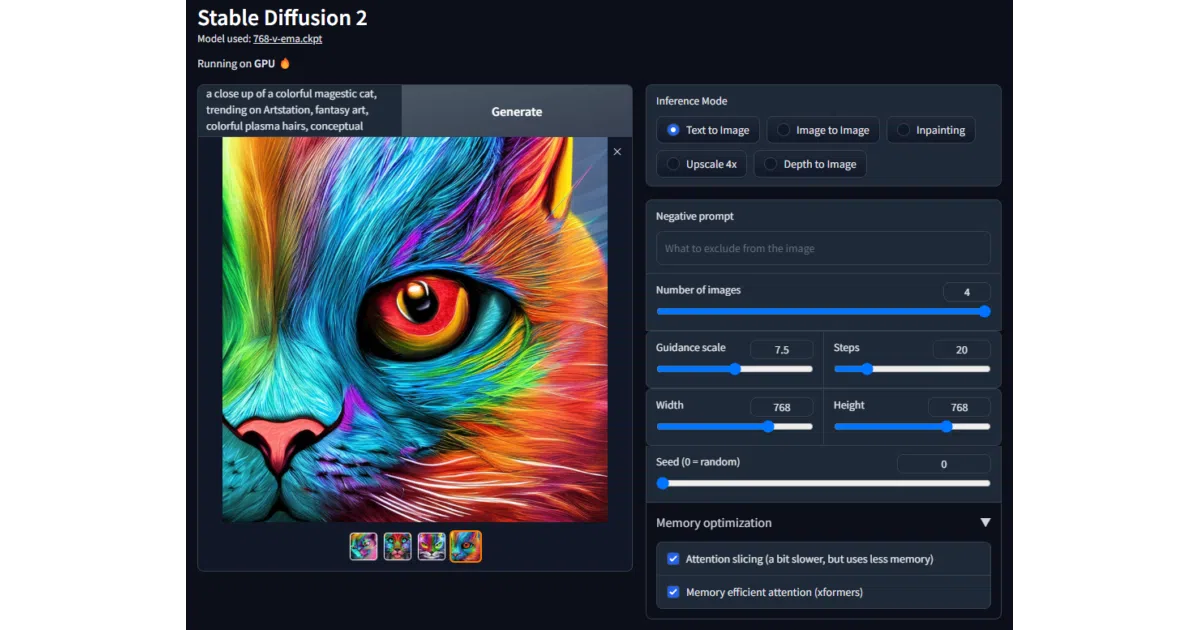
What it does This repository is essentially one Jupyter notebook that hosts a Gradio interface for Stability AI’s Stable Diffusion 2.1. It wraps the standard Hugging Face Diffusers pipelines—text-to-image, image-to-image, inpainting, upscaling, and depth-to-image—into browser-based widgets. The whole thing is tuned for Google Colab, so the UI spawns inside the notebook environment without local dependencies.
The interesting bit The project’s entire value proposition is portability. By collapsing five distinct Diffusers pipelines into a single notebook, it turns a research-grade toolkit into a shareable, ephemeral art machine. The README does not pretend to be a local installation guide; it assumes you are clicking the Colab badge and getting to work.
Key highlights
- Bundles five pipelines—
txt2img,img2img,depth2img,inpaint, andupscale4x—behind one Gradio app. - Built on top of Hugging Face Diffusers, tracking the reference implementation rather than a custom fork.
- Explicitly targets Google Colab; the README’s primary call-to-action is an “Open in Colab” badge.
- Uses DPM-Solver for sampling, per the credits section.
Caveats
- The README is sparse: hardware requirements, licensing notes for the model weights, and detailed usage guidance are absent.
- Two of the three screenshot links are commented out in the source, leaving the visual documentation nearly as lightweight as the code.
Verdict Grab this if you want to experiment with Stable Diffusion 2.1 in a browser without local environment wrangling. Skip it if you need a local-first, feature-heavy frontend or detailed documentation on custom weights.
Frequently asked
- What is qunash/stable-diffusion-2-gui?
- It gives Stable Diffusion 2.1 a Gradio interface inside a single notebook, mostly so you can click a Colab badge and start generating instead of fighting pip.
- Is stable-diffusion-2-gui open source?
- Yes — qunash/stable-diffusion-2-gui is open source, released under the MIT license.
- What language is stable-diffusion-2-gui written in?
- qunash/stable-diffusion-2-gui is primarily written in Jupyter Notebook.
- How popular is stable-diffusion-2-gui?
- qunash/stable-diffusion-2-gui has 598 stars on GitHub.
- Where can I find stable-diffusion-2-gui?
- qunash/stable-diffusion-2-gui is on GitHub at https://github.com/qunash/stable-diffusion-2-gui.