openchamber/openchamber
A control room for your AI coding agent
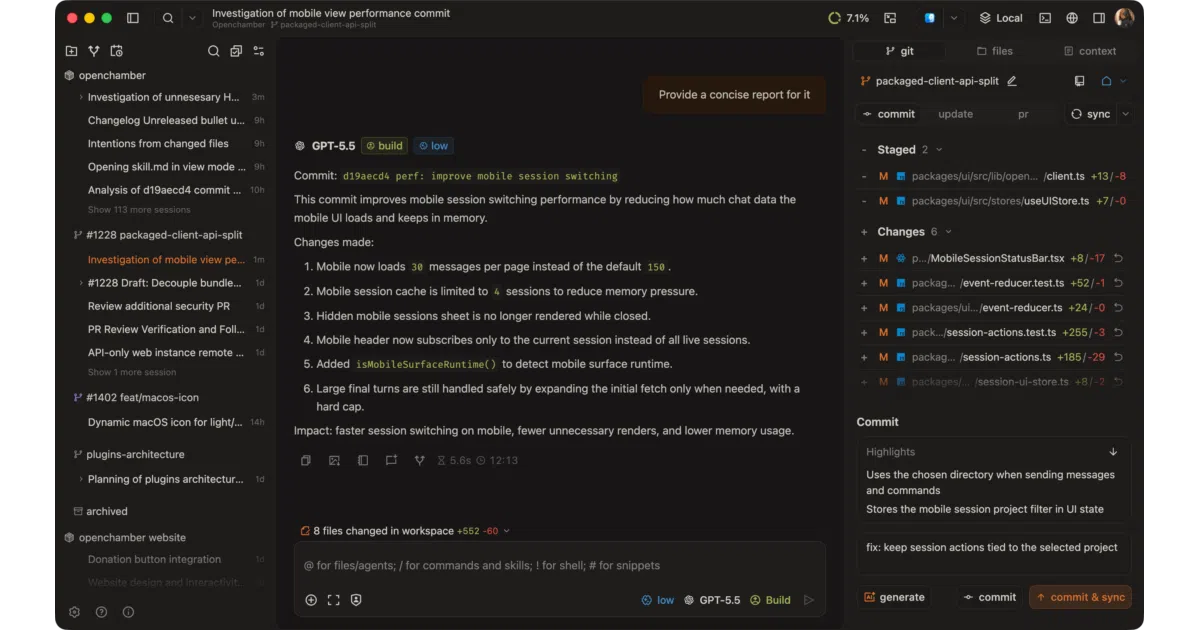
OpenChamber wraps the OpenCode CLI in a cross-platform UI so you can review diffs, fork conversations, and manage agents from desktop, browser, or phone.
Velocity · 7d
+51
★ / day
Trend
→steady
star history
What it does
OpenChamber is a visual frontend for the OpenCode AI agent. It renders chat timelines, diff views, tool output, and terminal sessions in a GUI that syncs across devices. You can start a session in the terminal, continue on a tablet, and finish on a Mac desktop without losing context.
The interesting bit
The chat timeline is branchable: /undo and /redo work, but you can also fork a new conversation from any earlier turn. That turns the usual linear AI chat into something closer to Git branches—useful when you want to explore two approaches without starting over. The project also bakes in Cloudflare tunneling with QR-code onboarding, which suggests the author actually wants you to use this from your couch.
Key highlights
- Multi-platform: macOS app, VS Code extension, web/PWA, and CLI from the same codebase
- GitHub-native workflows: start sessions from issues or PRs with context pre-attached
- Multi-agent runs from one prompt, each in isolated worktrees for side-by-side comparison
- Voice mode with speech input and read-aloud responses
- Integrated terminal with per-directory sessions and self-update flow that preserves settings
- Plan/Build mode with a dedicated plan view for drafting implementation steps before coding
Caveats
- Requires the OpenCode CLI already installed; this is a UI layer, not a standalone agent
- macOS desktop is the only native desktop target; Windows and Linux users are on web/CLI
- The README notes the sole maintainer is on vacation through early June, so issue response may lag
Verdict
Worth a look if you already use OpenCode and want a polished interface with mobile access and conversation branching. Skip it if you need a fully self-contained AI coding tool or native Windows/Linux desktop support.
Frequently asked
- What is openchamber/openchamber?
- OpenChamber wraps the OpenCode CLI in a cross-platform UI so you can review diffs, fork conversations, and manage agents from desktop, browser, or phone.
- Is openchamber open source?
- Yes — openchamber/openchamber is open source, released under the MIT license.
- What language is openchamber written in?
- openchamber/openchamber is primarily written in TypeScript.
- How popular is openchamber?
- openchamber/openchamber has 12.2k stars on GitHub and is currently holding steady.
- Where can I find openchamber?
- openchamber/openchamber is on GitHub at https://github.com/openchamber/openchamber.