op7418/guizang-ppt-skill
Single-file HTML decks, because agents speak CSS better than PPTX
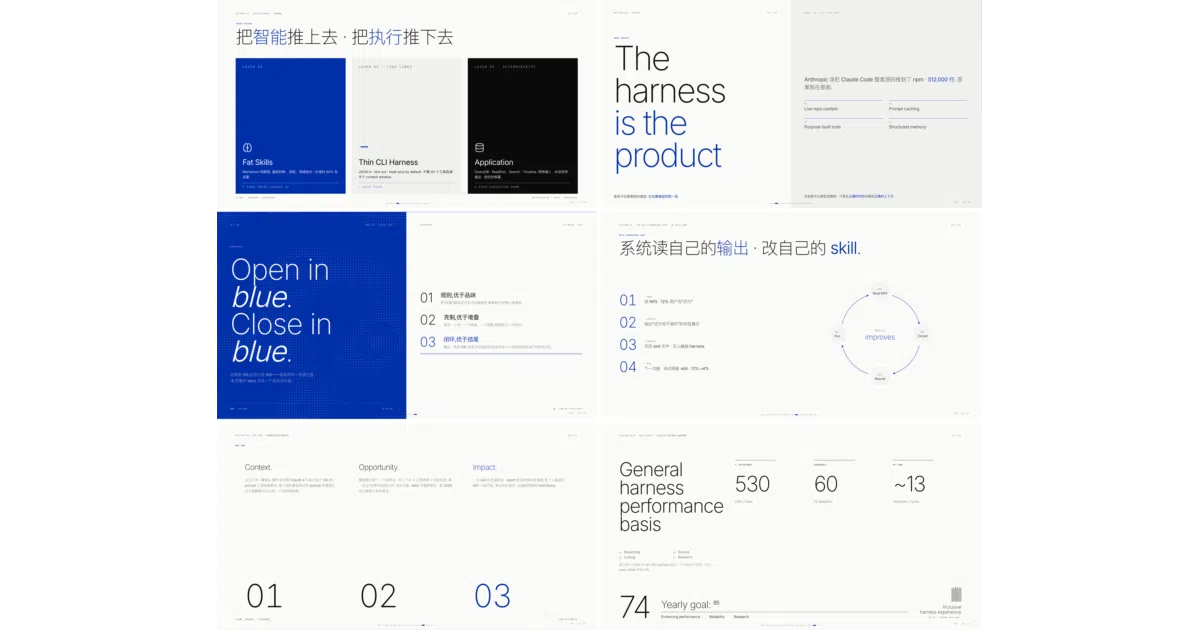
It turns Claude and Codex into a slide designer, outputting locked-layout HTML decks with magazine or Swiss styling and matching AI-generated imagery.
Velocity · 7d
+65
★ / day
Trend
↘cooling
star history
What it does
Guizang PPT Skill is an agent-facing workflow for Claude Code and Codex that generates single-file HTML slide decks. It packages two complete visual systems—an editorial magazine style and a rigid Swiss Internationalist grid—along with prompt libraries for generating matching images and social-media covers. The output is a plain HTML file that opens in any browser, flips horizontally, and can fall back to a static mode if WebGL feels too fancy for your machine.
The interesting bit
The project treats the agent as the user. Instead of asking you to hand-craft CSS, it gives the AI a locked design system—22 named Swiss layouts, 4 anchor colors, and a validation script that rejects off-grid experiments—so the agent does the layout correctly the first time. It also bakes in image-generation rules for Codex, specifying exact aspect ratios like 21:9 and 16:10 so the pictures actually fit the slots.
Key highlights
- Two visual systems: a narrative “electronic ink” magazine style and a factual Swiss-grid style with 22 locked layouts.
- Single-file HTML output runs fully offline in a browser with keyboard, wheel, touch, and index navigation.
- Built-in image prompt rules for GPT-Image 2.0 / GPT-M 2.0, covering photos, diagrams, screenshot reframing, and multi-platform social covers.
- Swiss style includes a validation script (
validate-swiss-deck.mjs) that enforces grid compliance, image-slot binding, and typographic rules. - Low-power static mode disables WebGL and canvas animations when you press
B.
Caveats
- Explicitly not built for data-heavy tables, training materials, or multi-user collaboration; the README admits information density is lower than traditional tools and the format is static HTML.
- Requires an agent environment with file-system and shell access; the authors warn that plain chatbots without browser preview struggle to generate complete decks.
Verdict
Worth a look if you regularly prep talks, demo-day pitches, or social covers and would rather delegate slide grunt work to Claude. Skip it if your workflow depends on collaborative editing or dense spreadsheet-style slides.
Frequently asked
- What is op7418/guizang-ppt-skill?
- It turns Claude and Codex into a slide designer, outputting locked-layout HTML decks with magazine or Swiss styling and matching AI-generated imagery.
- Is guizang-ppt-skill open source?
- Yes — op7418/guizang-ppt-skill is open source, released under the AGPL-3.0 license.
- What language is guizang-ppt-skill written in?
- op7418/guizang-ppt-skill is primarily written in HTML.
- How popular is guizang-ppt-skill?
- op7418/guizang-ppt-skill has 28.6k stars on GitHub and is currently cooling off.
- Where can I find guizang-ppt-skill?
- op7418/guizang-ppt-skill is on GitHub at https://github.com/op7418/guizang-ppt-skill.