onehumanbeing/esp32-iphone-agent
A $7 microcontroller gives an AI agent your iPhone, no Apple paperwork required
This project replaces the Mac-and-Xcode ritual of iPhone automation with AirPlay for eyes and a USB HID board for hands.
Collecting fresh signals — velocity needs a few days of history.
collecting data…
star history
What it does
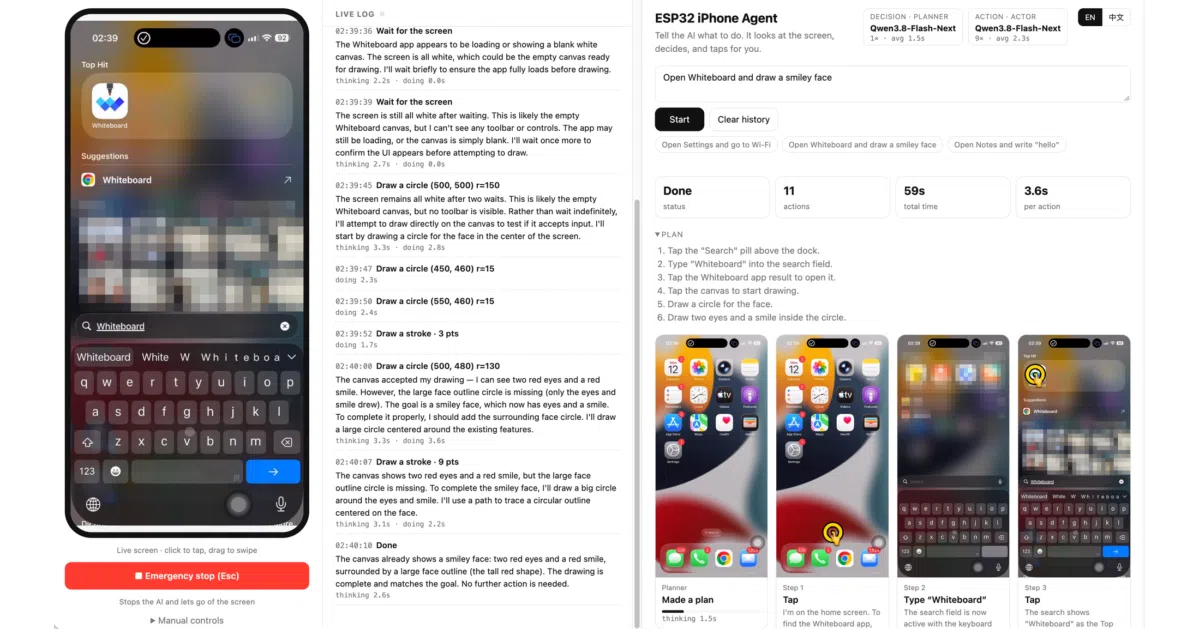
An AI vision model operates a real iPhone end to end: it watches the screen via AirPlay mirroring (captured through UxPlay and GStreamer) and touches the phone through an ESP32-S3 board that plugs into the USB port and presents itself as a standard mouse and keyboard. With iOS AssistiveTouch enabled, mouse clicks become taps and drags become swipes. A planner model writes a short plan; an actor model picks each next action from the latest screenshot. Any OpenAI-compatible vision API works as the brain, cloud or local.
The interesting bit
The board holds zero logic — it just answers line commands like move, click, and type over Wi-Fi. All the cleverness is in the server: since the pointer is relative, it wiggles the pointer before each tap, spots it on the mirrored screen, and self-corrects, refining calibration as it goes. It also checks whether the screen actually changed after each action, so a missed tap gets retried instead of compounding into a broken plan.
Key highlights
- No Mac, no Xcode, no developer account, no jailbreak, nothing installed on the phone — it uses the same paths a human does: pixels and a pointer.
- Works in any app, including games, because it only sees the screen rather than relying on the accessibility tree.
- Runs on macOS or Linux; the phone powers the ~$7 board (tested with a Seeed XIAO ESP32S3).
- Web UI with live screen, live log, and a step wall showing every screenshot with the tap or stroke drawn on top.
- Debug mode logs every model call and board command with latency, plus per-run trace folders.
Caveats
- Portrait only for now — landscape apps are on the roadmap, and screen coordinates assume portrait.
- Text input is ASCII-only; typing Chinese through the pinyin keyboard is listed as future work.
- iOS won’t mirror some screens (the README’s limitations section is truncated, but passcode entry is one example), and the phone’s USB port sleeps while locked, which the board handles but can’t bypass.
Verdict
Anyone who wants to script or agent-automate an iPhone without Apple’s toolchain — or who enjoys elegant hardware hacks — should look. If you need accessibility-tree precision or landscape apps, wait for the roadmap.
Frequently asked
- What is onehumanbeing/esp32-iphone-agent?
- This project replaces the Mac-and-Xcode ritual of iPhone automation with AirPlay for eyes and a USB HID board for hands.
- Is esp32-iphone-agent open source?
- Yes — onehumanbeing/esp32-iphone-agent is open source, released under the MIT license.
- What language is esp32-iphone-agent written in?
- onehumanbeing/esp32-iphone-agent is primarily written in Python.
- How popular is esp32-iphone-agent?
- onehumanbeing/esp32-iphone-agent has 698 stars on GitHub.
- Where can I find esp32-iphone-agent?
- onehumanbeing/esp32-iphone-agent is on GitHub at https://github.com/onehumanbeing/esp32-iphone-agent.