octimot/StoryToolkitAI
Ctrl+F for video rushes, plus an AI story editor
It exists because scrubbing through rushes to find one line of dialogue is a waste of an editor's time.
Not currently ranked — collecting fresh signals.
star history
What it does
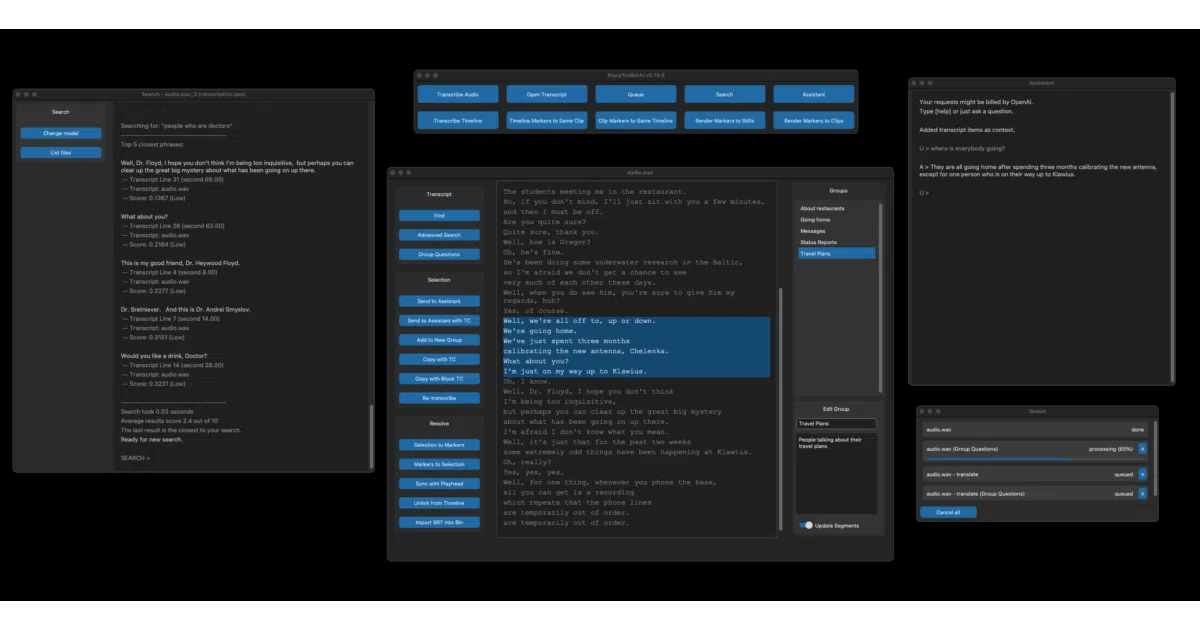
StoryToolkitAI is a desktop tool for film editors that runs local speech-to-text on your footage, indexes the results, and lets you search transcripts semantically—no exact keyword matching required. It can also generate story selections and screenplays from your indexed content using local or remote LLMs, then hand the results back to your NLE via EDL, XML, or Fountain. It works standalone or hooks into DaVinci Resolve Studio 18+ to sync transcripts directly with timelines and markers.
The interesting bit The tool keeps the sensitive stuff on your machine: transcription, translation, and indexing all happen locally using Whisper and sentence transformers, so your rushes never hit the internet unless you explicitly ask an external LLM for help. That local-first approach is rare in a field crowded with cloud-only AI tools.
Key highlights
- Local transcription and semantic search via OpenAI Whisper and sentence transformers.
- Generates story selections and screenplays from transcripts, exportable as
EDL/XML/Fountain. - Integrates with DaVinci Resolve Studio for timeline navigation, marker sync, and subtitle import.
- Supports local LLMs through
ollama,vLLM, and LM Studio, plus remote providers like OpenAI and DeepSeek. - Automatic speaker detection and question detection in transcripts.
Caveats
- The README admits the tool is “raw and unpolished,” and standalone releases lag behind the source version.
- Some features are currently only available in the non-standalone version, though the authors say they will reach the standalone release eventually.
- DaVinci Resolve integration requires the Studio edition (18+), not the free version.
Verdict Worth a look if you are a documentary or narrative editor drowning in unlogged footage and willing to tolerate rough edges. If you already have a polished media asset management pipeline or don’t work in Resolve, it may feel like extra friction.
Frequently asked
- What is octimot/StoryToolkitAI?
- It exists because scrubbing through rushes to find one line of dialogue is a waste of an editor's time.
- Is StoryToolkitAI open source?
- Yes — octimot/StoryToolkitAI is open source, released under the GPL-3.0 license.
- What language is StoryToolkitAI written in?
- octimot/StoryToolkitAI is primarily written in Python.
- How popular is StoryToolkitAI?
- octimot/StoryToolkitAI has 1.1k stars on GitHub.
- Where can I find StoryToolkitAI?
- octimot/StoryToolkitAI is on GitHub at https://github.com/octimot/StoryToolkitAI.