ngocanhnckh/renderlint
Your code lints clean and the UI still looks broken. Fix that.
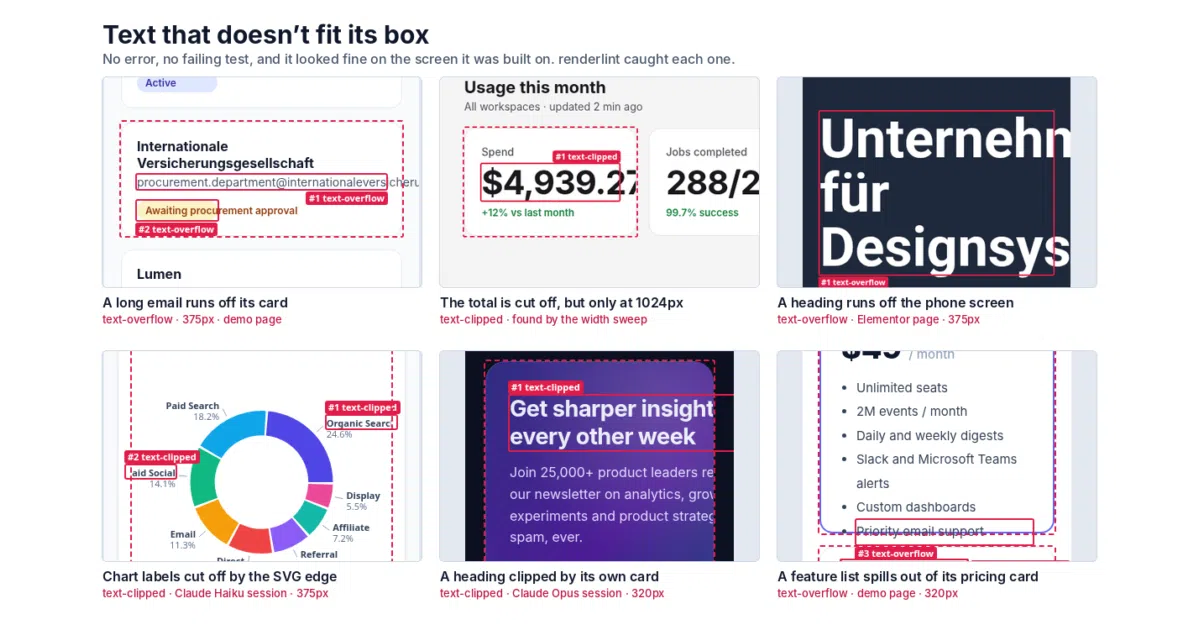
renderlint opens your app in a real browser and fails the build on the visual defects TypeScript and ESLint are structurally blind to.
Too new to rank. Velocity needs a few days of history.
not enough history yet
star history
What it does
renderlint is a linter for the rendered UI, not the source. It spins up a real browser, renders every page at phone, tablet and desktop widths (plus dark mode), sweeps the widths in between, and re-checks with longer text, bigger numbers and longer API data. When it finds something — overflowing text, gray-on-gray contrast, overlapping chart labels, emoji standing in for icons — it reports the element, the source file, an annotated screenshot and a concrete fix, in plain text a coding agent can act on. It exits 1 on errors, so it works as a build gate.
The interesting bit
The whole thing is aimed at AI coding agents: init writes agent instructions into AGENTS.md, installs Claude Code skills and a hook, and each finding says what to change so the agent can fix it without asking. The 52 rules are tuned so a finding is almost always a real defect — and the checks are behavioral, not just static: it holds API requests to catch blank loading states, answers requests with HTTP 500 to see if failures get surfaced, and turns the mouse wheel over suspicious content to verify it’s truly unreachable.
Key highlights
- 52 rules covering overflow, contrast (measured from real pixels, so gradients and images count), overlaps, broken images, placeholder text like
$undefined,alert()/confirm(), and accessibility basics like focus rings and tap targets. --uxpass clicks every button, tab and form like a user would, catching dead controls, double submits, missing error feedback, and dialogs that ignore Escape.- Reads routes from source (Next.js, Nuxt, SvelteKit, Astro, Remix, Angular and more), fills dynamic routes with real ids, and checks each page per role — with a coverage report so nothing is skipped silently.
- Handles pages behind a login, with API mocking that also applies server-side so middleware and loaders run.
- Integrates with Playwright (
withRenderlint(test)) and Storybook, and even lints WordPress/Elementor pages.
Caveats
- The README is a firehose — 52 rules, a UX pass, roles, mocks, skills — so expect a real configuration effort before big-app coverage works; the docs directory is extensive for a reason.
- Requires Node >= 18.17 and a real browser in your CI, which is heavier than your average linter.
Verdict
If an AI agent writes most of your UI — or you’re tired of “the code is fine, the pixels are wrong” — this is a genuinely useful gate. If you hand-review every pixel anyway, it’s probably more machinery than you need.
Frequently asked
- What is ngocanhnckh/renderlint?
- renderlint opens your app in a real browser and fails the build on the visual defects TypeScript and ESLint are structurally blind to.
- Is renderlint open source?
- Yes — ngocanhnckh/renderlint is open source, released under the MIT license.
- What language is renderlint written in?
- ngocanhnckh/renderlint is primarily written in JavaScript.
- How popular is renderlint?
- ngocanhnckh/renderlint has 687 stars on GitHub.
- Where can I find renderlint?
- ngocanhnckh/renderlint is on GitHub at https://github.com/ngocanhnckh/renderlint.