netease-youdao/LobsterAI
A desktop AI agent you can text from WeChat
LobsterAI puts a desktop AI agent to work on your actual machine—handling documents, data, and web tasks—then lets you boss it around from WeChat or Telegram.
Not currently ranked — collecting fresh signals.
star history
What it does
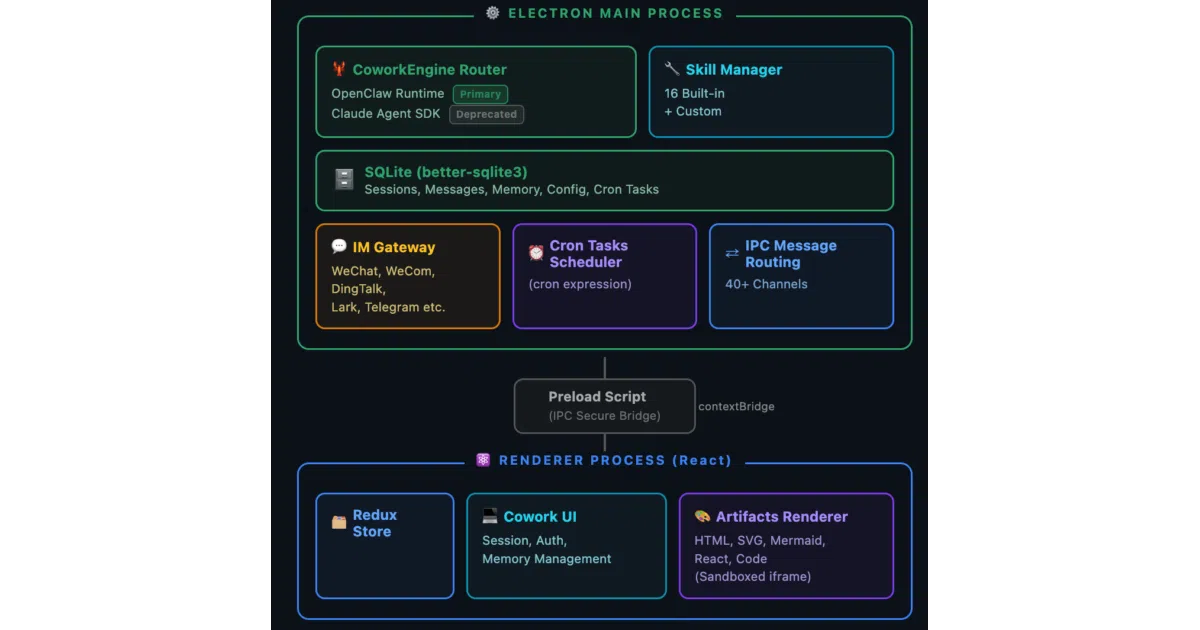
LobsterAI is an Electron-based desktop AI agent from NetEase Youdao that tackles everyday productivity work—Excel analysis, PowerPoint decks, document writing, web research, and video generation—by executing tools locally on your machine or inside an OpenClaw sandbox. It wraps the OpenClaw engine in a React frontend and routes every file-system or network action through a permission modal that demands your explicit approval before running.
The interesting bit
The hook is the IM gateway layer: the agent listens on WeChat, Telegram, DingTalk, Feishu, and several other chat platforms, so you can fire off tasks from your phone and have them execute on your home or office computer. It also keeps a local SQLite memory of your habits and preferences extracted from conversations, meaning it is supposed to get less clueless the longer you use it.
Key highlights
- 29 built-in skills including Office document generation, Playwright browser automation, Remotion video rendering, and web search
- Every tool invocation that touches the file system, terminal, or network triggers a
CoworkPermissionModalapproval first - Windows builds ship a bundled Python runtime so the host machine does not need a separate interpreter installed
- Chat history and user configuration live in a local SQLite database; no cloud storage required for persistence
- Electron architecture enforces strict process isolation with context isolation enabled and node integration disabled
Caveats
- The codebase still carries a deprecated legacy built-in adapter (
claudeRuntimeAdapter.ts) and executor (coworkRunner.ts) alongside the current OpenClaw integration - Development requires Node.js pinned to the narrow
>=24 <25window - The README lists IM platform support but does not explain authentication or setup mechanics for those gateways
Verdict
Worth a look if you want a hackable, local-first automation assistant with a GUI and the ability to text it commands from your phone. Give it a pass if you need a headless server agent or simply refuse to run Electron apps on your desktop.
Frequently asked
- What is netease-youdao/LobsterAI?
- LobsterAI puts a desktop AI agent to work on your actual machine—handling documents, data, and web tasks—then lets you boss it around from WeChat or Telegram.
- Is LobsterAI open source?
- Yes — netease-youdao/LobsterAI is open source, released under the MIT license.
- What language is LobsterAI written in?
- netease-youdao/LobsterAI is primarily written in TypeScript.
- How popular is LobsterAI?
- netease-youdao/LobsterAI has 6.2k stars on GitHub.
- Where can I find LobsterAI?
- netease-youdao/LobsterAI is on GitHub at https://github.com/netease-youdao/LobsterAI.