nesquena/hermes-webui
A web UI for your terminal agent, written like it’s 2008
Hermes WebUI gives the Hermes autonomous agent a browser interface without adding a JavaScript build pipeline.
Velocity · 7d
+22
★ / day
Trend
↘cooling
star history
What it does
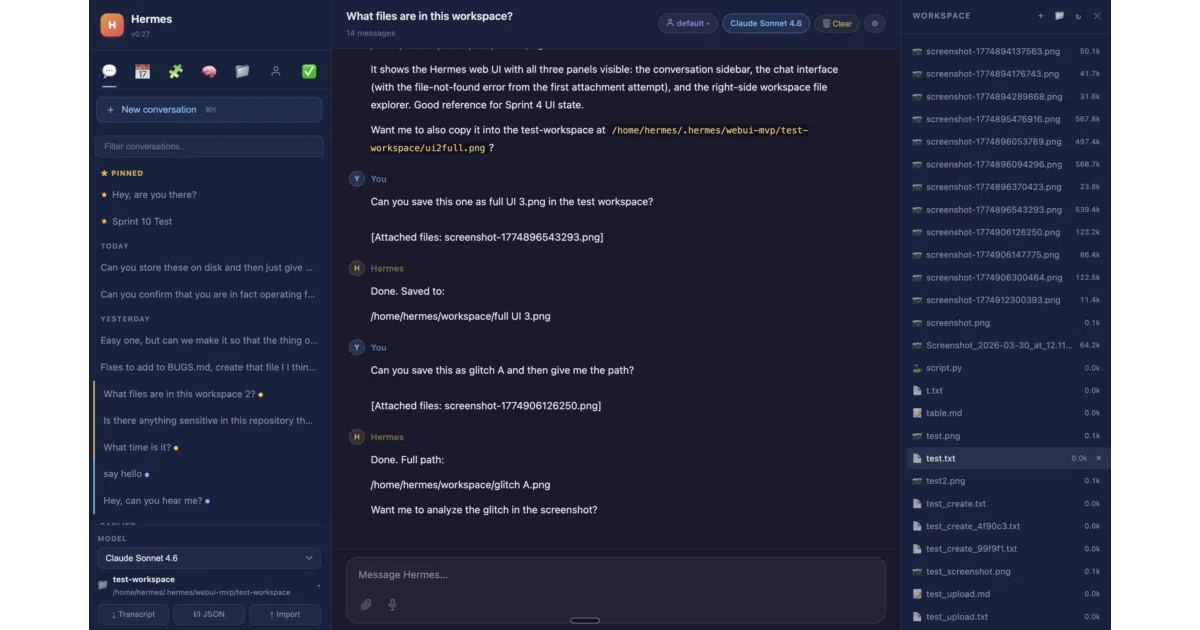
Hermes WebUI is a browser-based dashboard for the Hermes Agent, a self-hosted autonomous agent that remembers context across sessions and runs scheduled jobs while you are offline. The app replicates the terminal experience in a three-panel layout—sessions on the left, chat in the center, and workspace files on the right—so you can manage the agent from a browser or your phone without maintaining a separate configuration.
The interesting bit
The entire frontend is built with vanilla JavaScript and Python; there is no framework, no bundler, and no build step. In an ecosystem of 500-node-module dashboards, this is either refreshing restraint or stubborn minimalism, but it means you will not be debugging a Vite config when the agent misbehaves.
Key highlights
- Promises full parity with the Hermes CLI, including streaming responses, inline tool-call cards, subagent delegation, Mermaid diagrams, and approval flows for dangerous shell commands.
- Connects to your existing Hermes agent and models over an SSH tunnel; no extra provider keys or model setup is required.
- Session management supports projects, colored tags, archiving, pinning, and full-text search; new messages automatically queue while a turn is still streaming.
- A circular token-usage ring in the composer footer tracks context and cost at a glance, and a dedicated Control Center houses all settings and session tools.
Caveats
- Native Windows is not officially supported for the automated bootstrap; a community-maintained native setup exists, but POSIX-style file paths and bash-dependent agent tools can leak into the workspace browser.
- The optional Gateway-backed chat mode is still transitioning: attachments, cancellations, and approvals may not yet match behavior on other messaging surfaces.
Verdict
Worth a look if you already run Hermes Agent and want a no-frills, self-hosted web dashboard that stays out of your way. Skip it if you need a standalone cloud service or a polished native Windows installer.
Frequently asked
- What is nesquena/hermes-webui?
- Hermes WebUI gives the Hermes autonomous agent a browser interface without adding a JavaScript build pipeline.
- Is hermes-webui open source?
- Yes — nesquena/hermes-webui is open source, released under the MIT license.
- What language is hermes-webui written in?
- nesquena/hermes-webui is primarily written in Python.
- How popular is hermes-webui?
- nesquena/hermes-webui has 19.2k stars on GitHub and is currently cooling off.
- Where can I find hermes-webui?
- nesquena/hermes-webui is on GitHub at https://github.com/nesquena/hermes-webui.