ml-tooling/ml-workspace
When you can't decide between Jupyter and VS Code, use both
Because installing TensorFlow, PyTorch, Jupyter, and VS Code separately is a waste of an afternoon.
Not currently ranked — collecting fresh signals.
star history
What it does
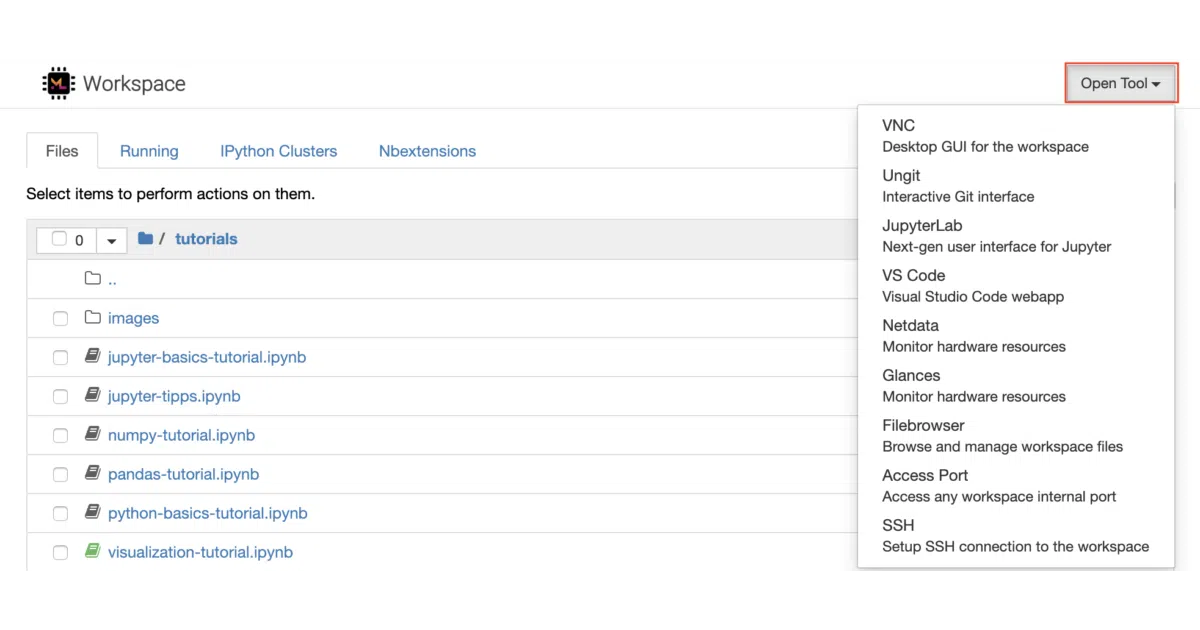
ML Workspace is a Docker image that crams an entire machine-learning development stack into one container. It serves Jupyter, JupyterLab, VS Code for the web, a full Linux desktop over VNC, and hardware-monitoring dashboards through a single port. The image comes preloaded with the usual Python and R suspects—TensorFlow, PyTorch, scikit-learn, Keras—and handles authentication, SSL, and persistence through environment variables and volume mounts.
The interesting bit
The real trick is proxying everything through one port so you can access IDEs, Git tools, file sharing, SSH, and VNC without opening a dozen firewall rules. It is fundamentally a curated glue layer, but the integration is thoughtful enough that it feels like a single product rather than a pile of tarballs.
Key highlights
- Web-based Jupyter, JupyterLab, and VS Code accessible from one URL
- Full Linux desktop GUI streamed via browser (VNC)
- Pre-installed ML libraries (TensorFlow, PyTorch, scikit-learn, Keras) and monitoring tools
- Single-port access for Web, SSH, and VNC connections
- Token-based or basic HTTP authentication via nginx
Caveats
- Shared links use tokens that cannot be easily invalidated and do not expire, which the README flags as a security risk.
- The default container memory limits can cause crashes; the README suggests increasing shared memory to mitigate this.
- Authentication is enforced only on the main proxy port, so exposing additional container ports directly bypasses it.
Verdict
Worth a look for solo developers or small teams who want a fully loaded ML environment without spending an afternoon on dependency conflicts. Skip it if you already run a Kubernetes-native platform or prefer composing your own minimal containers.
Frequently asked
- What is ml-tooling/ml-workspace?
- Because installing TensorFlow, PyTorch, Jupyter, and VS Code separately is a waste of an afternoon.
- Is ml-workspace open source?
- Yes — ml-tooling/ml-workspace is open source, released under the Apache-2.0 license.
- What language is ml-workspace written in?
- ml-tooling/ml-workspace is primarily written in Jupyter Notebook.
- How popular is ml-workspace?
- ml-tooling/ml-workspace has 3.6k stars on GitHub.
- Where can I find ml-workspace?
- ml-tooling/ml-workspace is on GitHub at https://github.com/ml-tooling/ml-workspace.