microsoft/prompty
Microsoft's .prompty: a markdown file format for LLM prompts
Write prompts once, run them from VS Code, Python, or TypeScript with built-in tracing and model-agnostic plumbing.
Not currently ranked — collecting fresh signals.
star history
What it does
Prompty is a .prompty file format that combines YAML frontmatter (model config, inputs, tools) with a markdown body for the actual prompt. The same file runs via VS Code extension, Python package, or TypeScript package. It handles templating (Jinja2 or Mustache), role markers (system:, user:, assistant:), and provider-specific execution for OpenAI, Microsoft Foundry, and Anthropic.
The interesting bit
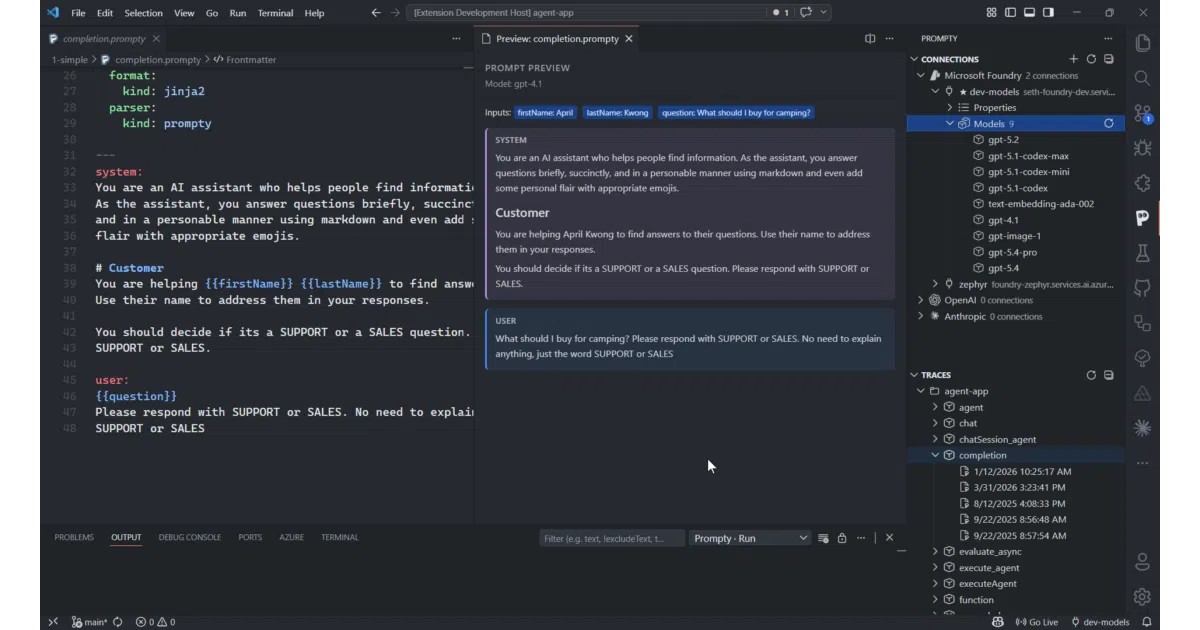
The VS Code extension treats prompts as a first-class asset: live preview with template interpolation, a connections sidebar for managing endpoints, chat mode with tool calling, and .tracy trace files that expose the full pipeline timing. The runtime splits execution into explicit stages—load, render, parse, execute, process—so you can step through or invoke the whole thing in one shot.
Key highlights
- Single
.promptyfile travels across Python, TypeScript, and VS Code without conversion - Variable resolution supports
${env:VAR},${env:VAR:default}, and${file:path.json} - VS Code extension includes trace viewer, live preview, and interactive chat panel
- Runtimes offer both one-shot
invoke()and step-by-stepload → prepare → run - v1 files auto-migrate with deprecation warnings
Caveats
- v2 is alpha; API, format, and tooling are actively shifting
- Provider support requires separate package installs (
@prompty/openai,prompty[jinja2,openai], etc.)
Verdict
Worth a look if you’re managing more than a handful of prompts across languages and want observability without building your own toolchain. Probably overkill if you’re just calling OpenAI directly from one codebase and never looking back.
Frequently asked
- What is microsoft/prompty?
- Write prompts once, run them from VS Code, Python, or TypeScript with built-in tracing and model-agnostic plumbing.
- Is prompty open source?
- Yes — microsoft/prompty is open source, released under the MIT license.
- What language is prompty written in?
- microsoft/prompty is primarily written in Rust.
- How popular is prompty?
- microsoft/prompty has 1.3k stars on GitHub.
- Where can I find prompty?
- microsoft/prompty is on GitHub at https://github.com/microsoft/prompty.