microsoft/AI-Engineering-Coach
A fitness tracker for your AI coding habits
It reads your local AI session logs and turns them into a private dashboard that coaches your prompt hygiene and coding patterns.
Not currently ranked — collecting fresh signals.
star history
What it does
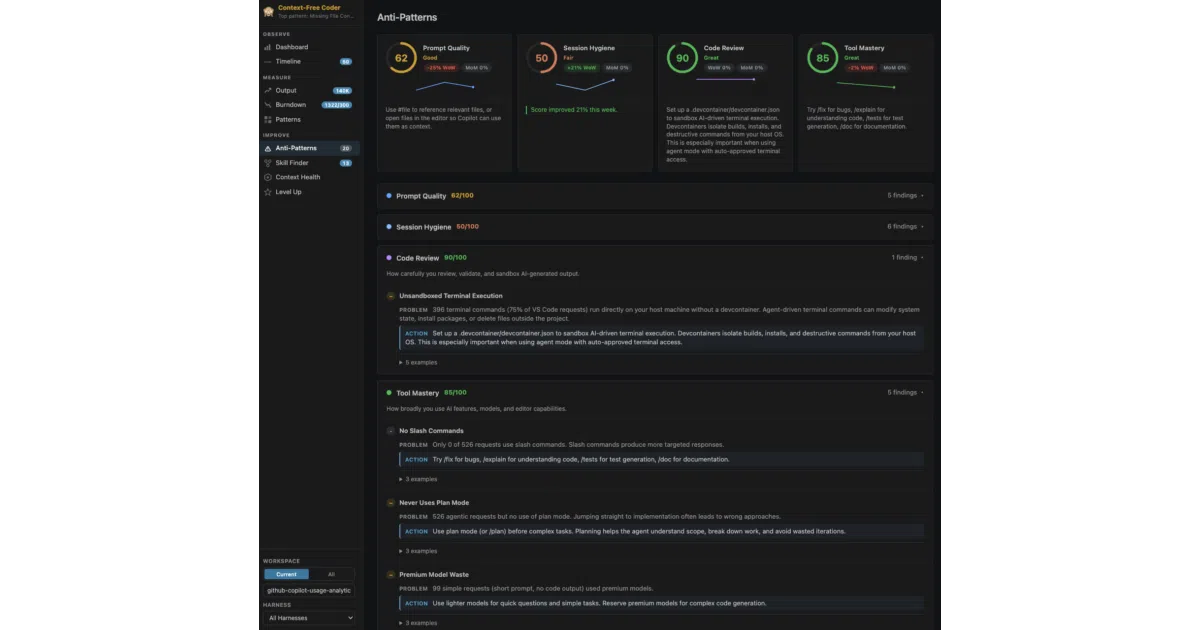
AI Engineer Coach is a VS Code extension that ingests logs from whatever AI coding assistant you already use and renders them into a local analytics dashboard. It tracks generated code volume, session timelines, and prompt patterns entirely on your machine, then scores your practice across categories like context management and tool mastery.
The interesting bit
The project treats developer-AI collaboration like a sport that can be coached. It ships with 45 editable markdown rules to detect anti-patterns—vague prompts, poor session hygiene, context bloat—and gamifies the fix with an XP-based achievement system. All analysis stays local; the only external call is an optional tap to VS Code’s built-in Copilot API for features like skill matching.
Key highlights
- Works with “any harness” (any AI assistant), parsing session logs into a unified dashboard
- 45 built-in anti-pattern rules covering prompt quality, session hygiene, and context management, plus a visual rule editor with live testing
- Privacy-first architecture: read-only access to logs, no proprietary telemetry, all analytics run offline
- Skill Finder surfaces repeated prompts and maps them to an open-source community catalog
- Gamified progression system (Bronze → Silver → Gold → Diamond) and shareable stat cards
Caveats
- Token breakdowns in the Output page are temporarily hidden, and the Burndown feature is temporarily disabled
- The project is not an official Microsoft product and is provided as-is with no warranties or guarantees
- Optional AI features (rule compiler, skill finder, context review) use the VS Code built-in Copilot language model API only when explicitly invoked
Verdict
Worth installing if you suspect your AI-assisted workflow is messier than it looks and want data—not vibes—to improve it. Skip it if you rarely use AI coding assistants or find quantified-self dashboards more anxiety-inducing than useful.
Frequently asked
- What is microsoft/AI-Engineering-Coach?
- It reads your local AI session logs and turns them into a private dashboard that coaches your prompt hygiene and coding patterns.
- Is AI-Engineering-Coach open source?
- Yes — microsoft/AI-Engineering-Coach is open source, released under the MIT license.
- What language is AI-Engineering-Coach written in?
- microsoft/AI-Engineering-Coach is primarily written in TypeScript.
- How popular is AI-Engineering-Coach?
- microsoft/AI-Engineering-Coach has 4.4k stars on GitHub.
- Where can I find AI-Engineering-Coach?
- microsoft/AI-Engineering-Coach is on GitHub at https://github.com/microsoft/AI-Engineering-Coach.