manaflow-ai/cmux
macOS terminal that babysits your swarm of AI coding agents
It exists because 'Claude is waiting for your input' is useless when you're running a dozen agents across split panes.
Velocity · 7d
+33
★ / day
Trend
↗accelerating
star history
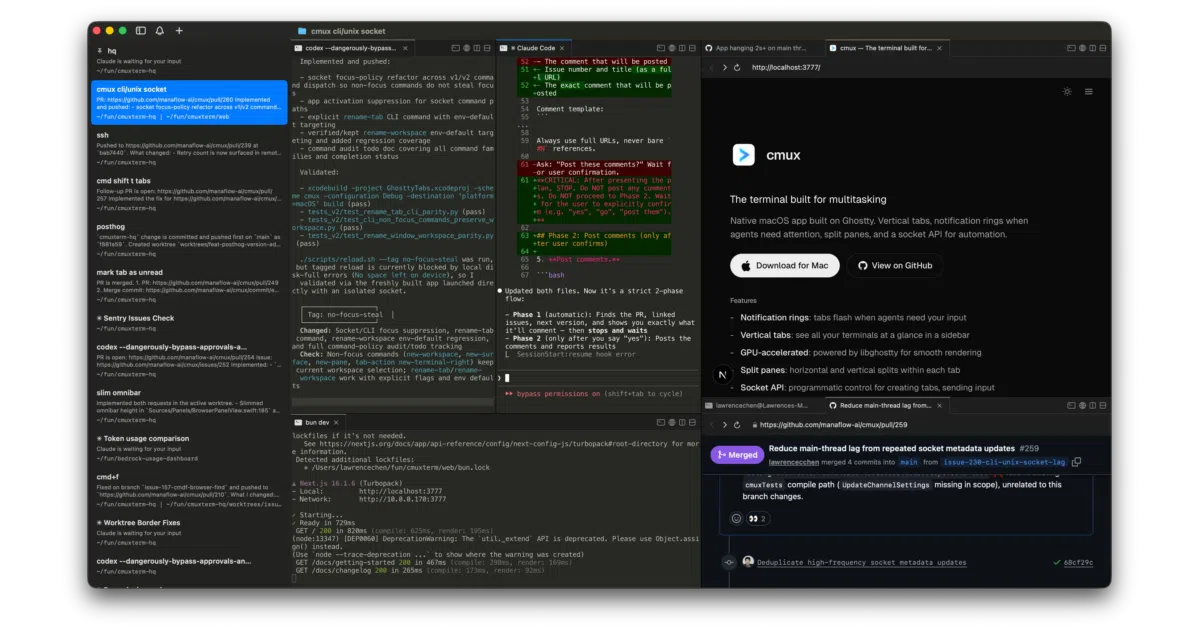
What it does cmux is a native macOS terminal built in Swift and AppKit around libghostty. It reads your existing Ghostty config and adds a sidebar with vertical tabs that surface git branch, PR status, working directory, listening ports, and the latest notification from each workspace. A notification system listens for terminal sequences and lights up tabs or rings panes in blue when an AI agent needs your attention, so you can spot the right split among many.
The interesting bit The author calls cmux “a primitive, not a solution”: it gives you terminals, browsers, splits, and a scriptable CLI, then stays out of your workflow. That is unusual in a space crowded with opinionated Electron orchestrators. The in-app browser is scriptable via an API ported from Vercel’s agent-browser, meaning Claude Code can snapshot accessibility trees and click around your local dev server without leaving the terminal window.
Key highlights
- Native Swift/AppKit app, not Electron; claims fast startup and low memory.
- Sidebar shows live metadata per workspace: git branch, linked PR number, listening ports, and latest agent notification text.
- Scriptable via CLI and socket API: create workspaces, split panes, send keystrokes, and automate the built-in browser.
- SSH workspaces route browser traffic through the remote machine and accept drag-and-drop uploads via scp.
- Session restore brings back layout, working directories, and browser history, but does not checkpoint live processes like tmux or vim.
Caveats
- macOS only; no Windows or Linux builds are mentioned.
- Session restore is explicitly best-effort for terminal scrollback and will not resume arbitrary live process state.
- Resuming supported agent sessions requires installing hooks and only covers a specific list of tools.
Verdict Worth a look if you are a macOS user running multiple AI agents in parallel and want a native, scriptable terminal that stays out of your way. Skip it if you are on Linux or Windows, or if you prefer a fully integrated IDE-style orchestrator.
Frequently asked
- What is manaflow-ai/cmux?
- It exists because 'Claude is waiting for your input' is useless when you're running a dozen agents across split panes.
- Is cmux open source?
- Yes — manaflow-ai/cmux is an open-source project tracked on heatdrop.
- What language is cmux written in?
- manaflow-ai/cmux is primarily written in Swift.
- How popular is cmux?
- manaflow-ai/cmux has 28.5k stars on GitHub and is currently accelerating.
- Where can I find cmux?
- manaflow-ai/cmux is on GitHub at https://github.com/manaflow-ai/cmux.