linyqh/NarratoAI
An LLM-powered conveyor belt for film commentary clips
Automates the entire grunt-work pipeline behind film commentary videos: scripting, dubbing, cutting, and subtitling.
Velocity · 7d
+12
★ / day
Trend
→steady
star history
What it does
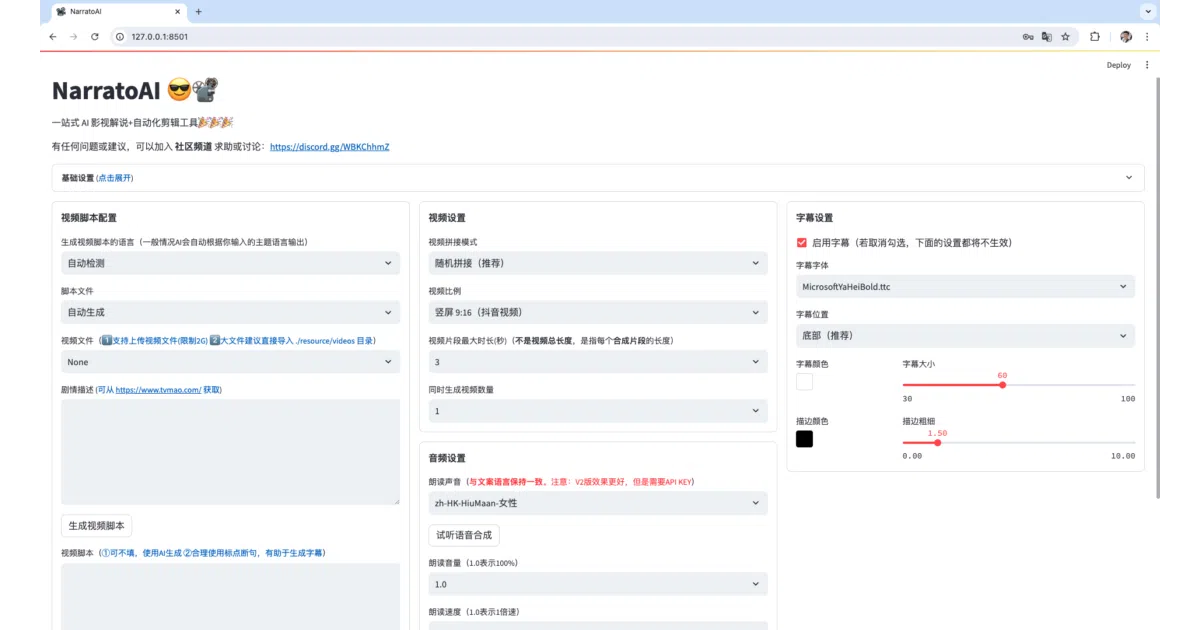
NarratoAI is a Python-based Streamlit app that ingests video and spits out a fully narrated, edited commentary clip. It uses large language models to draft the script, stitches together footage automatically, generates dubbed audio via multiple TTS engines, and burns in subtitles. The project is a refactored descendant of MoneyPrinterTurbo, rebuilt specifically around the repetitive workflow of film and short-drama commentary channels.
The interesting bit
The tool treats commentary creation as an assembly line rather than a craft: it can do frame-by-frame documentary analysis via vision models like Qwen2-VL, clone voices with IndexTTS2, and even export a draft to CapCut for final human touch-ups. That last step is telling—it knows AI still can’t quite nail the pacing, so it hands off to a human editor rather than pretending the job is done.
Key highlights
- Supports multiple LLM backends (DeepSeek R1/V3, Qwen2-VL) and TTS providers including Tencent Cloud and voice cloning via IndexTTS2
- Recently refactored its documentary analysis pipeline and ditched LiteLLM for a unified OpenAI-compatible route over security concerns
- Can export editable drafts to CapCut, acknowledging that full automation isn’t always enough
- Runs locally via Docker or a Windows bundle, with a cloud-hosted option at narratoai.cn
- Explicitly built for short-drama mixing and serial commentary, not just generic video summarization
Caveats
- The license strictly limits usage to learning and research; commercial use requires contacting the author
- The README spends significant space warning that resellers are scamming users by rebranding the free tool, which suggests the target audience includes non-developers
- Several promised features—main character face matching and automatic audio-to-footage alignment—remain unchecked on the roadmap
Verdict
Worth a look if you run a commentary channel and want to automate the tedious script-to-edit grind, but skip it if you need a commercially clean license out of the box or were hoping for a general-purpose video editor.
Frequently asked
- What is linyqh/NarratoAI?
- Automates the entire grunt-work pipeline behind film commentary videos: scripting, dubbing, cutting, and subtitling.
- Is NarratoAI open source?
- Yes — linyqh/NarratoAI is open source, released under the MIT license.
- What language is NarratoAI written in?
- linyqh/NarratoAI is primarily written in Python.
- How popular is NarratoAI?
- linyqh/NarratoAI has 11.5k stars on GitHub and is currently holding steady.
- Where can I find NarratoAI?
- linyqh/NarratoAI is on GitHub at https://github.com/linyqh/NarratoAI.