leblancfg/autocrop
A CLI wrapper that saves you from cropping headshots by hand
OpenCV does the heavy lifting; this tool does the batch scheduling, error handling, and polite folder management.
Not currently ranked — collecting fresh signals.
star history
What it does
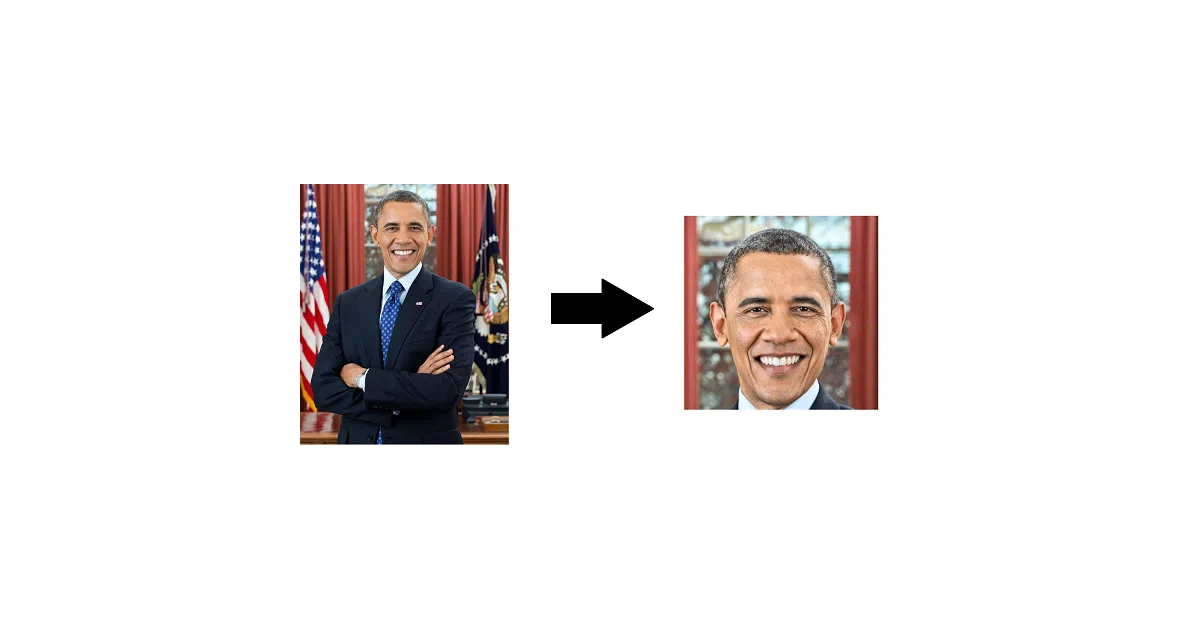
Autocrop takes a folder of photos, finds the largest face in each, and outputs a centered square crop. It handles the entire pipeline: input scanning, face detection via OpenCV’s Haar cascades, resizing, and sorting failures into a reject folder. There’s both a Python API (returns NumPy arrays) and a CLI with sensible defaults.
The interesting bit
The author is admirably honest: this is “essentially a CLI wrapper around a single OpenCV function.” The value isn’t the detection algorithm—it’s the ergonomics. In-place destructive cropping with confirmation prompts, a --no-resize flag for pixel purists, and a documented ffmpeg pipeline for video frame extraction. The boring parts (file I/O, format support for 20+ image types, cross-platform testing) are where the work actually went.
Key highlights
- CLI and Python API both supported; outputs raw NumPy arrays for downstream processing
- 20+ image formats including WebP, TIFF, and ancient formats like PCX and SGI
- Reject folder for images where no face is detected, so failed crops don’t silently disappear
--no-resizepreserves original pixels;--facePercentcontrols face-to-frame ratio- Actively maintained with CI across Python 3.7–3.10 on Linux, macOS, and Windows
Caveats
- Conda packaging is stalled due to OpenCV workflow complexity (issue #7)
- Only the first frame of animated GIFs is processed
- Defaults to destructive in-place cropping if you forget the output folder
Verdict
Worth a look if you process ID photos, profile pictures, or video frames in bulk. Skip it if you need fine-grained face alignment, multiple-face handling, or non-square aspect ratios—this centers on the single largest face and outputs squares.
Frequently asked
- What is leblancfg/autocrop?
- OpenCV does the heavy lifting; this tool does the batch scheduling, error handling, and polite folder management.
- Is autocrop open source?
- Yes — leblancfg/autocrop is an open-source project tracked on heatdrop.
- What language is autocrop written in?
- leblancfg/autocrop is primarily written in Python.
- How popular is autocrop?
- leblancfg/autocrop has 683 stars on GitHub.
- Where can I find autocrop?
- leblancfg/autocrop is on GitHub at https://github.com/leblancfg/autocrop.