kubeflow/kale
Jupyter notebooks that deploy themselves to Kubernetes
Kale turns a tagged notebook into a Kubeflow Pipeline without rewriting a line of Python.
Not currently ranked — collecting fresh signals.
star history
What it does
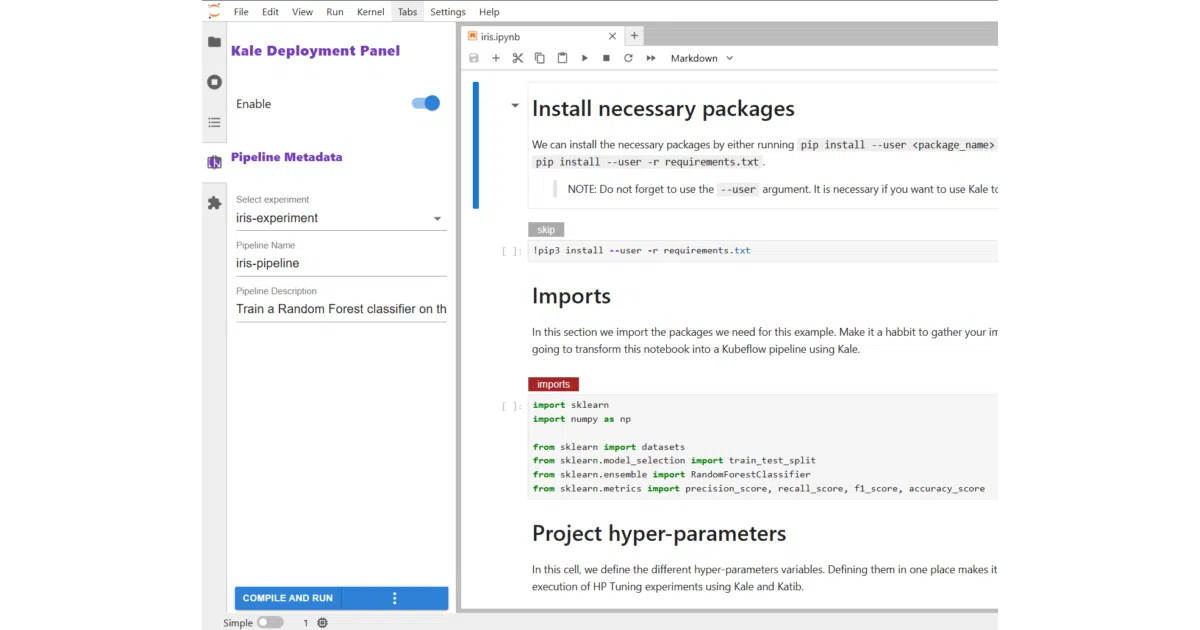
Kale is a JupyterLab extension and CLI that reads cell tags like step, imports, or pipeline-parameters, then compiles the notebook into a Kubeflow Pipeline and runs it on your cluster. You keep the notebook; Kale generates the YAML and component wiring.
The interesting bit
The dependency detection is the quiet magic. Kale traces which variables flow between tagged cells and builds the DAG automatically — no manual input/output declarations, no KFP SDK boilerplate. It treats the notebook as both dev environment and source of truth.
Key highlights
- Tag cells in JupyterLab, click “Compile and Run”; pipeline appears in Kubeflow Pipelines v2.16.0+
- Auto-detects data dependencies between steps; skips exploratory
skip-tagged cells - Supports pipeline parameters and metrics surfaced in the KFP UI
- CLI available for headless use (
kale --nb ... --run_pipeline) - Requires Python 3.11+ and an accessible KFP installation
Caveats
- v2.0 is fresh (April 2026); PyPI install docs still say “coming soon” while the README also lists
pip install kubeflow-kale[jupyter]— the install path is slightly inconsistent - Kubernetes cluster and running KFP required; not a standalone scheduler
Verdict
Data scientists already living in Jupyter who dread the “now rewrite it for production” phase should try this. If you don’t use Kubeflow Pipelines or prefer explicit pipeline-as-code, Kale adds abstraction you may not want.
Frequently asked
- What is kubeflow/kale?
- Kale turns a tagged notebook into a Kubeflow Pipeline without rewriting a line of Python.
- Is kale open source?
- Yes — kubeflow/kale is open source, released under the Apache-2.0 license.
- What language is kale written in?
- kubeflow/kale is primarily written in Python.
- How popular is kale?
- kubeflow/kale has 706 stars on GitHub.
- Where can I find kale?
- kubeflow/kale is on GitHub at https://github.com/kubeflow/kale.