jundot/omlx
LLM inference for Macs that swaps KV cache to SSD automatically
oMLX exists because running local LLMs on a Mac shouldn't mean choosing between a slick GUI and granular control over memory and caching.
Velocity · 7d
+59
★ / day
Trend
↗accelerating
star history
What it does
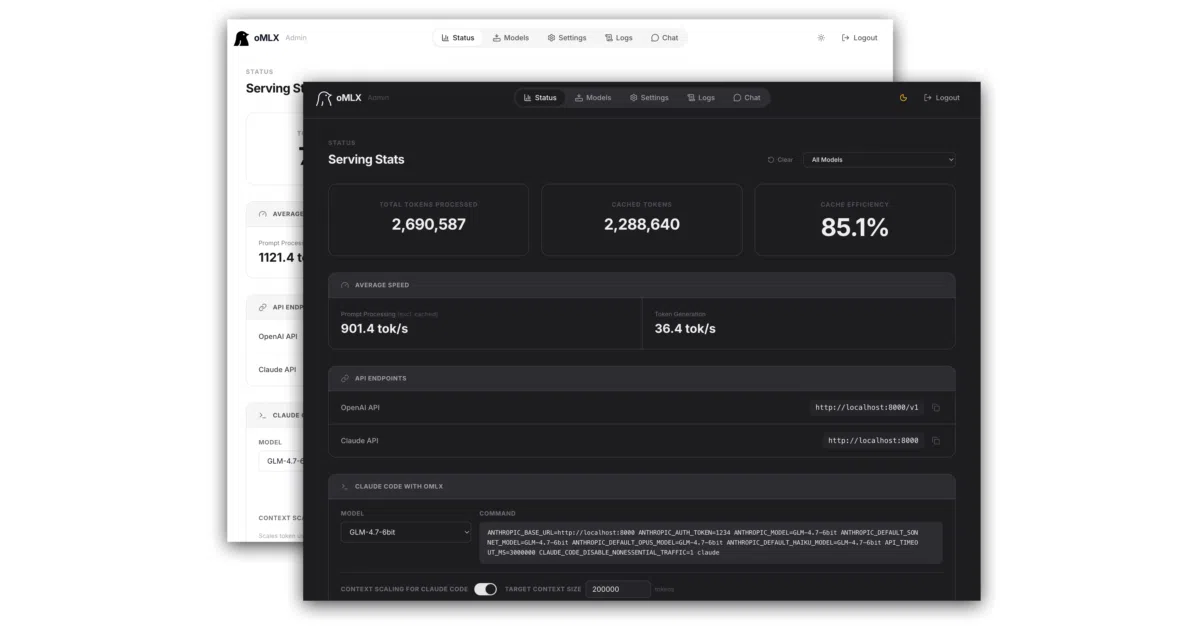
oMLX is an inference server built for Apple Silicon that serves LLMs, vision models, embeddings, and rerankers through an OpenAI-compatible API. You manage model loading, memory limits, per-model timeouts, and chat from a native macOS menu bar app or a built-in web dashboard. A memory guard caps usage at system RAM minus 8 GB by default to keep the machine alive.
The interesting bit
Its block-based KV cache, inspired by vLLM, adds a cold SSD tier. When RAM fills, blocks spill to disk in safetensors format and restore on prefix matches—even after a restart—so context is not recomputed from scratch. The author built this to make local models practical for long-context coding work with tools like Claude Code.
Key highlights
- Native Swift/SwiftUI menu bar app with auto-update, crash recovery, and persistent stats.
- Tiered KV cache with Copy-on-Write prefix sharing: hot blocks in RAM, cold blocks on SSD.
- Multi-model serving with LRU eviction, manual pinning, and per-model idle timeouts.
- One-click dashboard integrations for OpenClaw, Codex, Copilot, and others.
- Fully offline admin dashboard with built-in chat, benchmarking, and a HuggingFace model downloader.
Caveats
- Requires macOS 15.0+ and Apple Silicon; Intel Macs and Linux are unsupported.
- MCP support and some tool-calling dependencies are optional installs, not bundled by default.
- The macOS app installer does not include the
omlxCLI, so terminal users need a separate Homebrew or source install.
Verdict
Worth installing if you want a persistent, Mac-native local inference server for coding agents or chat. Skip it if you are not on Apple Silicon or need cross-platform deployment.
Frequently asked
- What is jundot/omlx?
- oMLX exists because running local LLMs on a Mac shouldn't mean choosing between a slick GUI and granular control over memory and caching.
- Is omlx open source?
- Yes — jundot/omlx is open source, released under the Apache-2.0 license.
- What language is omlx written in?
- jundot/omlx is primarily written in Python.
- How popular is omlx?
- jundot/omlx has 23.1k stars on GitHub and is currently accelerating.
- Where can I find omlx?
- jundot/omlx is on GitHub at https://github.com/jundot/omlx.