jtydhr88/ComfyTV
ComfyUI graduates from image prompts to a full media workbench
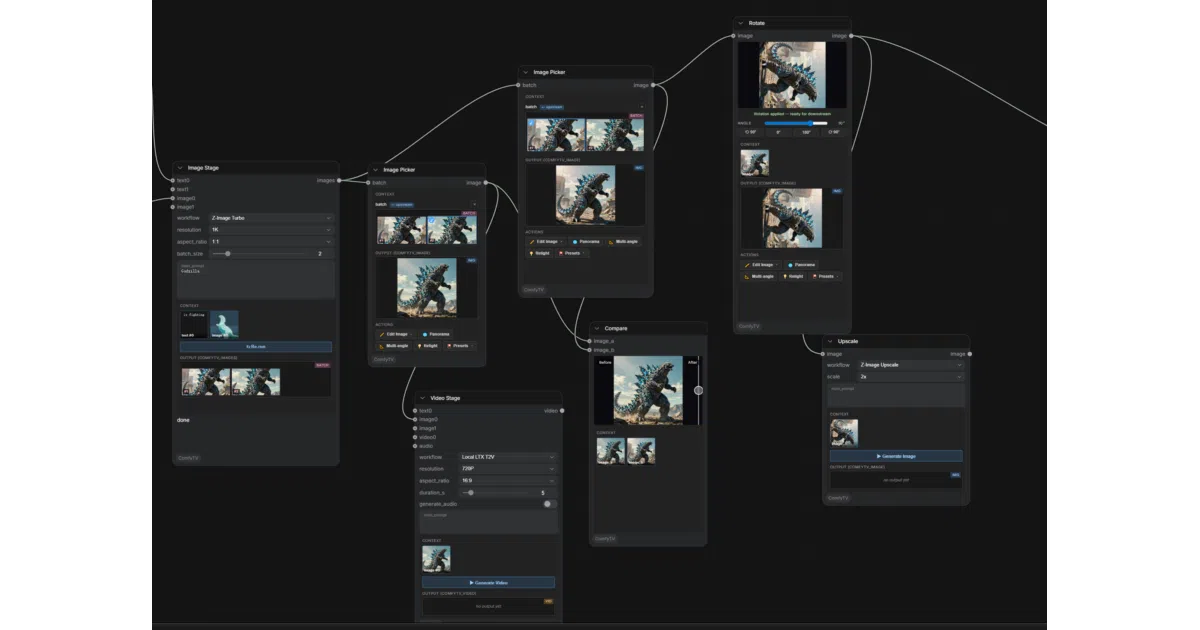
ComfyTV wraps ComfyUI in a canvas-based node graph so you can generate, edit, composite, and export images, video, audio, music, and 3D without leaving the ecosystem.
Not currently ranked — collecting fresh signals.
star history
What it does ComfyTV is a ComfyUI custom-node suite that reimagines the backend as a TapNow-style canvas app. It strings roughly 190 discrete stages into a pipeline—generate, pick, edit, composite, and export—spanning image, video, audio, music, panorama, and 3D. Each stage runs on its own and passes snapshots downstream, so re-running one node does not drag the entire chain with it.
The interesting bit Rather than treating ComfyUI as a rigid workflow engine, ComfyTV turns it into a project-centric workbench with built-in asset libraries, a 2D layer editor that imports and exports PSDs, a storyboard workbench, and a Director console for shot-by-shot timeline assembly. It also bakes in an agent-native stack—a sidebar Bot, an MCP server with 45 tools, and installable Skills—so the canvas can be driven by conversation as well as by hand.
Key highlights
- Per-node execution with snapshot-based caching; tweak one stage without re-rendering the whole graph.
- Roughly 100 video nodes covering edit, color, keying, roto, compositing, and FX; 30+ audio nodes including stem split and convolution reverb.
- In-node editors for 2D layers, storyboards, piano rolls, and 3D viewports, plus live previews on most video effects.
- Asset and resource libraries, prompt fragments, and Eagle integration for auto-archiving renders with full generation provenance.
- Bridge nodes connect third-party ComfyUI plugins; remote ComfyUI machines can be registered as extra runners.
- Experimental content-first V2 skin and a 45-tool MCP endpoint for agent-driven workflow building.
Caveats
- Some backend workflows are still on the roadmap; the README points to
docs/roadmap.mdfor current gaps. - The experimental V2 skin and agent features (Bot, MCP) ship behind toggles and are off by default.
Verdict ComfyTV is for ComfyUI power users who want a self-contained media workbench without abandoning local models. If you just need a fast text-to-image queue, the scope will feel like overkill.
Frequently asked
- What is jtydhr88/ComfyTV?
- ComfyTV wraps ComfyUI in a canvas-based node graph so you can generate, edit, composite, and export images, video, audio, music, and 3D without leaving the ecosystem.
- Is ComfyTV open source?
- Yes — jtydhr88/ComfyTV is open source, released under the MIT license.
- What language is ComfyTV written in?
- jtydhr88/ComfyTV is primarily written in JavaScript.
- How popular is ComfyTV?
- jtydhr88/ComfyTV has 1.1k stars on GitHub.
- Where can I find ComfyTV?
- jtydhr88/ComfyTV is on GitHub at https://github.com/jtydhr88/ComfyTV.