jsgrrchg/NeverWrite
Obsidian's brain meets Cursor's brawn, with trust issues
A local-first markdown workspace that makes AI agents show their work before they touch your files.
Not currently ranked — collecting fresh signals.
star history
What it does
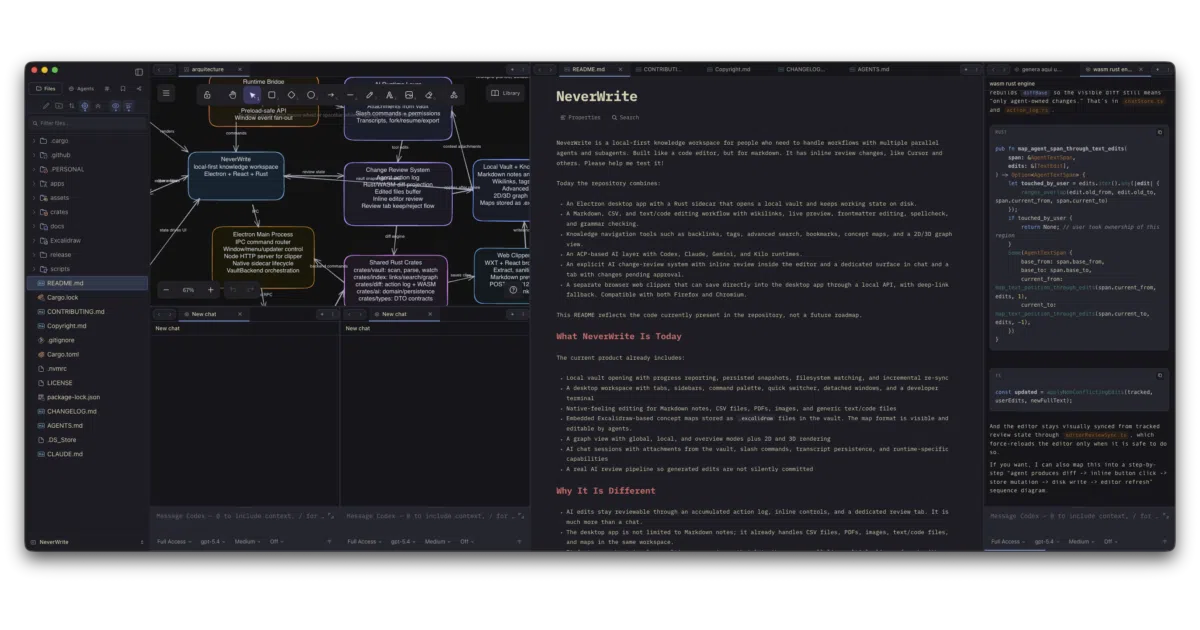
NeverWrite is an Electron desktop app for managing a local markdown vault—think Obsidian—but built with the editing guts of a code editor and a strict policy that AI changes must be reviewed before they land. It opens folders, watches files, renders wikilinks, and runs terminal tabs alongside your notes. A browser extension clips web pages directly into the vault over a local HTTP API.
The interesting bit
The project treats AI edits like pull requests you haven’t approved yet. Generated changes accumulate in a review log with inline keep/reject controls, a dedicated Review tab, and Rust/WASM-backed diffing. The author is explicit that this is “much more than a chat”—the AI layer is woven into the document surface, not bolted on as a sidebar conversation. Also notable: the 3D graph view exists, but the README admits it leaks memory on large vaults and suggests restarting the app afterward. Refreshing honesty.
Key highlights
- Six ACP runtimes wired in: Codex, Claude, Gemini, Grok, Kilo, OpenCode (bundling status varies; most require manual setup today)
- Inline AI review with accumulated action logs, not silent auto-commit
- Rust sidecar handles vault indexing, search, diffing, and filesystem watching
- Web clipper with Firefox + Chromium support, template system, and deep-link fallback
- Vim bindings, CodeMirror 6, Excalidraw concept maps, 2D/3D graph views, PDF viewing, CSV editing
- Terminal tabs with Claude Code integration in the Agents sidebar
Caveats
- Pre-1.0; author actively soliciting edge-case reports and help with local-LLM architecture
- Most AI runtimes (Gemini, Grok, Kilo, OpenCode) are integrated but not bundled by default
- 3D graph memory leaks acknowledged; requires app restart after heavy use
- No top-level JS workspace—dependencies installed per-app, pnpm required for clipper
Verdict
Worth a look if you want Obsidian’s linking and graph features with Cursor-style AI assistance and a genuine review gate. Skip it if you need a polished, zero-config AI setup or a memory-stable 3D graph for large vaults.
Frequently asked
- What is jsgrrchg/NeverWrite?
- A local-first markdown workspace that makes AI agents show their work before they touch your files.
- Is NeverWrite open source?
- Yes — jsgrrchg/NeverWrite is open source, released under the Apache-2.0 license.
- What language is NeverWrite written in?
- jsgrrchg/NeverWrite is primarily written in TypeScript.
- How popular is NeverWrite?
- jsgrrchg/NeverWrite has 793 stars on GitHub.
- Where can I find NeverWrite?
- jsgrrchg/NeverWrite is on GitHub at https://github.com/jsgrrchg/NeverWrite.