jlcodes99/cockpit-tools
A traffic controller for your scattered AI IDE accounts
Cockpit Tools exists because switching between your personal Cursor and work Copilot accounts shouldn't require a logout-login ritual.
Velocity · 7d
+38
★ / day
Trend
↗accelerating
star history
What it does
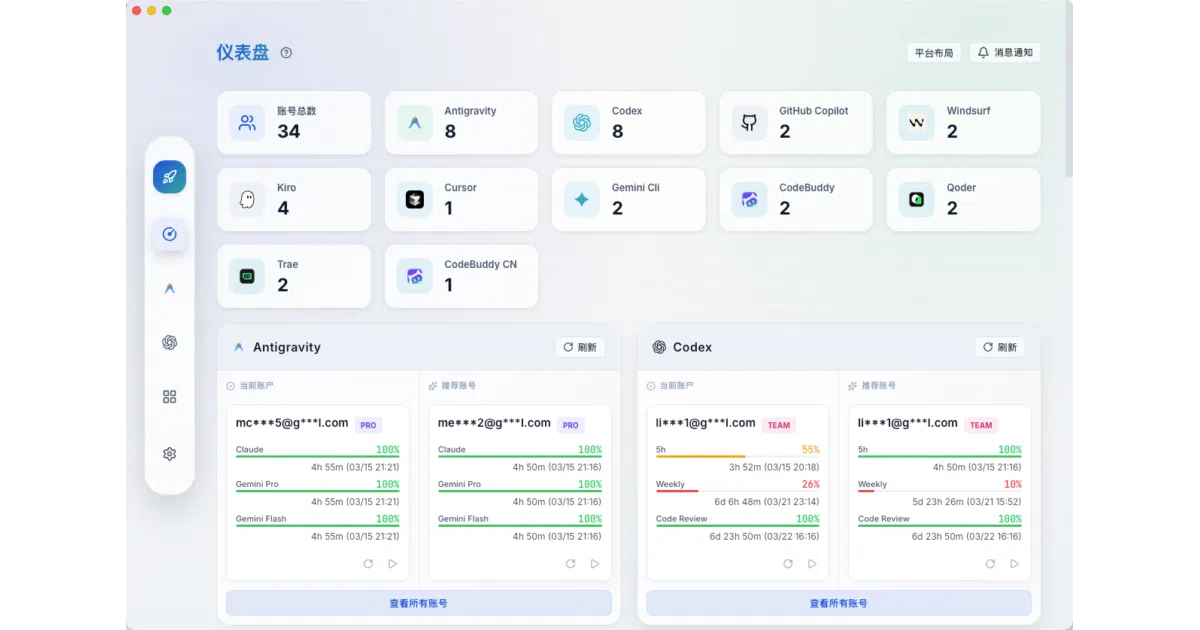
Cockpit Tools is a Rust-built desktop app that acts as a centralized account manager for twelve AI-powered IDEs and assistants. It stores credentials and configuration locally, lets you swap identities with a click, and spawns isolated instances of the same application so you can run, say, two Cursors with two different accounts side by side. A dashboard tracks quota consumption and reset timers across all platforms.
The interesting bit
The real utility is in the instance isolation: rather than fighting with shared user directories and single-session locks, the tool launches each IDE with its own profile folder and parameters, effectively cloning the app. It also includes a local sidecar proxy for Codex so your API base URL and key stay unchanged while it handles account synchronization behind the scenes.
Key highlights
- Supports twelve platforms including Cursor, GitHub Copilot, Windsurf, Codex, Zed, Trae, and Kiro
- Visual dashboard with quota progress bars, reset timers, and one-click wake-up tasks
- Multi-instance spawning with per-instance user directories and independent lifecycle controls
- Device fingerprint generation and binding for Antigravity IDE to reduce platform risk flags
- Runs fully offline except for OAuth, token refresh, and quota queries; no cloud account required
Caveats
- Gemini Cli currently lacks multi-instance support, so it is limited to single-account switching
- On macOS, child processes launched through the app can trigger file-access permission prompts that appear to come from Cockpit Tools itself, which the README admits looks confusing
Verdict
Developers managing several AI IDE subscriptions across different teams or clients will find the dashboard worthwhile. If you only use one account on a single editor, this is elaborate overkill.
Frequently asked
- What is jlcodes99/cockpit-tools?
- Cockpit Tools exists because switching between your personal Cursor and work Copilot accounts shouldn't require a logout-login ritual.
- Is cockpit-tools open source?
- Yes — jlcodes99/cockpit-tools is an open-source project tracked on heatdrop.
- What language is cockpit-tools written in?
- jlcodes99/cockpit-tools is primarily written in Rust.
- How popular is cockpit-tools?
- jlcodes99/cockpit-tools has 19.3k stars on GitHub and is currently accelerating.
- Where can I find cockpit-tools?
- jlcodes99/cockpit-tools is on GitHub at https://github.com/jlcodes99/cockpit-tools.