jacobgil/vit-explain
X-ray specs for Vision Transformers
A compact PyTorch toolkit that reveals where ViTs actually look in an image, with class-specific gradient variants and sensible noise-filtering tricks.
Not currently ranked — collecting fresh signals.
star history
What it does
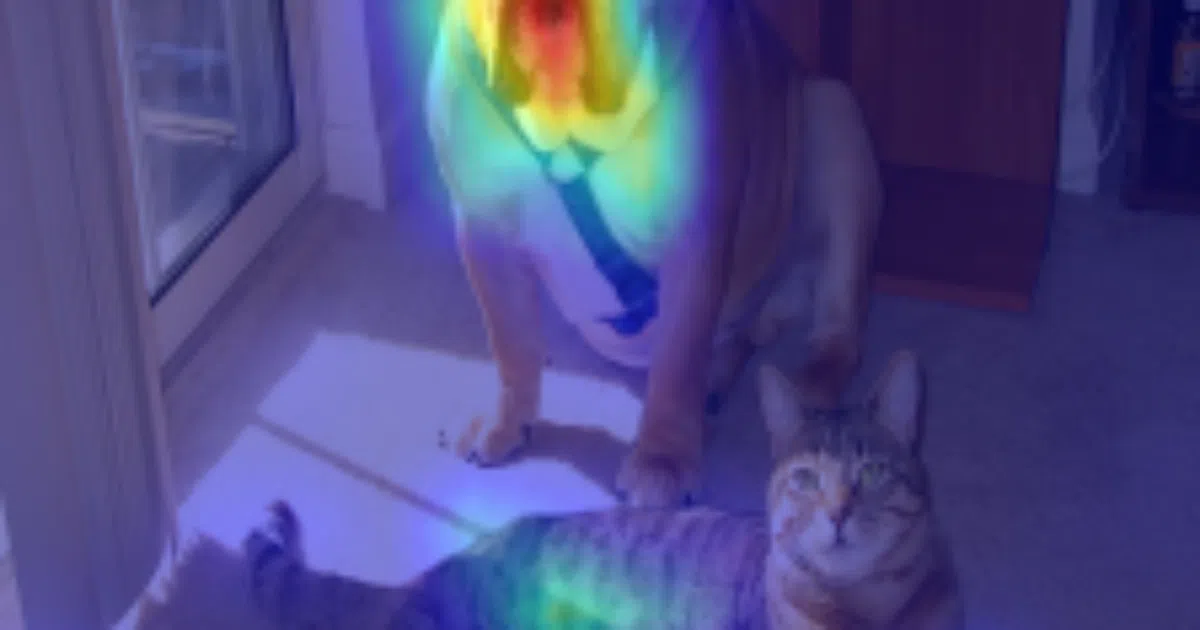
This repo implements Attention Rollout and Gradient Attention Rollout for Vision Transformers. Feed it an image and it generates a heatmap showing which patches the model attended to. The gradient variant goes further: it multiplies attention weights by class-specific gradients, masking out negative contributions so you see only the attention that actually drove a particular classification decision.
The interesting bit
The authors didn’t just port a paper. They found empirically that the standard “average across heads” recipe from the original Attention Rollout paper is often worse than taking the minimum or maximum attention value, especially when you also discard the weakest 90% of activations. It’s a small, honest tweak that makes the visualizations noticeably sharper.
Key highlights
- Two methods: vanilla Attention Rollout (class-agnostic) and Gradient Attention Rollout (class-specific)
- Three head fusion strategies:
mean,min,max— configurable per-run discard_ratioparameter filters low-attention noise layer by layer- Works out of the box with
torch.hubmodels (default: DeiT-Tiny) - Command-line tool plus clean Python API for dropping into notebooks
Caveats
- “Attention flow is work in progress” — one of the three referenced methods isn’t implemented yet
- Only requires
timm, but the repo itself is a thin wrapper; you’ll need to bring your own model if you stray from the DeiT default
Verdict
Worth a look if you’re debugging ViT behavior or writing a paper that needs interpretability baselines. Skip it if you need explanations for CNNs or a fully packaged library — this is research code with a narrow, useful scope.
Frequently asked
- What is jacobgil/vit-explain?
- A compact PyTorch toolkit that reveals where ViTs actually look in an image, with class-specific gradient variants and sensible noise-filtering tricks.
- Is vit-explain open source?
- Yes — jacobgil/vit-explain is open source, released under the MIT license.
- What language is vit-explain written in?
- jacobgil/vit-explain is primarily written in Python.
- How popular is vit-explain?
- jacobgil/vit-explain has 1.1k stars on GitHub.
- Where can I find vit-explain?
- jacobgil/vit-explain is on GitHub at https://github.com/jacobgil/vit-explain.