iot-salzburg/gpu-jupyter
One Docker command to stop fighting with CUDA drivers
A pre-built, version-tagged Docker image that bundles JupyterLab, PyTorch, TensorFlow, and the entire NVIDIA driver stack so you can run GPU notebooks without installing anything on your host.
Not currently ranked — collecting fresh signals.
star history
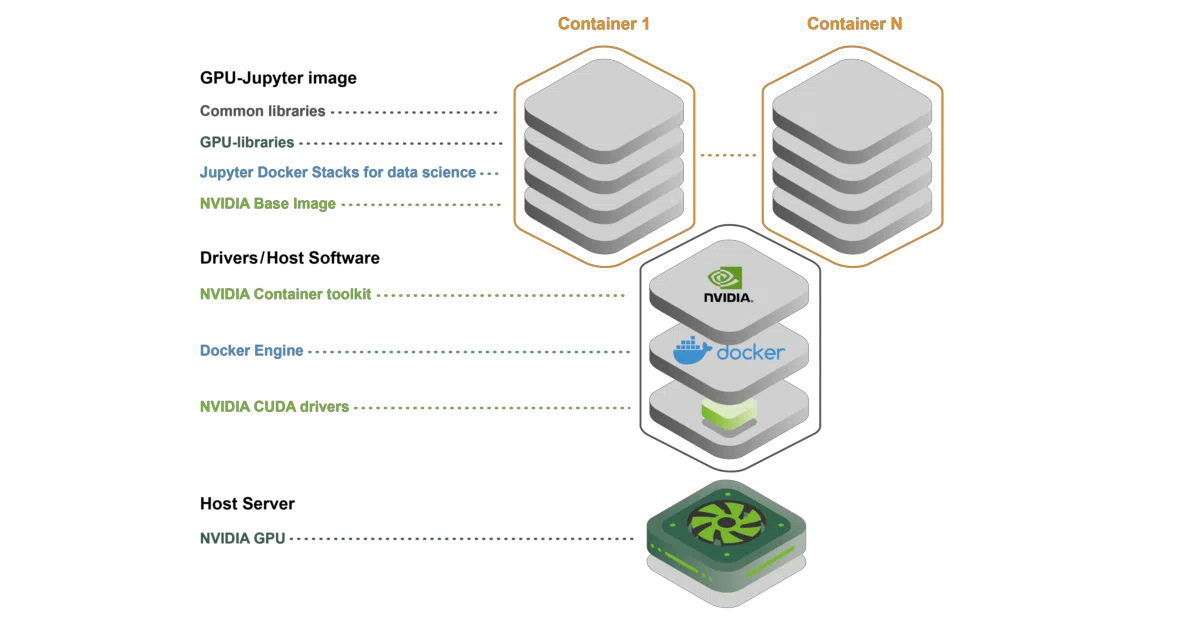
What it does GPU-Jupyter is a Docker image built on top of NVIDIA’s official CUDA base and Jupyter’s Docker Stacks. It packages JupyterLab with PyTorch, TensorFlow, and a full data-science toolstack into a container that sees your host GPU via the NVIDIA Container Toolkit. You pull a tagged image, run one command, and get a working GPU notebook server on localhost.
The interesting bit The project treats reproducibility as a first-class feature: version-tagged images, isolated containers, and pinned seeds are presented as the mechanism for “fully reproducible and sharable machine-learning experiments.” This is essentially environment-as-a-guarantee rather than environment-as-hope.
Key highlights
- Pre-built images on Docker Hub with explicit CUDA/Ubuntu version tags (e.g.,
v1.10_cuda-12.9_ubuntu-24.04) - Three image variants per release: full (Python + Julia + R), python-only, and slim
- Includes sample GPU starter code in
extra/Getting_Started - Companion repo demonstrates reproducible research workflow with one command
- Supports sudo inside container for custom package installation
Caveats
- Requires full NVIDIA stack on host: GPU, drivers, CUDA, Docker, and NVIDIA Container Toolkit
- README notes a GitHub workflow failure due to “No space left on device” — CI appears strained by image size
- Image tags in the “Available Images” section have copy-paste errors (three entries claim the same tag with different descriptions)
Verdict Worth a look if you’re tired of maintaining CUDA environments or need to hand a reproducible GPU notebook setup to collaborators. Skip it if you’re already happy with your current container workflow or don’t have an NVIDIA GPU.
Frequently asked
- What is iot-salzburg/gpu-jupyter?
- A pre-built, version-tagged Docker image that bundles JupyterLab, PyTorch, TensorFlow, and the entire NVIDIA driver stack so you can run GPU notebooks without installing anything on your host.
- Is gpu-jupyter open source?
- Yes — iot-salzburg/gpu-jupyter is open source, released under the Apache-2.0 license.
- What language is gpu-jupyter written in?
- iot-salzburg/gpu-jupyter is primarily written in Jupyter Notebook.
- How popular is gpu-jupyter?
- iot-salzburg/gpu-jupyter has 768 stars on GitHub.
- Where can I find gpu-jupyter?
- iot-salzburg/gpu-jupyter is on GitHub at https://github.com/iot-salzburg/gpu-jupyter.