humphd/have-fun-with-machine-learning
Teach Your Computer Dolphins From Seahorses, No PhD Required
A hands-on guide for programmers with zero AI background who want to train an image classifier without touching a single equation.
Not currently ranked — collecting fresh signals.
star history
What it does
This is a public, work-in-progress tutorial for programmers who know nothing about artificial intelligence and would like to keep it that way—at least until after they have trained a neural network. The goal is concrete: teach a convolutional neural network to look at an image and decide whether it is a dolphin or a seahorse. To get there, the guide leans on the older but declarative Caffe framework and NVIDIA’s DIGITS web interface, treating the whole exercise like learning a new open-source library rather than a research topic.
The interesting bit
The author cheerfully admits they barely understand what they are doing and invites readers to submit pull requests when they spot something “misleading, naive, or just plain wrong.” That humility is refreshing, and it sets the tone for a guide that chooses Caffe specifically because you do not write code to define the network; you write structured text files and use command-line tools, which makes the process feel more like configuration than incantation.
Key highlights
- Explicitly built for programmers with no AI background; the author promises not to use a single mathematical expression.
- Demonstrates transfer learning by fine-tuning pretrained AlexNet and GoogLeNet models, so the entire pipeline runs on a year-old MacBook Pro without a discrete GPU.
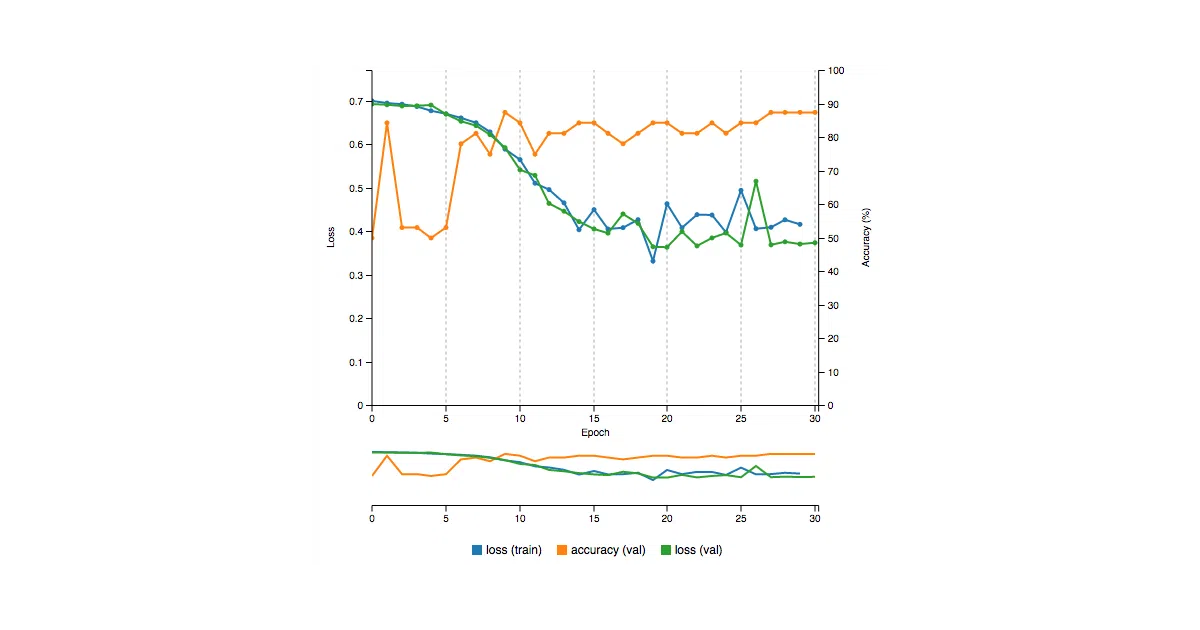
- Uses NVIDIA’s DIGITS web app for visual, real-time training charts and dataset management.
- Includes translations in Chinese (Traditional) and Korean.
- The author ran the workflow on a laptop with only integrated Intel graphics by using an OpenCL branch of Caffe.
Caveats
- The README warns that installing Caffe natively can be frustrating, especially on macOS, and that Docker is the far easier path.
- Because the author is learning in public, portions of the guide may contain errors or oversights; it is presented as a collaborative draft rather than authoritative documentation.
- The tooling is dated—Caffe and DIGITS are older stacks—so developers looking for modern PyTorch or TensorFlow patterns will need to translate the concepts themselves.
Verdict
Pick this up if you are a programmer curious about neural networks but allergic to graduate-level math and theory. Skip it if you already know your way around modern deep-learning frameworks or need production-ready patterns.
Frequently asked
- What is humphd/have-fun-with-machine-learning?
- A hands-on guide for programmers with zero AI background who want to train an image classifier without touching a single equation.
- Is have-fun-with-machine-learning open source?
- Yes — humphd/have-fun-with-machine-learning is an open-source project tracked on heatdrop.
- What language is have-fun-with-machine-learning written in?
- humphd/have-fun-with-machine-learning is primarily written in Python.
- How popular is have-fun-with-machine-learning?
- humphd/have-fun-with-machine-learning has 5.1k stars on GitHub.
- Where can I find have-fun-with-machine-learning?
- humphd/have-fun-with-machine-learning is on GitHub at https://github.com/humphd/have-fun-with-machine-learning.