hiroi-sora/Umi-OCR
Offline OCR with a grudge against watermarks
It exists so you can extract text from screenshots, PDFs, and barcodes without a network connection or a cloud bill.
Velocity · 7d
+23
★ / day
Trend
↘cooling
star history
What it does
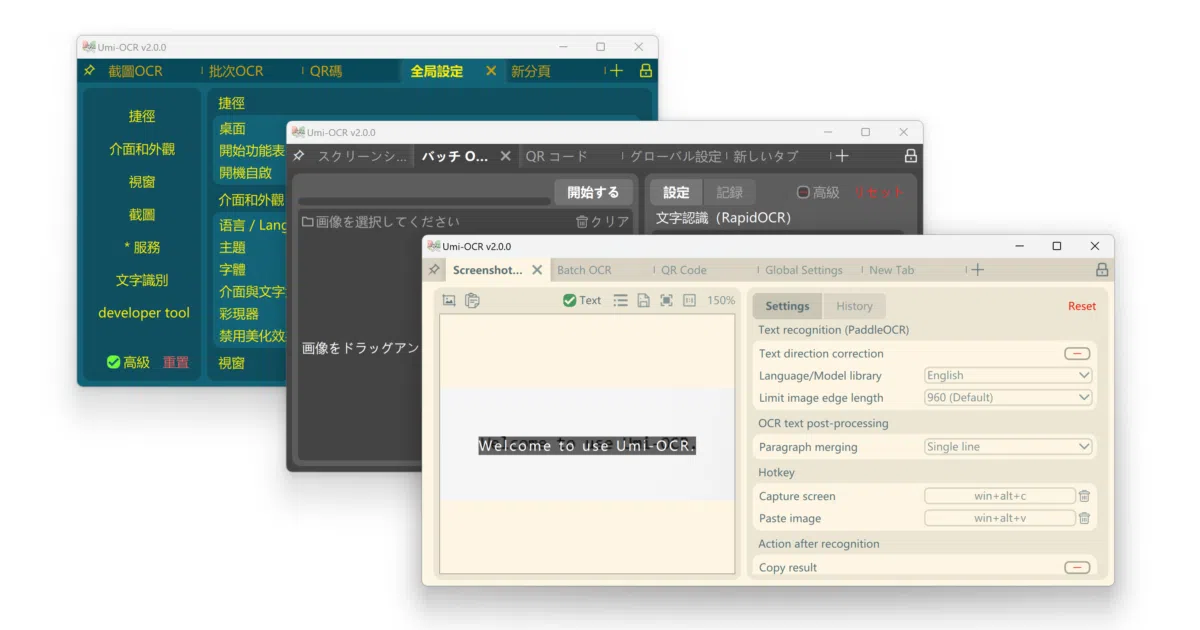
Umi-OCR is a desktop application for Windows and Linux that performs optical character recognition entirely offline. It turns screenshots, local image batches, and scanned documents into editable text, and can even spit out searchable PDFs. The tool also reads and generates QR codes and barcodes across 19 protocols, all without unpacking a single cloud API key.
The interesting bit
The real care is in the post-processing. The app does not just dump raw OCR text; it offers layout parsing presets that reconstruct multi-column documents, vertical text, and code indentation. For batch jobs, you can draw ignore regions to mask out persistent watermarks or page headers, effectively teaching the tool which parts of your images are noise.
Key highlights
- Runs fully offline with bundled PaddleOCR and RapidOCR engine plugins
- Supports screenshot hotkeys, batch image imports, and document formats like PDF, XPS, EPUB, and CBZ
- Outputs searchable double-layer PDFs from scanned documents
- Layout-aware text reconstruction handles multi-column, vertical, and code-block formatting
- Exposes both command-line and HTTP APIs for automation
- Multi-language UI with support for traditional Chinese, English, Japanese, and others
Caveats
- Windows 7 x64 and Linux x64 only; macOS is not mentioned in the README
- The README notes that GPU-accelerated UI rendering may cause screen-capture flickering or layout glitches on some hardware, requiring a fallback to software rendering
- Formula recognition appears to be experimental or incomplete, as the README links to a GitHub issue rather than documenting it as a stable feature
Verdict
Grab it if you regularly extract text from scans, screenshots, or ebooks and prefer keeping your files local. Skip it if you need a headless server tool or native macOS support; this is a Qt/QML desktop app first.
Frequently asked
- What is hiroi-sora/Umi-OCR?
- It exists so you can extract text from screenshots, PDFs, and barcodes without a network connection or a cloud bill.
- Is Umi-OCR open source?
- Yes — hiroi-sora/Umi-OCR is open source, released under the MIT license.
- What language is Umi-OCR written in?
- hiroi-sora/Umi-OCR is primarily written in Python.
- How popular is Umi-OCR?
- hiroi-sora/Umi-OCR has 48.2k stars on GitHub and is currently cooling off.
- Where can I find Umi-OCR?
- hiroi-sora/Umi-OCR is on GitHub at https://github.com/hiroi-sora/Umi-OCR.