gglucass/headroom-desktop
A 50% off coupon for Claude Code, written in Rust
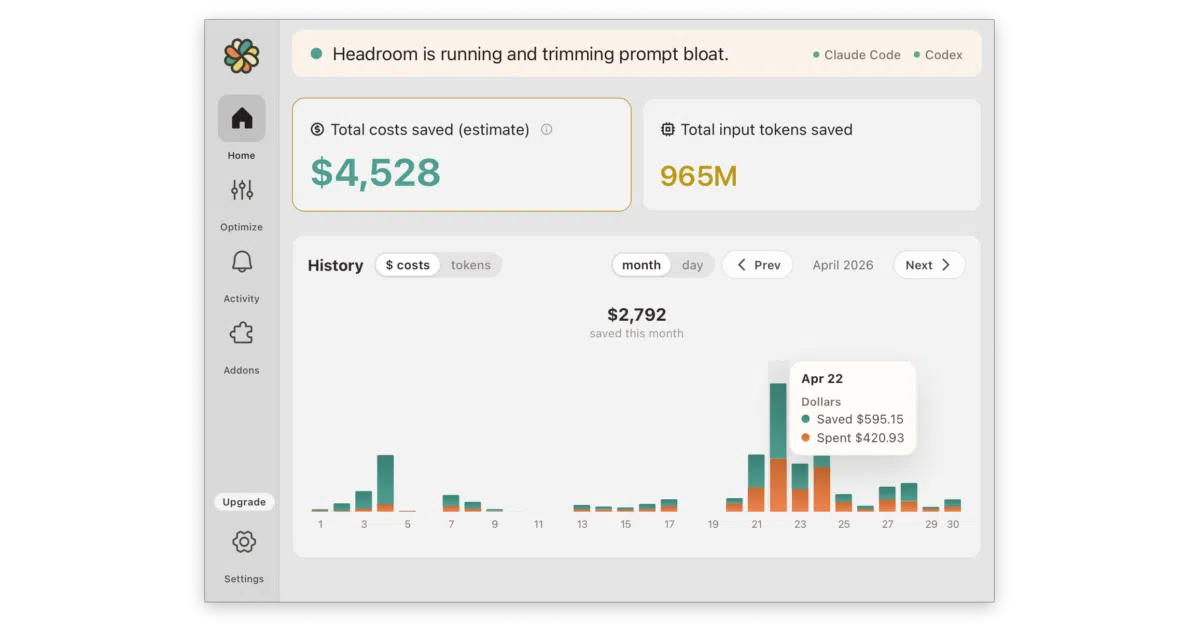
Headroom Desktop sits between Claude Code or Codex and the API, reversibly compressing tool outputs and boilerplate so your context window—and invoice—stretch about twice as far.
Not currently ranked — collecting fresh signals.
star history
What it does
Headroom Desktop is a macOS menu-bar app that routes Claude Code and OpenAI Codex through a local two-hop proxy running on 127.0.0.1. It intercepts API traffic, runs tool outputs and structured data through a reversible compression pipeline, and forwards the slimmed request upstream. The project claims roughly 50% token savings; its own benchmarks show higher compression for JSON and HTML workloads and far less for plain text or active source code.
The interesting bit
The architecture is deliberately paranoid. A Rust/Tauri shell manages the tray and client configuration, while a self-contained Python runtime—downloaded on first launch and isolated in ~/Library/Application Support—does the heavy lifting. If the proxy crashes, a watchdog restarts it; if that fails repeatedly, Headroom auto-pauses and strips every intercept so your CLI tools keep working without manual rescue. Uninstalling reverses every file edit, shell block, and keychain entry it touched.
Key highlights
- Reversible compression targets HTML, JSON arrays, structured logs, and agentic conversation history; anomalies and errors are preserved.
- Clean system hygiene: edits
~/.claude/settings.json,~/.codex/config.toml, and shell profiles inside fenced# >>> headroommarkers, with timestamped backups and full rollback on quit or uninstall. - Conservative with code: skips compression on recent messages and any conversation where you’re asking to analyze, debug, or fix code.
- Optional add-ons include
rtkfor CLI noise reduction,markitdownfor PDF-to-Markdown conversion, andponytailto nudge agents toward leaner output. - Paid subscription ($3/month after a 7-day trial); the Tauri shell is MIT-licensed open source, but the optimization backend requires a Headroom account.
Caveats
- Stable only on macOS 14+ Apple Silicon; Linux x86_64 builds are experimental and currently lack the “Learn” feature.
- Text compression requires a ~2 GB model download and adds latency, so it saves money but not time.
- Short arrays (under 5 items) and content under 200 tokens pass through uncompressed, meaning light usage sees little benefit.
Verdict Worth a trial if you run Claude Code or Codex daily and your API bill is starting to sting. Skip it if you’re on Intel Macs, need Windows support, or your workflow rarely generates the long tool-output chains that actually compress well.
Frequently asked
- What is gglucass/headroom-desktop?
- Headroom Desktop sits between Claude Code or Codex and the API, reversibly compressing tool outputs and boilerplate so your context window—and invoice—stretch about twice as far.
- Is headroom-desktop open source?
- Yes — gglucass/headroom-desktop is open source, released under the MIT license.
- What language is headroom-desktop written in?
- gglucass/headroom-desktop is primarily written in Rust.
- How popular is headroom-desktop?
- gglucass/headroom-desktop has 592 stars on GitHub.
- Where can I find headroom-desktop?
- gglucass/headroom-desktop is on GitHub at https://github.com/gglucass/headroom-desktop.