getagentseal/codeburn
The receipt printer for AI coding assistants
To show developers exactly where their AI coding budget goes by reading session data already sitting on disk.
Velocity · 7d
+9.9
★ / day
Trend
↘cooling
star history
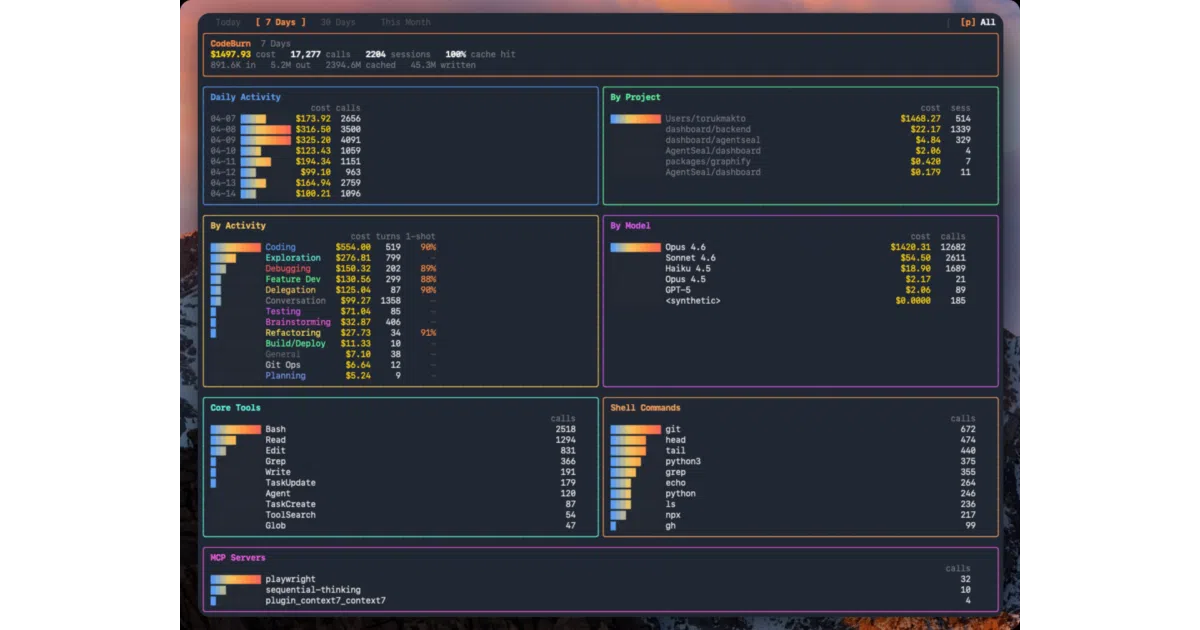
What it does CodeBurn is a local CLI tool that reads session logs and databases left behind by AI coding assistants—Cursor, Claude Code, Codex, Gemini, and roughly two dozen others—and reconstructs an itemized view of token usage and cost. It breaks spending down by model, provider, project, and task type without wrapping the tools or proxying their traffic. Pricing is handled via LiteLLM using real model data where available, or documented heuristics where the tool hides the details.
The interesting bit The real work is provider-specific archaeology. Each tool stores its own crumbs differently—Cursor uses a local SQLite database, Gemini CLI drops JSON session files, GitHub Copilot buries transcripts in VS Code workspace storage—so CodeBurn normalizes these disparate formats into a single financial view. It is essentially a forensic accountant that never asks the tools for permission; it just reads what they already wrote to disk.
Key highlights
- Runs fully offline with no API keys, proxies, or wrappers.
- Supports 25 providers including Claude Code, Cursor, Codex, Gemini CLI, and GitHub Copilot.
- Interactive TUI dashboard with time-window switching and auto-refresh, plus a macOS menu bar mode.
optimizeandyieldcommands flag wasted spend and compare productive versus abandoned sessions.- Exports to CSV or JSON for external analysis.
Caveats
- Several providers force estimation: Cursor’s “Auto” mode hides the real model, so costs are labeled
Auto (Sonnet est.); Kiro and GitHub Copilot lack explicit token counts and estimate from content length. - First run on a large Cursor database can take up to a minute, though results are cached afterward.
- Some providers need optional dependencies or hooks, such as
better-sqlite3for Cursor and a live hook for Antigravity CLI.
Verdict Worth a look if you juggle multiple AI coding tools and want to know which one is quietly draining your budget. Skip it if you use a single flat-rate assistant and do not care about per-model or per-session costs.
Frequently asked
- What is getagentseal/codeburn?
- To show developers exactly where their AI coding budget goes by reading session data already sitting on disk.
- Is codeburn open source?
- Yes — getagentseal/codeburn is open source, released under the MIT license.
- What language is codeburn written in?
- getagentseal/codeburn is primarily written in TypeScript.
- How popular is codeburn?
- getagentseal/codeburn has 11.6k stars on GitHub and is currently cooling off.
- Where can I find codeburn?
- getagentseal/codeburn is on GitHub at https://github.com/getagentseal/codeburn.