dmMaze/BallonsTranslator
Deep Learning Does the Dirty Work of Comic Translation
It exists to automate the tedious detect-erase-translate-typeset pipeline of manga scanlation, letting you swap OCR, inpainting, and translation engines at each stage.
Not currently ranked — collecting fresh signals.
star history
What it does
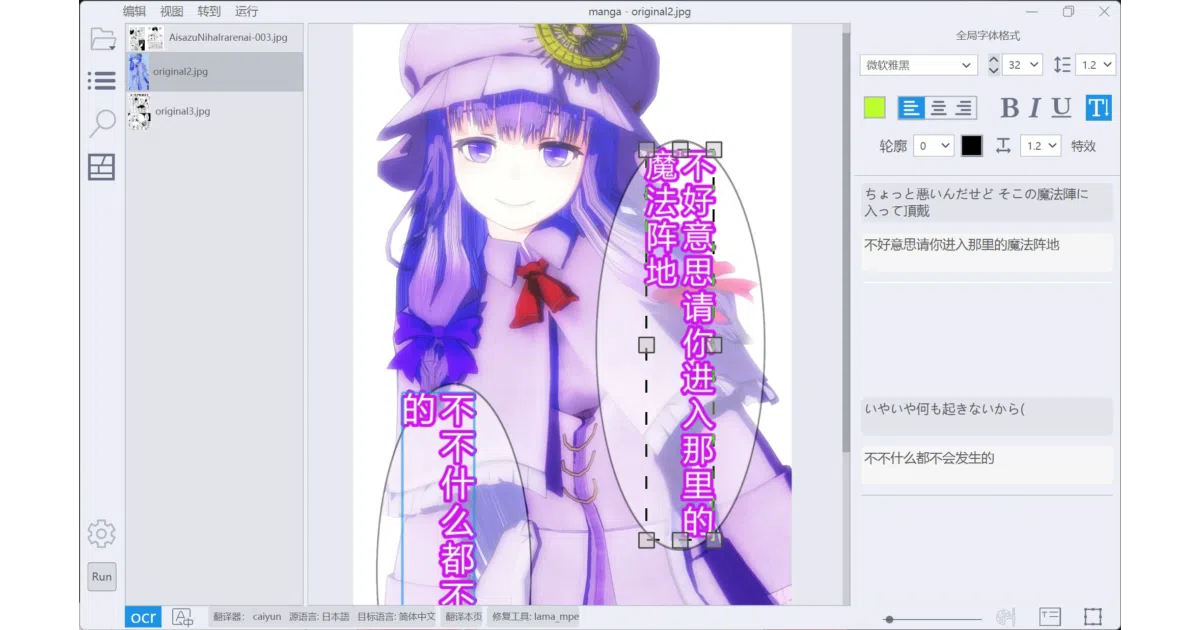
BallonsTranslator is a desktop tool that handles the entire comic localization workflow behind a Qt GUI. It detects text blocks and speech bubbles, erases the original lettering with inpainting, translates the content through your choice of engine, and renders the new text back into the art while attempting to match the original color, outline, angle, and alignment. A headless mode is available for batch processing without the interface.
The interesting bit
The project treats scanlation as an assembly line with swappable stations: you can mix and match text detectors, OCR models, inpainting algorithms, and translators—including offline models like Sugoi or Sakura-13B, cloud APIs, and OpenAI-compatible LLMs—without touching the rest of the codebase. It also tries to preserve the original typography by using the extracted bubble background as a layout reference, rather than simply overlaying generic subtitles.
Key highlights
- WYSIWYG rich text editor with font presets, find/replace, and Word document import/export for manual cleanup.
- Multiple inpainting backends: a fine-tuned LaMA, AOT, and a PatchMatch implementation (the same non-ML algorithm that powers Photoshop’s healing brush).
- Optimized layout logic for English-to-Chinese and Japanese-to-English, using
pkusegfor Chinese sentence segmentation. - GPU acceleration defaults on for NVIDIA and Apple Silicon, with a low-VRAM mode for running local LLMs like Sakura-13B.
- Headless batch mode that reads settings from
config.jsonand processes directories without launching the GUI.
Caveats
- Text detection officially supports only Japanese and English; Chinese is handled opportunistically because character blocks look similar, but it is not a guaranteed target.
- The project is heavily dependent on
manga-image-translatorfor core models, and several advanced features (such as the YSGDetector or font recognition) require manually downloading models into specific directory paths. - A bug where third-party input methods break the right-side edit panel has been documented since issue #76 and is currently not planned for a fix.
Verdict
Worth a look if you scanlate manga or webtoons and want to speed up the mechanical parts of the workflow, but expect to supervise the output—especially for vertical Japanese-to-Chinese text, which the README admits still needs improvement. Windows users get the most reliable packaged builds; macOS and AMD GPU setups are documented but described as potentially problematic.
Frequently asked
- What is dmMaze/BallonsTranslator?
- It exists to automate the tedious detect-erase-translate-typeset pipeline of manga scanlation, letting you swap OCR, inpainting, and translation engines at each stage.
- Is BallonsTranslator open source?
- Yes — dmMaze/BallonsTranslator is open source, released under the GPL-3.0 license.
- What language is BallonsTranslator written in?
- dmMaze/BallonsTranslator is primarily written in Python.
- How popular is BallonsTranslator?
- dmMaze/BallonsTranslator has 5.2k stars on GitHub.
- Where can I find BallonsTranslator?
- dmMaze/BallonsTranslator is on GitHub at https://github.com/dmMaze/BallonsTranslator.