djyde/ccmate
Stop Juggling Claude Code Configs by Hand
CC Mate exists because hand-editing Claude Code’s JSON configs and juggling MCP servers in a terminal is a recipe for typos and tears.
Not currently ranked — collecting fresh signals.
star history
What it does
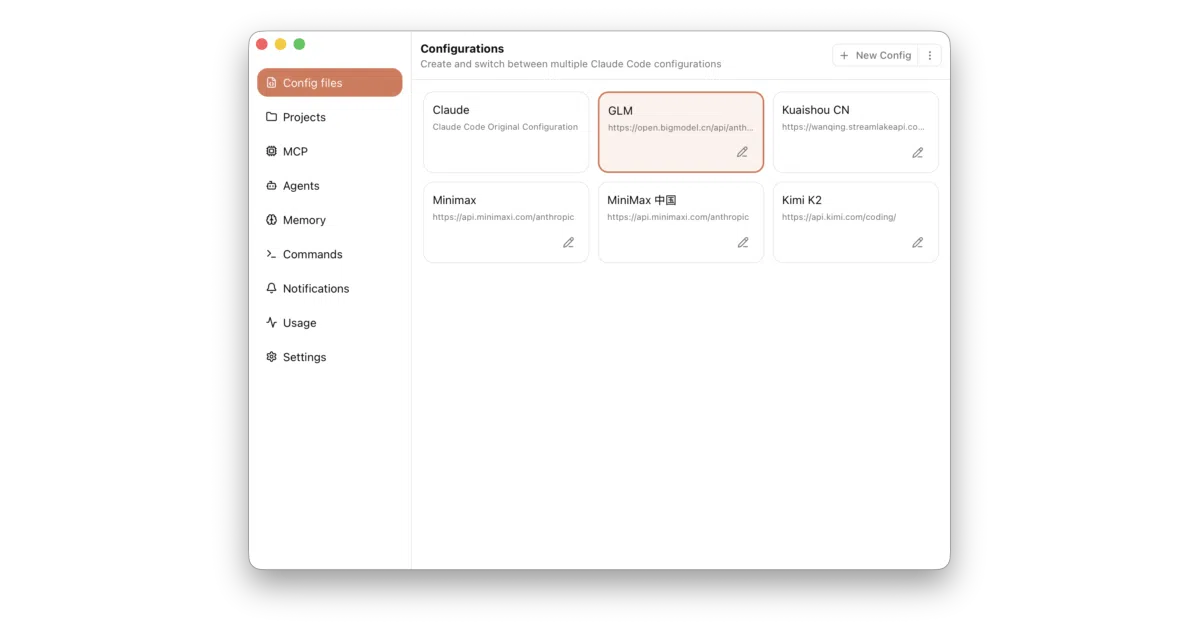
CC Mate is a cross-platform desktop application that manages Claude Code configuration files through a visual interface rather than a text editor. It lets you switch between multiple Claude Code profiles, manage Model Context Protocol (MCP) servers, organize global commands, and edit the global CLAUDE.md memory file. The app also tracks usage analytics and sends notifications, turning Claude Code’s scattered dotfiles into a centralized settings panel.
The interesting bit
The project treats Claude Code’s ~/.claude/ directory like a database that deserves its own client, which is a quietly radical assumption for a CLI-centric tool. By wrapping these files in a desktop GUI, it exposes knobs and dials that most users probably did not know existed—or were too intimidated to tweak by hand.
Key highlights
- Multi-configuration support: swap between entire Claude Code profiles without touching the terminal
- MCP server management: add, remove, and configure Model Context Protocol servers visually
- Agent and global command management: organize Claude Code agents and universal commands through forms instead of JSON
CLAUDE.mdintegration: read and write the global memory file directly from the app- Usage analytics and notifications: track usage over time and get alerts from the app
Caveats
- The README is light on technical architecture details; it is unclear how the app handles file synchronization or conflicts when Claude Code is running simultaneously
- Usage analytics and notifications are mentioned as features but not explained in depth, so their granularity and privacy implications are unspecified
- The project is AGPL v3 licensed, which may affect how you integrate or redistribute it
Verdict
Grab this if you manage more than one Claude Code environment or find hand-editing MCP server JSON tedious. Skip it if you live in the terminal and prefer vim ~/.claude/CLAUDE.md.
Frequently asked
- What is djyde/ccmate?
- CC Mate exists because hand-editing Claude Code’s JSON configs and juggling MCP servers in a terminal is a recipe for typos and tears.
- Is ccmate open source?
- Yes — djyde/ccmate is an open-source project tracked on heatdrop.
- What language is ccmate written in?
- djyde/ccmate is primarily written in TypeScript.
- How popular is ccmate?
- djyde/ccmate has 624 stars on GitHub.
- Where can I find ccmate?
- djyde/ccmate is on GitHub at https://github.com/djyde/ccmate.