diodiogod/TTS-Audio-Suite
Fifteen TTS engines, one ComfyUI graph, and a serious subtitle habit
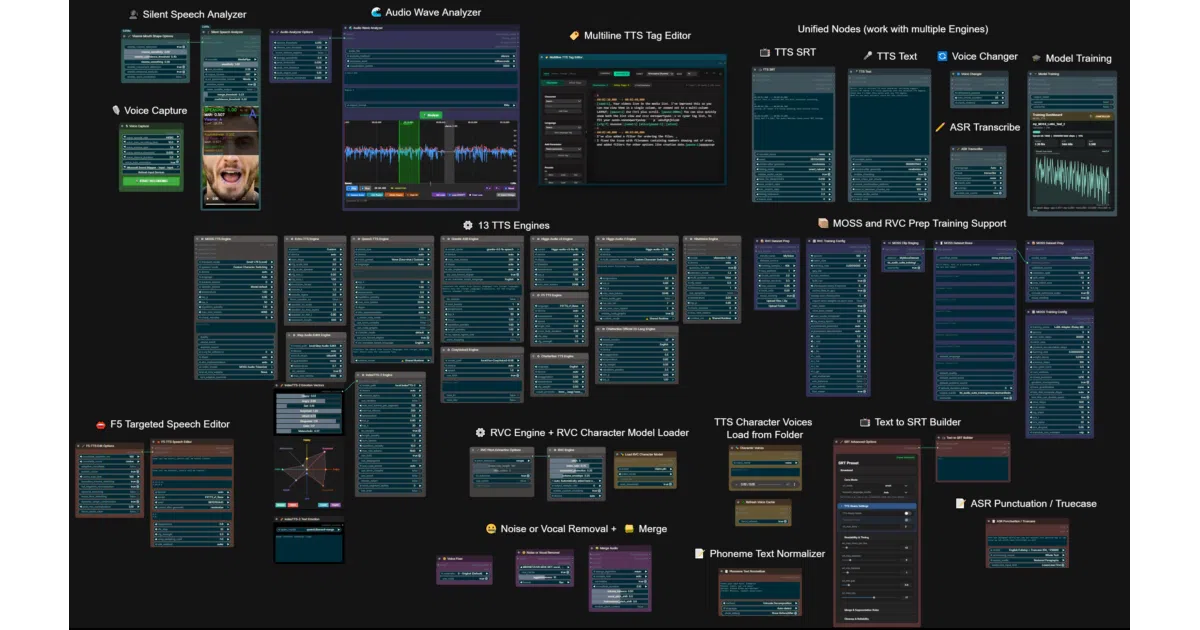
It wires fifteen distinct local TTS engines into ComfyUI so you can generate, edit, and subtitle audio without leaving the node graph.
Not currently ranked — collecting fresh signals.
star history
What it does
TTS Audio Suite is a ComfyUI extension that treats speech synthesis as a pipeline problem. It wraps fifteen local TTS and voice-conversion engines—from F5-TTS and Qwen3-TTS to RVC and Higgs Audio—into a single node graph, then layers on SRT subtitle timing, character voice switching, and inline prosody tags so you can generate long-form narrated audio without leaving the canvas. It also folds in RVC model training and audio analysis utilities, making it closer to a DAW front-end than a simple text-to-speech wrapper.
The interesting bit
The suite isolates fragile legacy engine dependencies in their own runtime environments while keeping a modern Transformers 5 backbone for the main node graph—essentially a compatibility layer that stops older model stacks from colliding with newer ones in the same Python environment. That architectural choice is what lets it safely stack current diffusion models next to older RVC checkpoints in one workflow.
Key highlights
- Supports 15 engines including F5-TTS, VibeVoice (90-minute long-form), Higgs Audio v3 with native inline emotion tags, and RVC with integrated training workflows.
- Deep subtitle support: transcribes to SRT, rebuilds subtitles from edited transcripts, and estimates timing from plain text using readability rules.
- Runtime isolation keeps legacy engine dependencies separate from the main Transformers 5 environment.
- Character and narrator switching, per-segment parameter overrides, and bracket-based language switching (e.g.,
[German:Bob]) inside the prompt. - Voice conversion, ASR via Granite and Qwen3-TTS, and a “New Engine Guide” structured around LLM-assisted development.
Caveats
- Several engines require 5–9 GB downloads, with some base models hitting 18 GB, so disk and VRAM budgets add up fast.
- The README explicitly notes that ChatterBox 23L’s emotion tokens “don’t work” in the current version.
Verdict
Grab this if you are building narrated video, audiobook, or dubbing workflows inside ComfyUI and need to A/B test voices across multiple local engines without writing glue scripts. Skip it if you just want a single lightweight TTS endpoint; this is an integration layer, not a model itself.
Frequently asked
- What is diodiogod/TTS-Audio-Suite?
- It wires fifteen distinct local TTS engines into ComfyUI so you can generate, edit, and subtitle audio without leaving the node graph.
- Is TTS-Audio-Suite open source?
- Yes — diodiogod/TTS-Audio-Suite is an open-source project tracked on heatdrop.
- What language is TTS-Audio-Suite written in?
- diodiogod/TTS-Audio-Suite is primarily written in Python.
- How popular is TTS-Audio-Suite?
- diodiogod/TTS-Audio-Suite has 1.2k stars on GitHub.
- Where can I find TTS-Audio-Suite?
- diodiogod/TTS-Audio-Suite is on GitHub at https://github.com/diodiogod/TTS-Audio-Suite.