devoxx/DevoxxGenieIDEAPlugin
An IDE plugin that treats your LLM like a project member, not a chatbot
DevoxxGenie turns IntelliJ into a control center for local and cloud LLMs, with task boards, security scanners, and agent loops that actually run your backlog.
Not currently ranked — collecting fresh signals.
star history
What it does
DevoxxGenie is a Java-based IntelliJ plugin that wires local LLMs (Ollama, LMStudio, llama.cpp, Exo) and cloud providers (OpenAI, Anthropic, Gemini, Groq, Azure, Bedrock, and others) into your IDE. It started as a code explainer/reviewer, but has grown into something closer to a project operating system: task management, autonomous agents, inline completion, security scanning, and even a protocol for talking to external CLI tools like Claude Code and Copilot.
The interesting bit
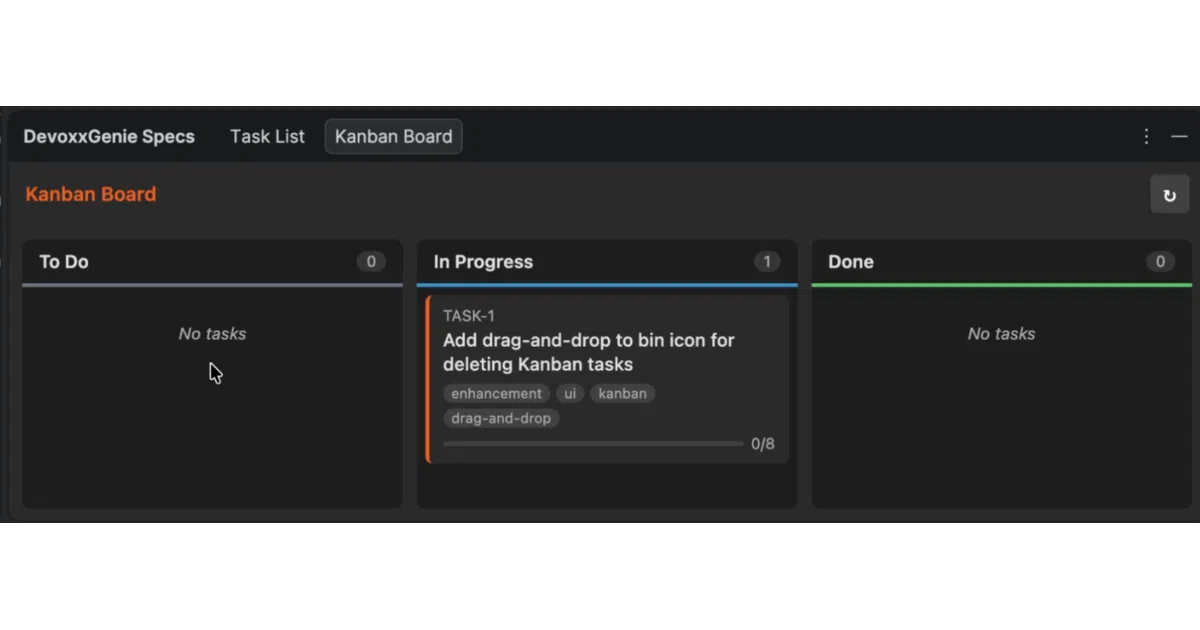
The Spec Driven Development (SDD) workflow is the unusual part. You write tasks in Backlog.md, browse them in a Kanban board inside IntelliJ, then hit “Implement with Agent” and let the LLM work through them in dependency order via an “Agent Loop.” Security findings from Gitleaks, OpenGrep, and Trivy automatically become backlog tasks too. There’s even a reflection-based ExternalPromptService so other IntelliJ plugins can feed it findings without compile-time coupling — demonstrated with SonarLint and SpotBugs forks.
Key highlights
- Broad LLM support: 15+ providers including local inference tools and major cloud APIs
- SDD with Agent Loop: Kanban task board, topological batch execution, and autonomous implementation
- Security scanning as agent tools: Gitleaks (secrets), OpenGrep (SAST), Trivy (CVEs) — findings auto-convert to backlog tasks
- ACP/CLI Runners: JSON-RPC 2.0 protocol to orchestrate external agents (Claude Code, Gemini CLI, Kimi, Codex, Copilot)
- Portable skills:
SKILL.mdfiles shared with Claude Code, Codex, and Gemini ecosystems - Inline FIM completion: context-aware suggestions via Ollama or LM Studio
- 60K+ downloads, actively maintained with extensive documentation at genie.devoxx.com
Caveats
- The README is enthusiastic about “paradigm shifts” and “the future of agentic programming”; the actual feature set is solid but the hype-to-substance ratio is tilted
- Some newer features (ACP Runners, Plugin Integration API) are documented but the real-world stability is unclear from the sources
- Security scanners require separate local installation (brew install) and manual path configuration
Verdict
Worth a look if you want LLM assistance tightly integrated into your IDE workflow rather than bouncing between browser tabs and terminal windows. Probably overkill if you just want Copilot-style autocomplete. Java developers and teams already using IntelliJ will get the most mileage; VS Code users need not apply.
Frequently asked
- What is devoxx/DevoxxGenieIDEAPlugin?
- DevoxxGenie turns IntelliJ into a control center for local and cloud LLMs, with task boards, security scanners, and agent loops that actually run your backlog.
- Is DevoxxGenieIDEAPlugin open source?
- Yes — devoxx/DevoxxGenieIDEAPlugin is open source, released under the MIT license.
- What language is DevoxxGenieIDEAPlugin written in?
- devoxx/DevoxxGenieIDEAPlugin is primarily written in Java.
- How popular is DevoxxGenieIDEAPlugin?
- devoxx/DevoxxGenieIDEAPlugin has 686 stars on GitHub.
- Where can I find DevoxxGenieIDEAPlugin?
- devoxx/DevoxxGenieIDEAPlugin is on GitHub at https://github.com/devoxx/DevoxxGenieIDEAPlugin.