chuspeeism/dashi-taskboard
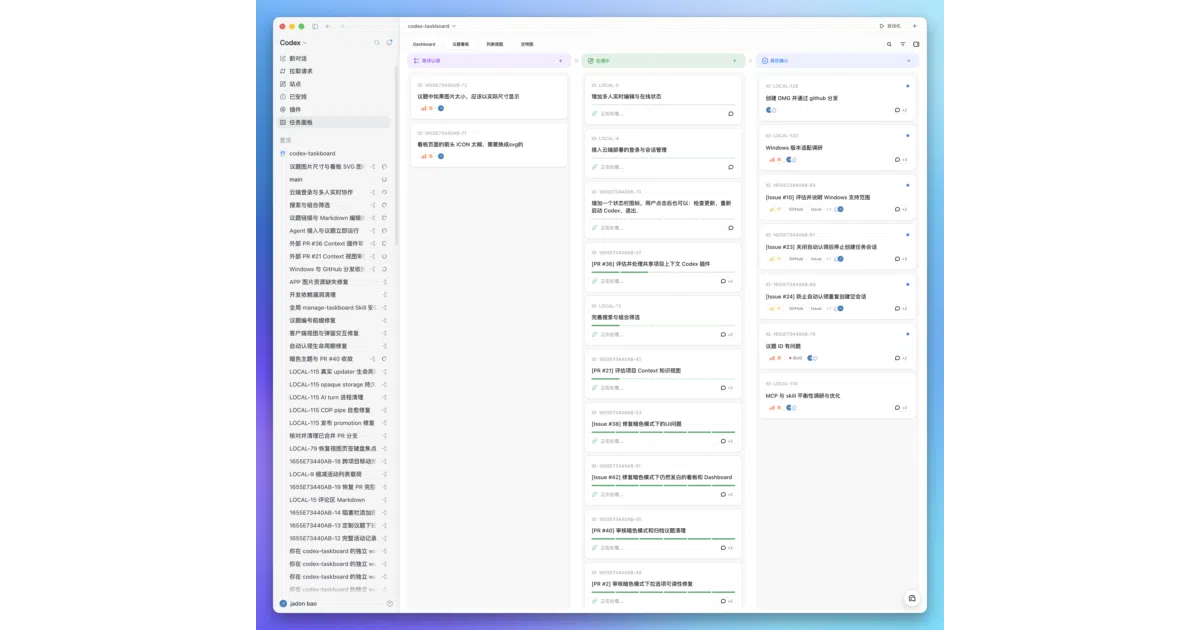
A taskboard that lives inside your Codex chat window
It turns the Codex desktop app into a local-first issue tracker by injecting a React panel through Chrome DevTools Protocol.
Velocity · 7d
+2.3
★ / day
Trend
↘cooling
star history
What it does
Codex Taskboard is a browser-based, local-first issue tracker built around a SQLite backend. It provides a React UI and a taskctl CLI for managing projects and issues, and can embed itself directly into the official OpenAI Codex desktop app as a sidebar panel. A bundled Codex Skill teaches the agent to inspect tasks, move them through workflow states, and mark them done only after explicit user confirmation.
The interesting bit
Rather than building a separate plugin API, the project uses Chrome DevTools Protocol to inject a native-looking iframe into Codex’s main workspace, suppressing the contextual header and mounting a sidebar entry without patching React, replacing fetch, or modifying Codex data files. The launcher keeps the original Codex window untouched while spawning an independent profile for the injected panel.
Key highlights
- Local-first SQLite with LAN sharing via server-sent events; optional Cloudflare deployment using D1 and R2 with HTTPS Basic Auth.
- Tauri desktop apps for macOS and Windows bundle the Node runtime, local service, web UI, CLI, Skill, and injector—no separate Node installation needed on the target machine.
- Full Markdown support including GFM tables, task lists, and read-only Mermaid diagrams.
- Conversations initiated from the board are tracked via Codex thread IDs and linked back to issues through the native route bridge.
taskctlCLI and HTTP API let teammates share a single board instance over a trusted network.
Caveats
- LAN mode has no authentication; anyone who can reach the URL can read and write the board.
- Windows CI builds are currently unsigned, and public macOS releases still require Apple notarization.
- The Codex renderer’s strict CSP forces the launcher to enable a CDP CSP bypass and reload the renderer before injection.
Verdict
Grab it if you want a self-hosted task tracker that lives inside the Codex app rather than alongside it. If you do not use OpenAI’s desktop Codex client, this is essentially a local SQLite kanban board with extra steps.
Frequently asked
- What is chuspeeism/dashi-taskboard?
- It turns the Codex desktop app into a local-first issue tracker by injecting a React panel through Chrome DevTools Protocol.
- Is dashi-taskboard open source?
- Yes — chuspeeism/dashi-taskboard is open source, released under the Apache-2.0 license.
- What language is dashi-taskboard written in?
- chuspeeism/dashi-taskboard is primarily written in JavaScript.
- How popular is dashi-taskboard?
- chuspeeism/dashi-taskboard has 3.3k stars on GitHub and is currently cooling off.
- Where can I find dashi-taskboard?
- chuspeeism/dashi-taskboard is on GitHub at https://github.com/chuspeeism/dashi-taskboard.