cheind/pytorch-blender
Blender as your GPU farm's weird cousin
A bridge that turns Blender's real-time renderer into a distributed data source for PyTorch training pipelines.
Not currently ranked — collecting fresh signals.
star history
What it does
blendtorch wires Blender’s Eevee renderer into PyTorch data loaders so you can train on synthetic images without waiting for disk I/O. It runs multiple Blender instances in parallel, streams rendered frames over the network, and optionally lets your model talk back to the simulation to adjust parameters on the fly. There’s also an OpenAI Gym wrapper if you want Blender as your RL physics sandbox.
The interesting bit
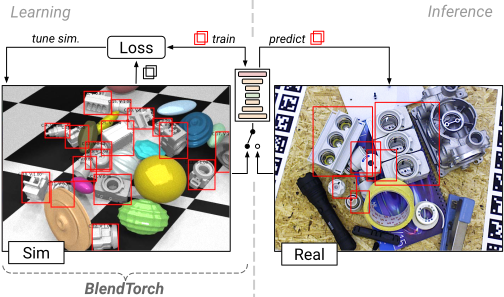
The bidirectional channel is the less obvious half: your training loss can directly steer domain randomization in Blender, which is handy when you’re trying to make synthetic data that doesn’t fall over in the real world. The 2000Hz claim for pure physics sims (no rendering) is buried in the benchmarks and actually plausible—no pixels, no pain.
Key highlights
- Distributed rendering: scales from 1 to 5+ Blender instances, with per-image latency dropping to ~11ms at 5 instances (640×480 RGBA)
- Ships arbitrary pickle-able objects alongside images/video frames
- Built-in recording to replay datasets without firing up Blender again
- Gym environment support for RL with live Blender visualization
- Two-package install:
btblives inside Blender’s Python,bttlives in your normal PyTorch environment
Caveats
- Offscreen rendering still needs a UI frontend in Blender 2.8x, so true headless
--backgroundmode won’t work for visual output (non-rendered physics sims are fine) - Output is linear color space by default, so your “bright” synthetic data will look dim until you gamma-correct it
- Windows 10 and Linux tested; macOS and other Blender versions are YMMV territory
Verdict
Worth a look if you’re generating synthetic training data and your current pipeline involves writing thousands of PNGs to disk. Skip it if you just need basic image augmentation—this is for when you need a 3D engine in your data loop.
Frequently asked
- What is cheind/pytorch-blender?
- A bridge that turns Blender's real-time renderer into a distributed data source for PyTorch training pipelines.
- Is pytorch-blender open source?
- Yes — cheind/pytorch-blender is open source, released under the MIT license.
- What language is pytorch-blender written in?
- cheind/pytorch-blender is primarily written in Python.
- How popular is pytorch-blender?
- cheind/pytorch-blender has 583 stars on GitHub.
- Where can I find pytorch-blender?
- cheind/pytorch-blender is on GitHub at https://github.com/cheind/pytorch-blender.