babygoton/WorkDaddy
An Electron sidecar that injects itself via Chrome DevTools
It remote-debugs the WorkBuddy desktop app to inject multi-account management, automation, and frosted-glass themes without modifying the official binary.
Velocity · 7d
+26
★ / day
Trend
↗accelerating
star history
What it does
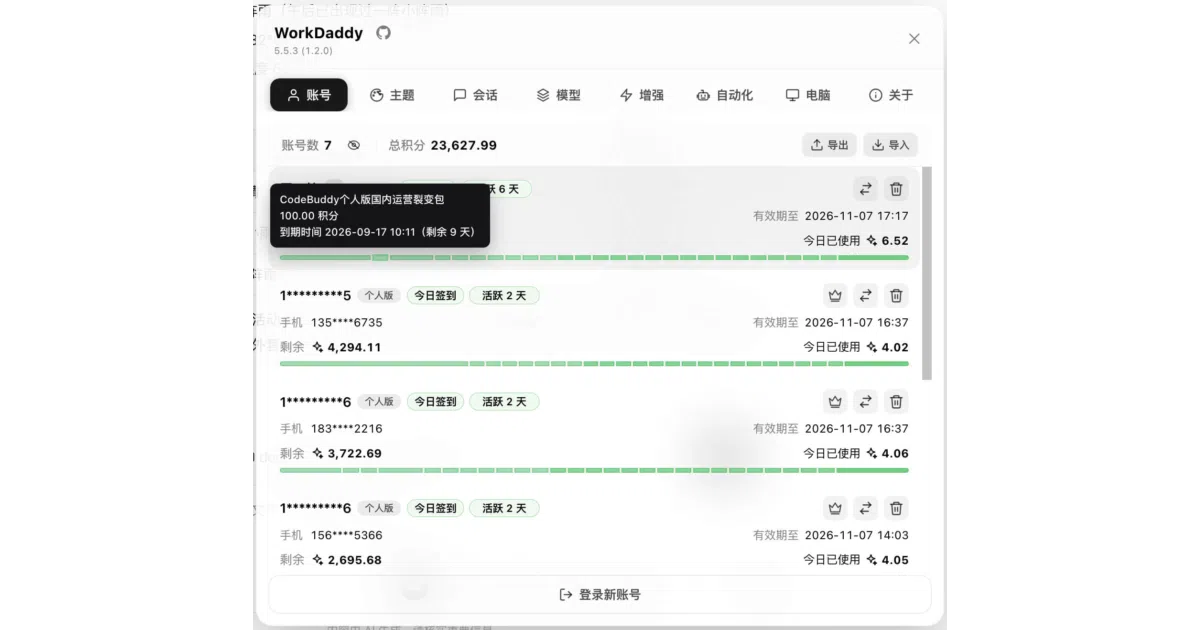
WorkDaddy is a local daemon that sits beside the WorkBuddy (or WorkBuddy AI) Electron desktop client and patches features into it through a Chrome DevTools Protocol (CDP) connection. It adds a floating robot button and panel UI for multi-account backup and switching, session migration across accounts, stashed prompts, automated check-ins, and custom themes. All account data and configuration stay on the local machine; the official WorkBuddy binary and signature remain untouched.
The interesting bit
Instead of building a plugin or modding the installer, WorkDaddy launches WorkBuddy with --remote-debugging-port=9222 and uses Runtime.evaluate to push inject.js straight into the renderer process. This lets it intercept login events, render its own UI in the app window, and survive official client upgrades as long as the DOM layout does not change drastically.
Key highlights
- Multi-account management with encrypted backup, one-click switching, and OAuth login without exiting the app.
- Automation tasks that can be triggered manually, by event, or on a schedule, including daily point check-ins and run logs.
- A true “do not disturb” mode that auto-handles permission popups so long-running AI tasks can run overnight.
- Stashed prompts and quick phrases that preserve images, files, and references in a send-later queue.
- Frosted-glass themes, custom wallpapers, and sleep prevention while tasks are running.
Caveats
- The injected UI is tightly coupled to WorkBuddy’s renderer DOM, so a major official client redesign could break the panel until WorkDaddy updates.
- macOS users will likely hit Gatekeeper on first launch and must manually allow the app in Privacy & Security settings.
- Support for the CodeBuddy profile is currently delayed and not included in release packages.
Verdict
WorkDaddy is for WorkBuddy power users who juggle multiple accounts, run long automation tasks, or want local-only session backups. If you use WorkBuddy only sporadically with a single account, the extra daemon and CDP injection are probably overkill.
Frequently asked
- What is babygoton/WorkDaddy?
- It remote-debugs the WorkBuddy desktop app to inject multi-account management, automation, and frosted-glass themes without modifying the official binary.
- Is WorkDaddy open source?
- Yes — babygoton/WorkDaddy is an open-source project tracked on heatdrop.
- What language is WorkDaddy written in?
- babygoton/WorkDaddy is primarily written in JavaScript.
- How popular is WorkDaddy?
- babygoton/WorkDaddy has 2.3k stars on GitHub and is currently accelerating.
- Where can I find WorkDaddy?
- babygoton/WorkDaddy is on GitHub at https://github.com/babygoton/WorkDaddy.