awdr74100/figwright
A two-way AI bridge for Figma that skips the Dev Mode toll booth
Figwright lets any MCP client—Claude, Cursor, Codex—read your Figma canvas for context and write directly to it, without a paid Dev Mode seat.
Velocity · 7d
+5.9
★ / day
Trend
↘cooling
star history
What it does
Figwright is a local MCP server paired with a Figma plugin. It exposes 112 tools that let an AI agent inspect your design—layout, typography, variables, components—and emit framework-aware code that reuses your existing stack. The same agent can also edit the canvas, creating frames, text, auto-layout, and even Motion animations, effectively treating Figma as a read/write design database.
The interesting bit
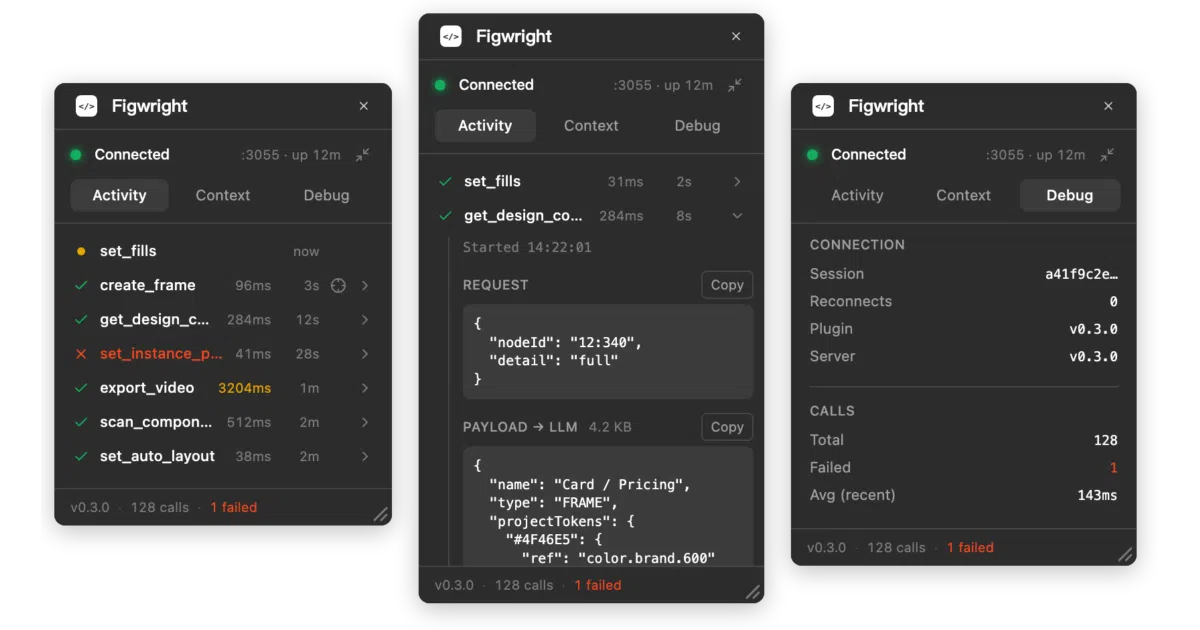
Instead of a fixed compiler pipeline, Figwright surfaces honest design context and lets the model generate code that matches your codebase. The plugin itself is transparent: it logs every tool call, shows the exact payload sent to the model, and can hide in the background while the relay stays alive. Multiple MCP clients can even share one plugin connection, electing a leader and failing over automatically if it drops.
Key highlights
- Truly bidirectional: read designs into code, or build and edit Figma documents from a spec.
- Provider-first codegen: detects your framework and styling system, reusing your components and tokens rather than emitting generic markup.
- No Figma Dev Mode required: runs entirely through a local plugin and WebSocket relay, so it bypasses paid seats.
- Resilient local relay: built-in leader election, session resume, and heartbeat handling for dropped sockets.
- Transparent plugin UI: inspect payloads, connection health, and call timing inside Figma; resizable and theme-aware.
Caveats
- The plugin is not yet on the Figma Community marketplace, so getting started is currently a manual process.
- Both the local MCP server and the plugin must be running; this is strictly local, not a cloud-hosted integration.
Verdict
Worth a look if you want AI agents that actually edit Figma rather than just screenshot it, especially if you’re avoiding Dev Mode costs. Skip it if you need a polished, one-click install or cloud-native deployment.
Frequently asked
- What is awdr74100/figwright?
- Figwright lets any MCP client—Claude, Cursor, Codex—read your Figma canvas for context and write directly to it, without a paid Dev Mode seat.
- Is figwright open source?
- Yes — awdr74100/figwright is open source, released under the MIT license.
- What language is figwright written in?
- awdr74100/figwright is primarily written in TypeScript.
- How popular is figwright?
- awdr74100/figwright has 981 stars on GitHub and is currently cooling off.
- Where can I find figwright?
- awdr74100/figwright is on GitHub at https://github.com/awdr74100/figwright.