ashblue/fluid-behavior-tree
Behavior trees you can actually read at 2 a.m.
A Unity library that trades visual node spaghetti for fluent C# builders and runtime debugging.
Not currently ranked — collecting fresh signals.
star history
What it does
Fluid Behavior Tree lets you build AI logic in Unity using chained C# method calls instead of dragging nodes around a graph. You construct sequences, selectors, conditions, and actions through a BehaviorTreeBuilder, then tick the tree each frame. It ships with common nodes (wait, random chance, repeaters, inverters) and restores execution position across frames so long-running behaviors don’t restart from scratch.
The interesting bit
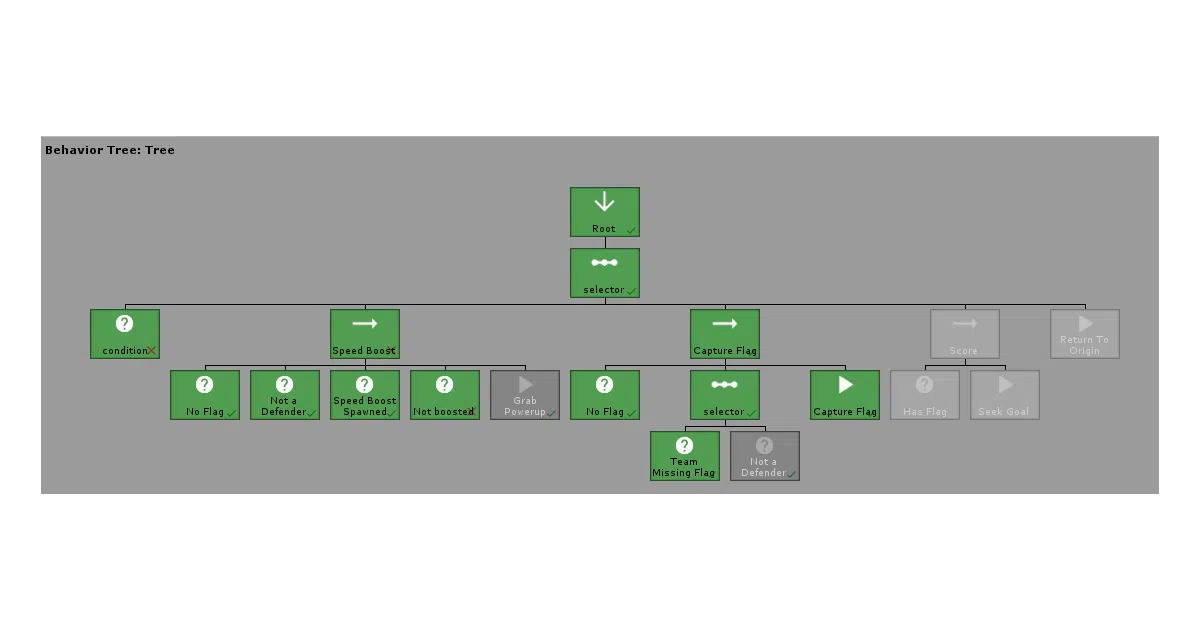
The builder pattern isn’t just syntax sugar here—it’s the project’s bet against visual-scripting fragility in large codebases. Trees are plain objects you can compose, inject, and unit test. There’s also a runtime visualizer that prints the active tree in the editor, but only while the game is running; the tree has to be built first, which is a small admission that static inspection wasn’t worth the complexity.
Key highlights
- Pre-built library of actions, conditions, composites, and decorators (including
SelectorRandomwith shuffle) - Custom nodes via inheritance and extension methods—add your own
.MyAction()to the builder - Execution pointer tracks
Continuestatus acrossTick()calls; reset with.Reset() - Unity Package Manager install via scoped NPM registry
- Capture-the-flag example project shows real-time usage
Caveats
- Every composite and decorator requires an explicit
.End()call; forgetting one breaks tree construction - Visualizer only works at runtime, not in edit mode
- Scoped registry setup in
manifest.jsonis required for installation
Verdict
Worth a look if you’re a Unity developer who prefers version-controlled C# over binary scene files for AI logic. Skip it if you’re already productive with visual behavior-tree editors or need non-Unity behavior trees.
Frequently asked
- What is ashblue/fluid-behavior-tree?
- A Unity library that trades visual node spaghetti for fluent C# builders and runtime debugging.
- Is fluid-behavior-tree open source?
- Yes — ashblue/fluid-behavior-tree is open source, released under the MIT license.
- What language is fluid-behavior-tree written in?
- ashblue/fluid-behavior-tree is primarily written in C#.
- How popular is fluid-behavior-tree?
- ashblue/fluid-behavior-tree has 1.2k stars on GitHub.
- Where can I find fluid-behavior-tree?
- ashblue/fluid-behavior-tree is on GitHub at https://github.com/ashblue/fluid-behavior-tree.