ai-genie/chatgpt-vscode
VS Code's ChatGPT sidekick, now with commit-message guilt trips
A VS Code extension that wires OpenAI's models into your editor for code fixes, diffs, and自动生成 commit messages you'll still want to rewrite.
Not currently ranked — collecting fresh signals.
star history
What it does
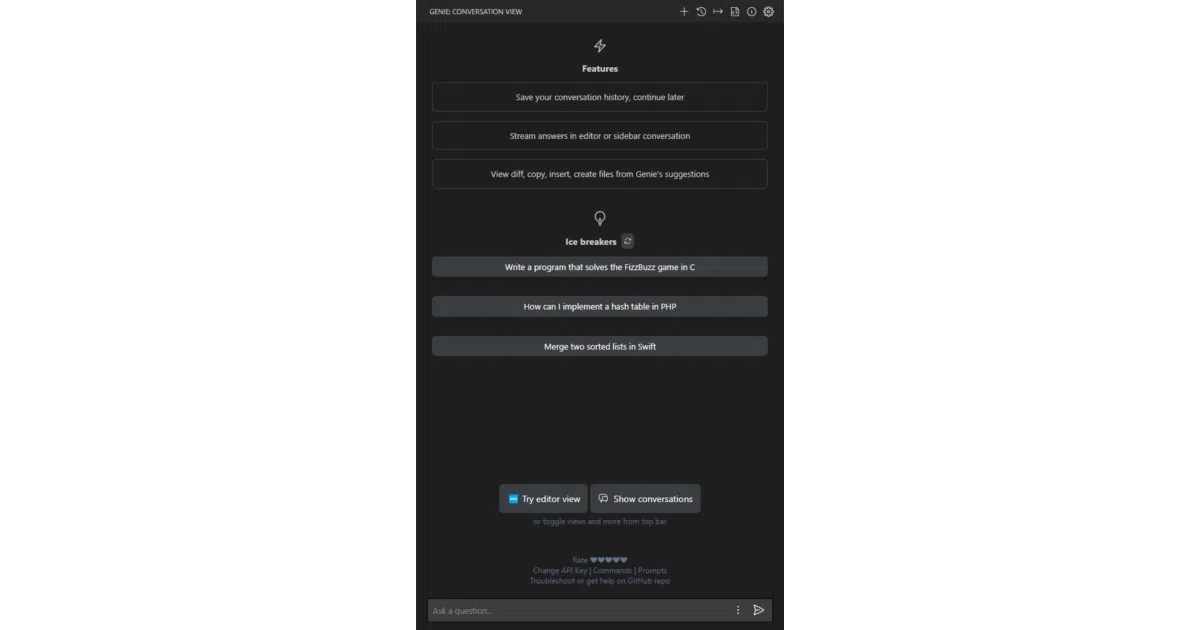
Genie drops a ChatGPT sidebar into VS Code. Select code, right-click, and ask GPT-4o, o1-mini, or older models to explain, fix, or refactor it. It streams answers, shows diffs, and will even draft commit messages from your git diff — because staring at git commit is a special kind of developer fatigue.
The interesting bit
The extension leans into VS Code’s native UI rather than building a chat window in a browser tab. It hooks the Problems panel lightbulb for quick fixes, stores conversation history locally via VS Code’s global storage API, and supports Azure OpenAI deployments for the enterprise-captive crowd. The “partial response detection” is a nice touch: if GPT trails off mid-function, you can continue and stitch answers together.
Key highlights
- Bring your own OpenAI API key or Azure OpenAI deployment URL
- One-click diff between your code and GPT’s suggestion
- Generate commit messages from staged changes (with opt-out settings)
- Conversation history stored locally, exportable as Markdown
- Custom system messages and ad-hoc prompt prefixes per selection
Caveats
- Conversation history is explicitly experimental: “limitations at the moment and may have bugs, use it at your own risk”
- You must manually clean stored conversation files for privacy; the extension can only append, not delete
- o1-mini and o1-preview carry OpenAI usage-tier rate limits
Verdict
Worth a look if you want GPT inside your editor rather than toggling between browser tabs. Skip it if you already pay for Copilot and don’t need Azure flexibility or commit-message automation.
Frequently asked
- What is ai-genie/chatgpt-vscode?
- A VS Code extension that wires OpenAI's models into your editor for code fixes, diffs, and自动生成 commit messages you'll still want to rewrite.
- Is chatgpt-vscode open source?
- Yes — ai-genie/chatgpt-vscode is open source, released under the ISC license.
- What language is chatgpt-vscode written in?
- ai-genie/chatgpt-vscode is primarily written in HTML.
- How popular is chatgpt-vscode?
- ai-genie/chatgpt-vscode has 1.3k stars on GitHub.
- Where can I find chatgpt-vscode?
- ai-genie/chatgpt-vscode is on GitHub at https://github.com/ai-genie/chatgpt-vscode.