Waishnav/devspace
A self-hosted MCP server that lends ChatGPT your terminal
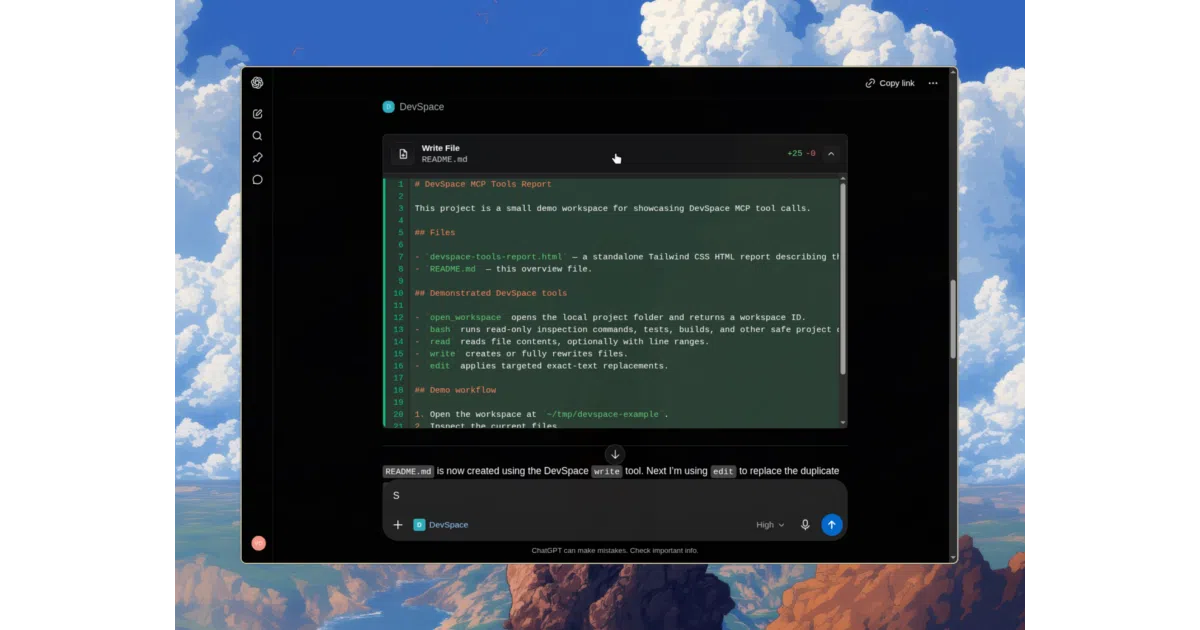
DevSpace is a self-hosted MCP server that wires ChatGPT into your local filesystem and terminal so the model can read, edit, and run code without uploading anything.
Velocity · 7d
+40
★ / day
Trend
↗accelerating
star history
What it does DevSpace runs as an MCP server on your own hardware, giving ChatGPT a toolbox for local projects. After you proxy the endpoint through a tunnel and approve the client with an owner password, the model can open allowed folders, read and edit files, run shell commands, search code, and spin up isolated worktrees. Everything stays local; only the MCP connection leaves your machine.
The interesting bit The author frames DevSpace as a bet that ChatGPT will become an “operating system for everything,” with local agents orchestrating workflows through natural language. Less philosophically, it includes an optional sponsored footer that pays you cash back per session—an ad model you can toggle off, which is a curious funding experiment for a CLI tool.
Key highlights
- Runs fully offline on your machine; only the MCP endpoint is exposed through a tunnel you control.
- Connection is gated by an owner password generated during setup and stored in
~/.devspace/auth.json. - ChatGPT can execute shell commands, edit files, search directories, and use isolated worktrees inside approved roots.
- Respects project-specific instructions from
AGENTS.mdandCLAUDE.md, and discovers local agent skills. - Supports Linux, macOS, and Windows via Bash-compatible shells; native PowerShell/cmd is not yet supported.
Caveats
- The repo description promises “2× rate limits,” but the README never explains how that number is derived.
- A connected client effectively has shell access to your machine, and the docs bluntly advise treating it like a trusted coding partner.
- Windows users limited to PowerShell or cmd.exe need to install a Bash-compatible shell or switch to WSL.
Verdict Worth a look if you want ChatGPT to act like a local IDE agent without uploading repos to a cloud. Skip it if you need first-class Windows native shell support or are uncomfortable giving a remote LLM toolchain direct file-system and terminal access.
Frequently asked
- What is Waishnav/devspace?
- DevSpace is a self-hosted MCP server that wires ChatGPT into your local filesystem and terminal so the model can read, edit, and run code without uploading anything.
- Is devspace open source?
- Yes — Waishnav/devspace is open source, released under the MIT license.
- What language is devspace written in?
- Waishnav/devspace is primarily written in TypeScript.
- How popular is devspace?
- Waishnav/devspace has 4.9k stars on GitHub and is currently accelerating.
- Where can I find devspace?
- Waishnav/devspace is on GitHub at https://github.com/Waishnav/devspace.