ValueCell-ai/ClawX
A desktop shell for AI agents that refuses to make you touch a terminal
ClawX wraps the OpenClaw agent runtime in an Electron app so you can chat, schedule, and manage skills without ever writing YAML.
Not currently ranked — collecting fresh signals.
star history
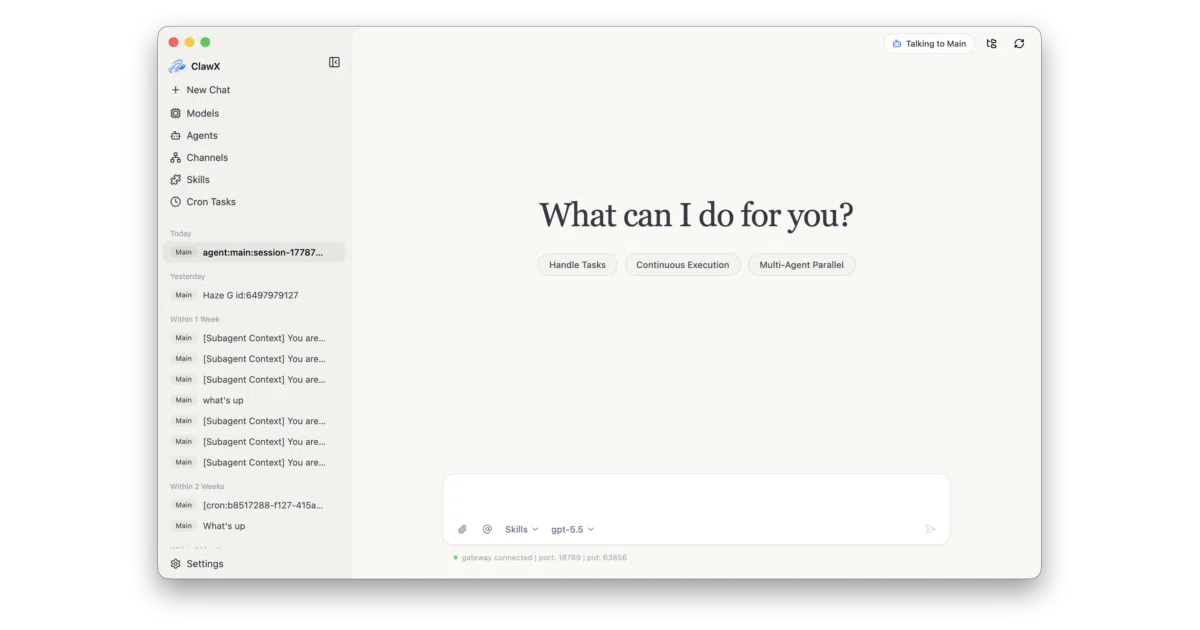
What it does ClawX is an Electron + React desktop app that embeds the OpenClaw agent runtime and exposes it through a GUI. You get a chat interface, cron scheduling, multi-channel management (including a bundled WeChat plugin with QR login), and a skills panel—none of which require opening a terminal or editing config files by hand.
The interesting bit The app doesn’t just shell out to OpenClaw; it embeds the runtime directly, manages the gateway lifecycle, and even prunes stale bundled skills on startup to stay aligned with upstream. There’s also a “Dreams” page for memory review when Developer Mode is enabled, which is either genuinely useful or slightly unsettling depending on your stance on AI introspection.
Key highlights
- Pre-bundled document-processing skills (
pdf,xlsx,docx,pptx) auto-deploy on first launch - Per-agent provider/model overrides with
@agentrouting in the composer - Native keychain credential storage; OpenAI supports OAuth sign-in, not just API keys
- Proxy settings with per-protocol overrides and automatic Telegram config sync
- In-app QR flow for linking Tencent WeChat as a channel
Caveats
- The README mentions an enterprise edition with “dedicated service support,” so the open-source build may be a loss leader
- Some bundled skills (
tavily-search) require API keys or will throw runtime errors - 4GB RAM minimum, 8GB recommended—not exactly lightweight for a chat wrapper
Verdict Worth a look if you want OpenClaw’s agent orchestration without the CLI tax. Skip it if you’re already comfortable running agents in a terminal or need a headless/server deployment.
Frequently asked
- What is ValueCell-ai/ClawX?
- ClawX wraps the OpenClaw agent runtime in an Electron app so you can chat, schedule, and manage skills without ever writing YAML.
- Is ClawX open source?
- Yes — ValueCell-ai/ClawX is open source, released under the MIT license.
- What language is ClawX written in?
- ValueCell-ai/ClawX is primarily written in TypeScript.
- How popular is ClawX?
- ValueCell-ai/ClawX has 7.6k stars on GitHub.
- Where can I find ClawX?
- ValueCell-ai/ClawX is on GitHub at https://github.com/ValueCell-ai/ClawX.