SpenserCai/sd-webui-deoldify
Old photos and video, new colors, same WebUI
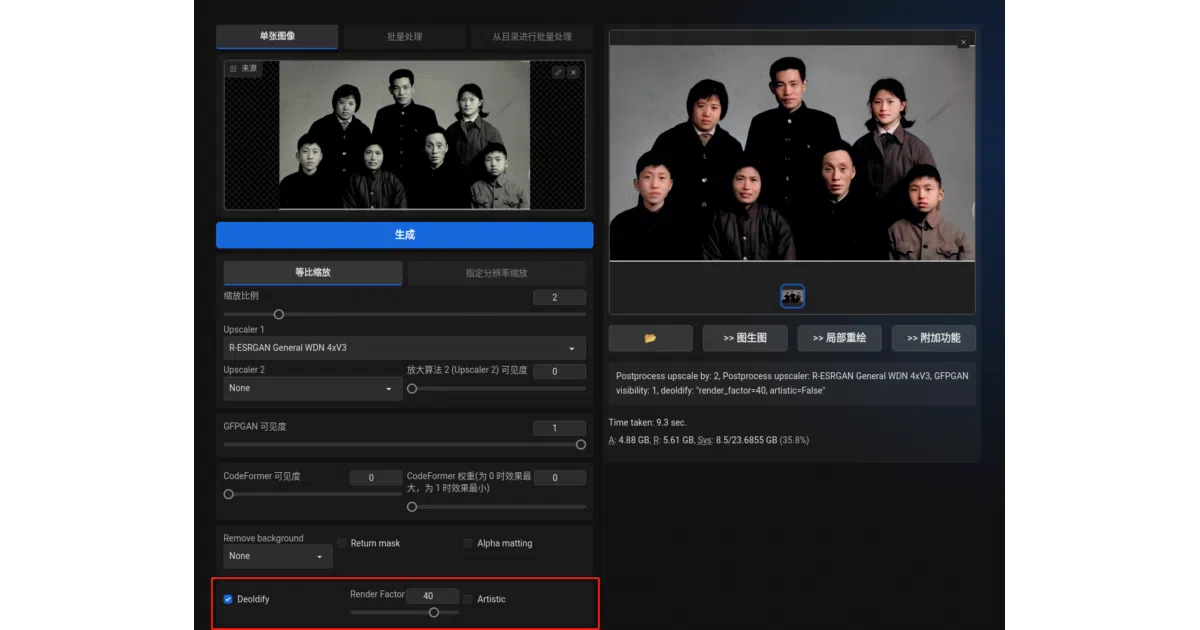
It wires DeOldify’s colorization engine directly into AUTOMATIC1111’s WebUI so you can restore vintage photos and video without switching contexts.
Not currently ranked — collecting fresh signals.
star history
What it does
sd-webui-deoldify is an extension for AUTOMATIC1111’s Stable Diffusion WebUI that colorizes black-and-white photos and video using the DeOldify model. It adds dedicated tabs to the WebUI interface, letting you upload media and adjust parameters like Render Factor alongside your existing diffusion pipeline. The project also ships with an open-source Discord bot, DeOldifyBot, for colorizing images via a server chat interface.
The interesting bit
Rather than treating colorization as a separate toolchain, it folds the capability into the same UI where you might already be running GFPGAN or upscalers for face restoration. The video path is handled natively within the extension, and the companion Discord bot suggests the author sees this less as a one-off script and more as a small media-rendering service.
Key highlights
- Colorizes both still images and video from inside the WebUI
ExtraandDeOldifytabs. - Explicitly tested on Windows 11 and Linux across several PyTorch versions up to 2.0.1+cu118.
- Ships with DeOldifyBot, a standalone Go-based Discord bot that hits the same backend.
- Plays nicely with existing WebUI restoration pipelines like GFPGAN and upscalers.
- Resolved earlier safe-unpickle compatibility issues so it no longer needs
--disable-safe-unpickleat startup.
Caveats
- Several features remain on the TODO list, including dedicated repair options and X/Y/Z-style batch generation across different
Render Factorvalues. - Video colorization depends on
ffmpegbeing available on the host system; the extension does not bundle it.
Verdict
Worth a look if you already live inside AUTOMATIC1111’s WebUI and want to restore old family photos or archival footage without maintaining a separate colorization environment. If you are not using the WebUI ecosystem, this is just a thin wrapper around DeOldify and not worth the context switch.
Frequently asked
- What is SpenserCai/sd-webui-deoldify?
- It wires DeOldify’s colorization engine directly into AUTOMATIC1111’s WebUI so you can restore vintage photos and video without switching contexts.
- Is sd-webui-deoldify open source?
- Yes — SpenserCai/sd-webui-deoldify is open source, released under the AGPL-3.0 license.
- What language is sd-webui-deoldify written in?
- SpenserCai/sd-webui-deoldify is primarily written in Python.
- How popular is sd-webui-deoldify?
- SpenserCai/sd-webui-deoldify has 693 stars on GitHub.
- Where can I find sd-webui-deoldify?
- SpenserCai/sd-webui-deoldify is on GitHub at https://github.com/SpenserCai/sd-webui-deoldify.