SAOS-3624/dsh-see-now
An AI screen-watcher that only pays for frames that changed
See Now turns your screen into a token-efficient visual stream for DSH, scoring every frame for change and packing the survivors into one image.
Collecting fresh signals — velocity needs a few days of history.
collecting data…
star history
What it does
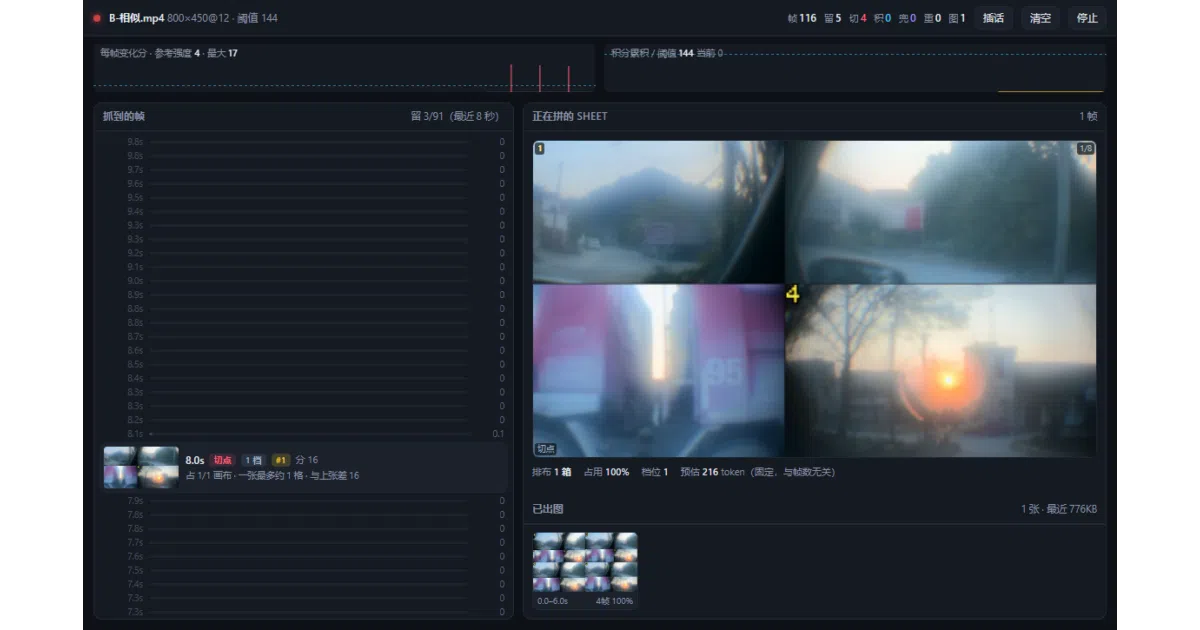
It’s a real-time vision plugin for DSH (DeepSeek’s agent host) that lets the model literally watch your screen — or a webcam or video file. Instead of blindly screenshotting every few seconds, it scores each frame for change (a weighted HSV diff on a 64×36 grid, ~0.2ms), keeps only frames where the picture actually changed, and stitches several of them into a single composite image. A static screen produces almost nothing; a hard-cut slideshow keeps exactly one frame per cut.
The interesting bit
The token accounting is obsessive in a good way. Canvas widths are deliberately aligned to the host model’s 42px patch grid (798 instead of 800, saving 11–24 tokens per image), and the audio-track strip is placed in leftover padding rows that get billed anyway — so adding it costs literally zero tokens. The README is also unusually honest about the failure mode it can’t fix: DSH’s image-omission mechanism permanently rewrites session history past the 20 MiB base64 cap, invalidating the prefix cache and re-billing huge chunks of context. The plugin’s advice: start a new session every hour or so.
Key highlights
- Default
lowtier costs ~222 tokens per composite image, whether it holds 4 frames or 8 — extra frames are nearly free, missed frames are the expensive ones. - Static screens emit almost nothing; a 20-second fallback frame confirms “nothing changed.”
- Scene mode (
scene:true) emits one full image per hard cut — 6 slides, 6 frames. - Cross-platform capture:
ddagrab/gdigrabon Windows,avfoundationon macOS, and xdg-desktop-portal → PipeWire → GStreamer on Linux (because Wayland has no honest ffmpeg path). - A floating window speaks the AI’s replies;
/seenowslash commands bind the watch loop to a session without submitting a user message.
Caveats
- The floating window needs Python ≥ 3.8 with
_tkinter— the most common “window won’t start, no logs” trap, and it crashed outright on macOS/Linux before 0.1.4. - On Retina displays the window background can misalign due to logical-vs-physical pixel scaling; the README suggests the non-screen-grabbing
frostorsolidstyles there. - Long sessions get expensive regardless: at
denserates you hit the host’s 20 MiB image cap in about half an hour, and the plugin can’t intercept that.
Verdict
Worth a look if you’re building screen-aware AI companions and care about token budgets — the frame-scoring and patch-grid alignment tricks are genuinely instructive. If you’re not in the DSH ecosystem, it’s a well-documented case study rather than a drop-in.
Frequently asked
- What is SAOS-3624/dsh-see-now?
- See Now turns your screen into a token-efficient visual stream for DSH, scoring every frame for change and packing the survivors into one image.
- Is dsh-see-now open source?
- Yes — SAOS-3624/dsh-see-now is open source, released under the Apache-2.0 license.
- What language is dsh-see-now written in?
- SAOS-3624/dsh-see-now is primarily written in JavaScript.
- How popular is dsh-see-now?
- SAOS-3624/dsh-see-now has 591 stars on GitHub.
- Where can I find dsh-see-now?
- SAOS-3624/dsh-see-now is on GitHub at https://github.com/SAOS-3624/dsh-see-now.