ParthJadhav/app-store-screenshots
Your AI Agent Can Build You a Real Screenshot Editor
A skill for AI coding agents that scaffolds a complete Next.js editor for designing and exporting store-ready App Store and Google Play marketing assets.
Velocity · 7d
+27
★ / day
Trend
↘cooling
star history
What it does
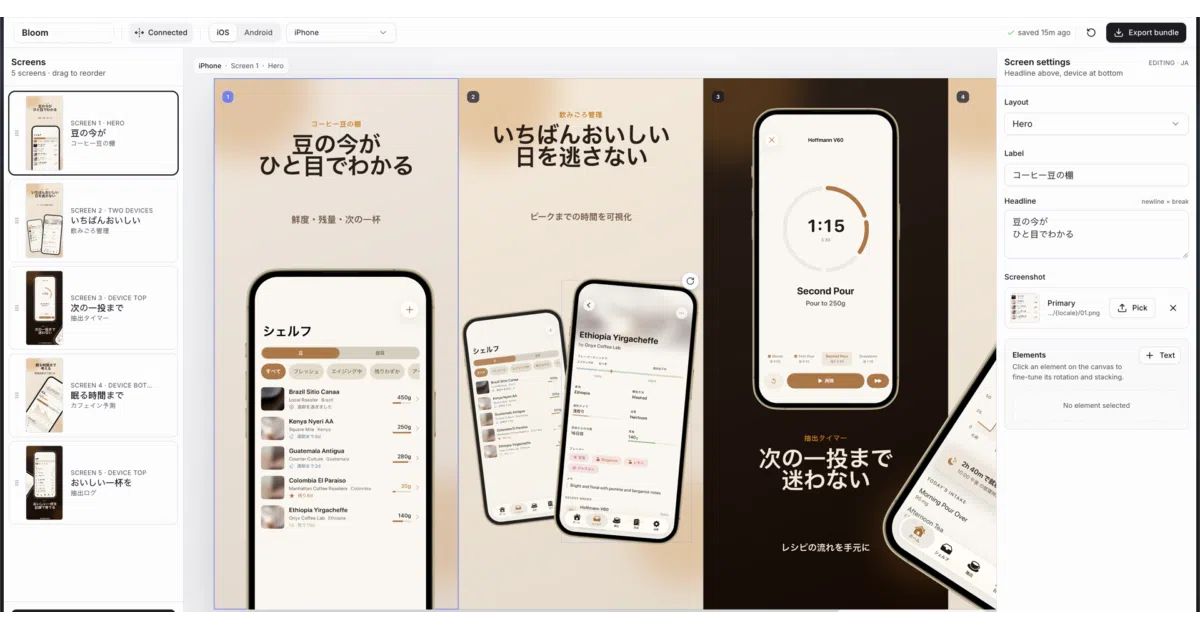
This is not a static image generator. It is a skill that tells your AI coding agent to scaffold a complete Next.js editor where you arrange device frames, headlines, and decorative elements across a connected canvas, then export precise PNG crops in every required App Store and Google Play size. Project state lives in app-store-screenshots.json, so decks are git-trackable and resumable.
The interesting bit
The editor’s connected canvas lets you design the entire screenshot strip as one continuous surface, allowing elements to bleed across screen boundaries while still exporting each slide as an isolated, store-ready crop. It is essentially a lightweight design tool that your agent builds on demand.
Key highlights
- Scaffolds a full editor via natural-language prompts to your agent, not just a one-off page
- Connected canvas mode plus an isolated fallback for legacy decks
- One-click export bundles organized by platform, device, resolution, and locale
- RTL-aware copy guidance and reusable themes
- Example decks were accepted for a live App Store app (Bloom Coffee Shelf Recipe)
Caveats
- Requires an AI coding agent such as Claude Code or Cursor to scaffold and manage the project
- iPhone frames use a bundled
mockup.pngbezel, while Android frames are CSS-rendered, so visual fidelity may vary - Source iPhone screenshots from the 6.1-inch simulator are recommended to minimize manual adjustment inside frames
Verdict
Indie developers and lean teams tired of wrangling Figma for store assets should look here; if you already have a design pipeline or do not use agentic coding tools, this will not fit your workflow.
Frequently asked
- What is ParthJadhav/app-store-screenshots?
- A skill for AI coding agents that scaffolds a complete Next.js editor for designing and exporting store-ready App Store and Google Play marketing assets.
- Is app-store-screenshots open source?
- Yes — ParthJadhav/app-store-screenshots is open source, released under the MIT license.
- What language is app-store-screenshots written in?
- ParthJadhav/app-store-screenshots is primarily written in TypeScript.
- How popular is app-store-screenshots?
- ParthJadhav/app-store-screenshots has 7.6k stars on GitHub and is currently cooling off.
- Where can I find app-store-screenshots?
- ParthJadhav/app-store-screenshots is on GitHub at https://github.com/ParthJadhav/app-store-screenshots.