Nexus-JPF/note-companion
An AI janitor for your Obsidian hoard
It exists to stop your Obsidian inbox from becoming a graveyard for unread links, voice memos, and half-formed notes.
Not currently ranked — collecting fresh signals.
star history
What it does
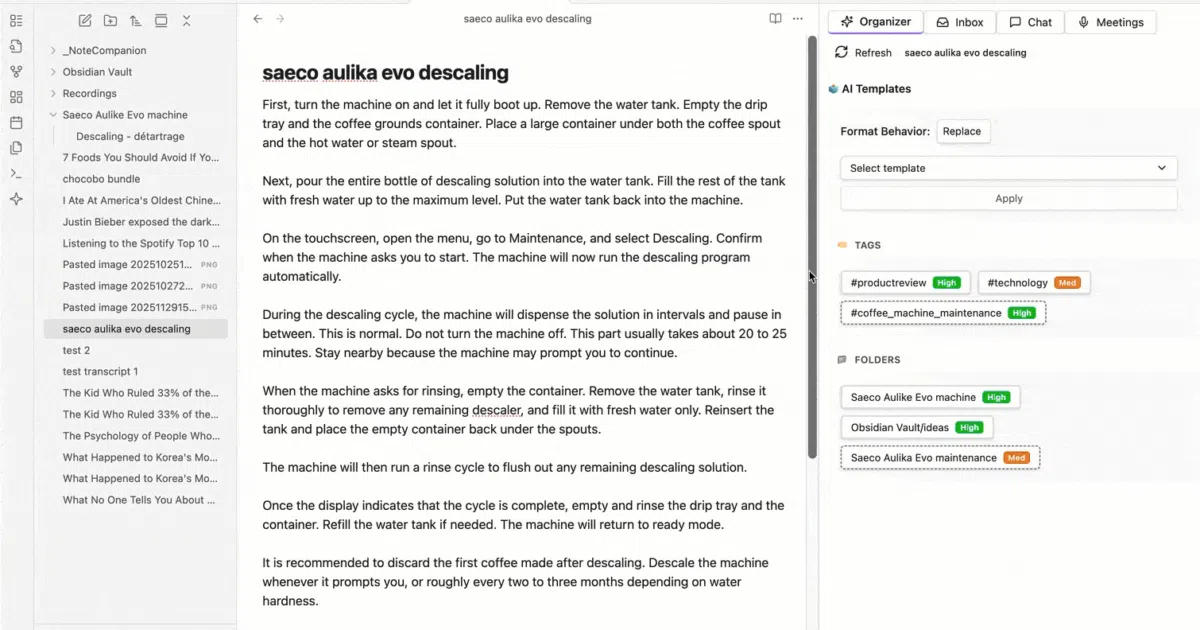
Note Companion is a desktop-only Obsidian plugin that ingests messy raw material—YouTube links, audio recordings, unstructured text—and attempts to impose order. It transcribes media, suggests folders and tags, formats notes, and offers a chat interface that can reference specific files or tags in your vault. The plugin operates through either a paid cloud service, your own API keys, or a self-hosted backend.
The interesting bit
The project is essentially a workflow automation layer glued to multiple AI providers, but it is unusually honest about its boundaries: it admits it is desktop-only, that its separate mobile app is stalled, and that cloud features cost money after a week. The meeting recorder is the standout feature, turning a raw recording into a structured note with embedded audio, transcript, and action items without leaving Obsidian.
Key highlights
- Desktop-only (Windows, macOS, Linux); the plugin manifest explicitly blocks mobile Obsidian
- Three operational modes: cloud subscription, bring-your-own API keys, or self-hosted Docker backend
- Auto-organization engine suggests folders, tags, titles, and templates for raw “Inbox” notes
- Transcribes YouTube videos even when standard captions are unavailable, plus local audio and video files
- Vault-aware chat supports
@mentionsfor files, folders, and tags to ground responses in your actual notes - Broad provider support: OpenAI, Claude, Gemini, Groq, and Ollama/local models via custom base URLs
Caveats
- Cloud access requires a paid subscription after a 7-day trial; self-hosting is free but you bring the infrastructure
- The companion mobile app is real but development is paused, so don’t expect a seamless phone-to-desktop pipeline
- Large audio/video files may hit size limits or require compression depending on your chosen provider
Verdict
Worth a look if you live in Obsidian desktop and treat your vault like a dumping ground for meeting recordings, lecture links, and voice memos. Skip it if you are mobile-first or unwilling to either pay for cloud convenience or manage a self-hosted backend.
Frequently asked
- What is Nexus-JPF/note-companion?
- It exists to stop your Obsidian inbox from becoming a graveyard for unread links, voice memos, and half-formed notes.
- Is note-companion open source?
- Yes — Nexus-JPF/note-companion is open source, released under the MIT license.
- What language is note-companion written in?
- Nexus-JPF/note-companion is primarily written in TypeScript.
- How popular is note-companion?
- Nexus-JPF/note-companion has 873 stars on GitHub.
- Where can I find note-companion?
- Nexus-JPF/note-companion is on GitHub at https://github.com/Nexus-JPF/note-companion.