NeuralNomadsAI/CodeNomad
OpenCode lives in the terminal. This is its apartment.
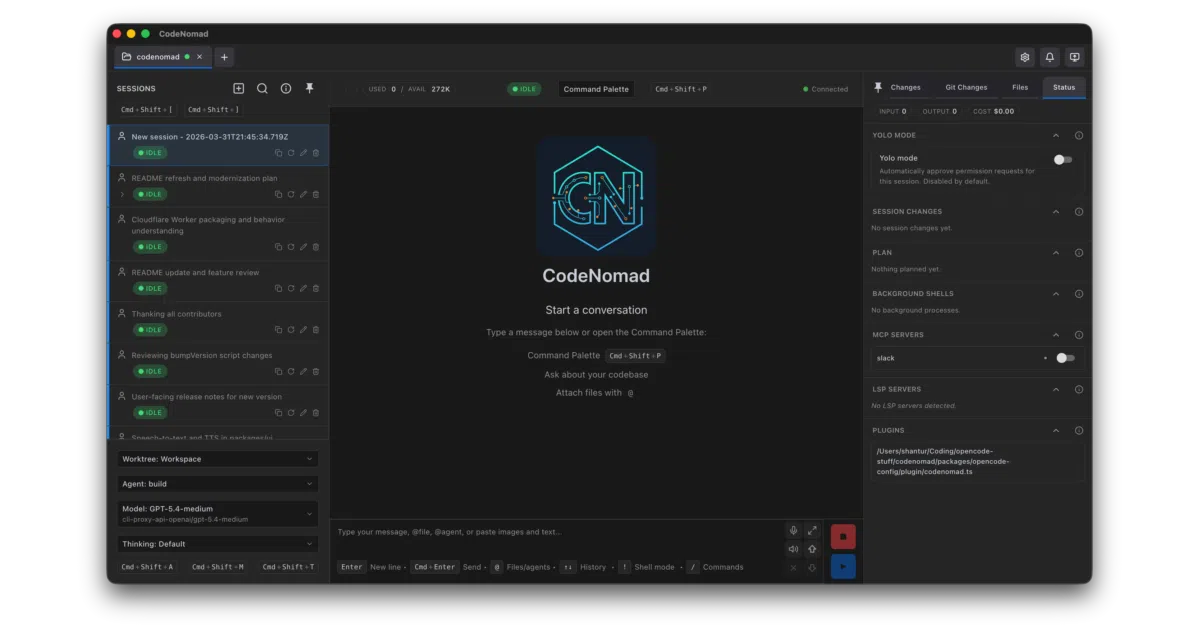
It wraps the OpenCode CLI in a multi-session desktop workspace so you can manage AI coding without living in a terminal.
Velocity · 7d
+2.3
★ / day
Trend
↗accelerating
star history
What it does CodeNomad is essentially a premium GUI shell for the OpenCode CLI. It proxies the terminal-based AI coding engine into a desktop or browser workspace where you can juggle multiple sessions, browse the file system, and use voice input. The project is built as a monorepo with a SolidJS frontend, a core server, and both Electron and Tauri desktop shells.
The interesting bit The standout feature is SideCars, which lets you mount local web tools—like an OpenVSCode Server instance or a ttyd terminal—as tabs inside the same workspace. That turns CodeNomad from a simple OpenCode wrapper into a centralized control panel for your entire dev environment. It also runs as a self-hosted server with password auth, so you can access the setup remotely without installing the desktop app.
Key highlights
- Multi-instance workspace for parallel OpenCode sessions.
- SideCars embed local web services as internal tabs.
- Ships as both desktop app (Electron, plus experimental Tauri) and self-hosted server.
- SolidJS UI with theming, i18n, notifications, and a command palette.
- Requires OpenCode CLI to be pre-installed; it is a layer on top, not a standalone engine.
Caveats
- The Tauri build is explicitly marked experimental.
- macOS desktop builds currently trigger Gatekeeper warnings because they are not notarized.
- The server mode uses a self-signed HTTPS certificate by default, which browsers will flag.
Verdict Worth a look if you are already using OpenCode and want a GUI with remote access and session management. Skip it if you need a self-contained AI coding tool—this is strictly a wrapper and will not function without the OpenCode CLI.
Frequently asked
- What is NeuralNomadsAI/CodeNomad?
- It wraps the OpenCode CLI in a multi-session desktop workspace so you can manage AI coding without living in a terminal.
- Is CodeNomad open source?
- Yes — NeuralNomadsAI/CodeNomad is open source, released under the MIT license.
- What language is CodeNomad written in?
- NeuralNomadsAI/CodeNomad is primarily written in TypeScript.
- How popular is CodeNomad?
- NeuralNomadsAI/CodeNomad has 2.6k stars on GitHub and is currently accelerating.
- Where can I find CodeNomad?
- NeuralNomadsAI/CodeNomad is on GitHub at https://github.com/NeuralNomadsAI/CodeNomad.